EasyManua.ls Logo

Qdos StayPut - User Manual

Qdos StayPut
3 pages
Print Icon
To Next Page IconTo Next Page
Loading...
StayPut™ Self-Closing
Outlet Cover
Easy Installation Guide
Prongs
Important:
Qdos wants to keep you and
your children safe and for that
we need you to do your part
by carefully reading and
following the instructions
below.
For installation videos and
FAQ go to: QdosSafety.com
Ground
prong
Parts List:
Step 1 - Determine type of outlet
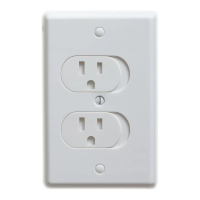
Standard Outlet
Existing cover is attached with
one screw in the middle.
IMPORTANT:
Do not use with two prong
ungrounded or GFCI outlets.
For indoor use only.
Existing cover is attached with
two screws.
IMPORTANT:
Do not use with GFCI outlets.
For indoor use only.
Decora Outlet
Question and Answer IconNeed help?

Do you have a question about the Qdos StayPut and is the answer not in the manual?

Summary

Easy Installation Guide

Step 1: Determine Outlet Type

Identify outlet type (Standard or Decora) based on screw configuration for proper installation.

Important Safety & Usage Notes

Important warnings regarding outlet compatibility (ungrounded, GFCI) and indoor use only.

Step 2: Install Outlet Cover

Standard Outlet Installation

Remove existing plate, push out center screw cover, attach new cover with long screw. Do not overtighten.

Decora Outlet Installation

Remove existing plate, push out top/bottom screw covers, attach new cover with short screws. Do not overtighten.

Step 3: Test and Use Cover

Operation and Maintenance

Insert plug, test auto-closing function. Adjust screw if needed. Avoid lubricants. Retain old cover.

Qdos StayPut Specifications

General IconGeneral
BrandQdos
ModelStayPut
CategoryAccessories
LanguageEnglish