REMOTE CONTROL
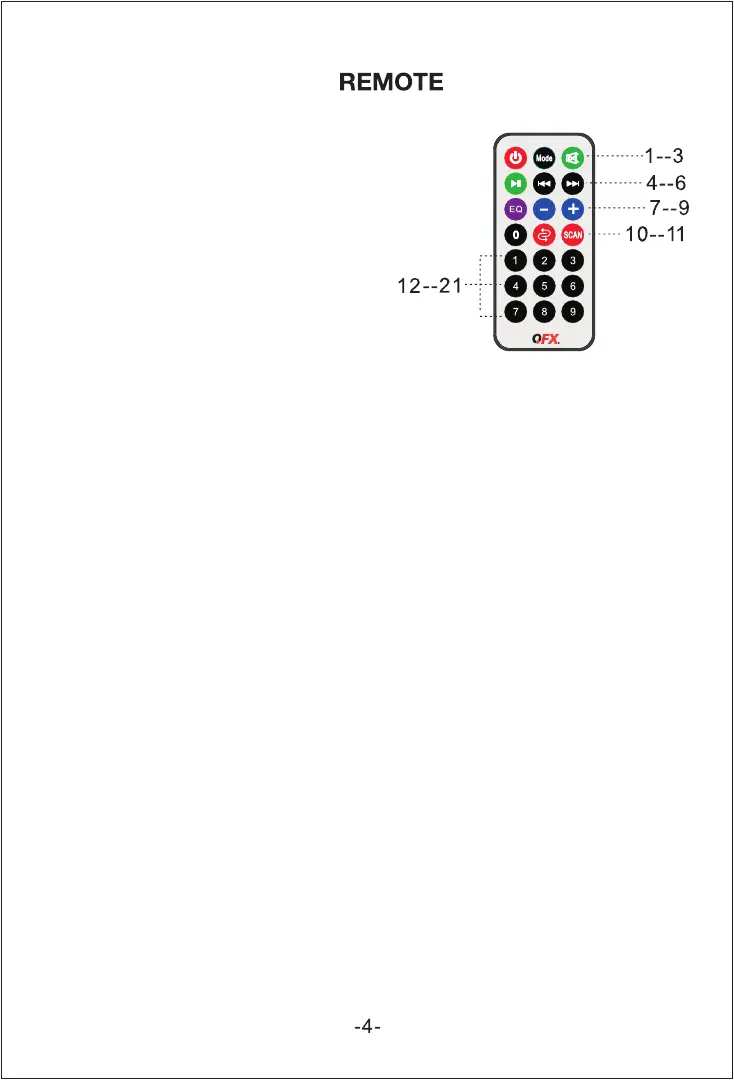
1. Standby: Set the unit to Standby mode.
2. Input Mode Button: Toggle between USB,
TF, FM, AUX, BT
3. Mute: Mutes the track.
4. PLAY/PAUSE: Play and Pause the track
5. Previous Track: Select previous track or channel
6. Next Track: Select next channel.
7. EQ: Select EQ mode.
8. VOL-: Decrease the Master Volume
9. VOL+: Increase the Master Volume ¬¬
10. REP: Repeat the playing track.
11. Scan Channel in FM Mode
12-21. Numeric Keys for selecting a certain track
for USB flash drive or TF card.


 To Next Page