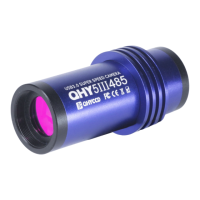
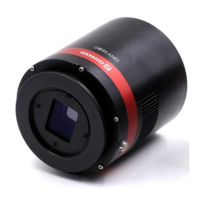
The QHY600 is a COLDMOS Astronomy Camera designed for deep-sky imaging, offering high performance and advanced features for astrophotography. It is available in both Professional (QHY600U3G20) and Photographic (QHY600U3) versions.
Function Description:
The QHY600 is a dedicated astronomy camera that captures high-resolution images of celestial objects. It utilizes a full-frame BSI CMOS sensor to deliver excellent image quality, especially for long-exposure astrophotography. The camera is equipped with a dual-stage TEC cooler to reduce sensor temperature, minimizing dark current and noise, which is crucial for capturing faint astronomical details. It supports various readout modes, allowing users to optimize performance based on their specific imaging needs, balancing full well capacity, readout noise, and other noise behaviors. The camera can output the entire image, including optic black and overscan areas, which are useful for precise calibration.
Important Technical Specifications:
- Image Sensor: SONY Full Frame BSI CMOS Sensor IMX455.
- Pixel Size: 3.76µm x 3.76µm.
- Effective Pixels: 60 Megapixels.
- Effective Image Area: 36mm x 24mm.
- Color/Mono Version: Both QHY600U3GM (Mono) and QHY600U3GC (Color) are available.
- Sensor Surface Glass: AR+AR Multi-Coating Clear Glass.
- Sensor Type: Back-Illuminated (BSI).
- Full Well Capacity (1x1, 2x2, 3x3): >51ke- / >204ke- / >408ke-.
- A/D: 16-bit (0-65535 greyscale) at 1x1 binning; 18-bit at 2x2, 19-bit at 3x3, 20-bit at 4x4 software binning.
- Read Noise: 1.0e- to 3.7e-.
- Dark Current: TBD.
- Exposure Time Range: 40µs - 3600sec.
- Shutter Type: Electric Rolling Shutter.
- Cooling System: Dual Stage TEC cooler, capable of achieving typical -35°C max delta below ambient in long exposure (>1sec) and -30°C max delta below ambient in short exposure (<1sec).
- Anti-Dew Heater: Yes.
- Telescope Interface: M54/0.75.
- Optic Window Type: AR+AR High Quality Multi-Layer Anti-Reflection Coating.
- Power: 40W/100%, 20W/50%, 13.8W/0%.
- Back Focal Length: 17.5mm (±0.2).
- Weight (net): 915g (not including the M54/0.75mm center/tilt adjust ring).
- Computer Interface: USB3.0 / GigaE Dual Port (GigaE is hardware supported but will be active in the future).
- Built-in Image Buffer: 1GB (8Gbit) / 2GB (16Gbit) DDR3 memory.
- USB3.0 Port Image Transfer Speed: Full Frame Size: 4.0FPS (8-bit output), 2.5FPS (16-bit output). Higher frame rates are achievable with smaller capture areas (e.g., 160FPS at 9600x100).
- Fiber Port Image Transfer Speed (QHY600U3G20 only): Full Frame Size: 4.0FPS (16-bit output).
Usage Features:
- Reboot Mechanism: The QHY600 is designed to reboot by cycling the +12V power, not by disconnecting/reconnecting the USB. This is particularly useful for remote observatories, allowing for remote power control.
- Software Compatibility: Supports ASCOM platform and various astrophotography software like SharpCap (recommended 64-bit version for large image sizes) and N.I.N.A. (Nighttime Imaging 'N' Astronomy 64bit). It also works with EZCAP_QT for basic shooting functions.
- Image Area Layout: Outputs images with optic black and overscan areas (total size 9600x6422). The optic black area is on the left, and the overscan area is at the bottom. These areas are used for precise calibration, including bias and dark frame calibration, and do not respond to light. Users can choose to ignore these areas in software if not needed.
- Input Voltage: Requires 11V to 13.8V, with 12V being optimal. Users are advised to use shorter 12V power cables to minimize voltage drop, especially at high power settings.
- 64-bit Software Recommendation: Due to the large image size (120MBytes), 64-bit software is recommended for efficient capture, buffering, and display.
- DDR Buffer: Features a built-in 1GB/2GB DDR3 image buffer to prevent data loss during USB transmission, especially with long exposures or less robust USB3.0 connections. This ensures smooth video images even with intermittent USB transfer pauses.
- Readout Modes: Offers multiple readout modes with different performance characteristics (full well, readout noise, noise behavior) to suit various imaging scenarios.
- Zero Amplifier Glow: The QHY600 boasts zero amplifier glow, ensuring clean long-exposure images.
- Temperature Control: Allows precise control of the CMOS sensor temperature through software, enabling users to set a target temperature for auto-regulated cooling or a specific PWM percentage for consistent TEC power.
- Offset Adjustment: Users can adjust the offset to achieve a better dark field and improve image contrast, verifiable via the histogram in software.
- Horizontal Banding Optimization: The camera allows adjustment of the USB traffic value to optimize the frequency point of the CMOS sensor driver, which can effectively reduce periodic horizontal banding in images.
- Image Task Planner: EZCAP_QT includes an image task planner for scheduling series of images with different settings.
Maintenance Features:
- CMOS Cavity Drying: The camera has a socket for connecting a silicone gel tube to dry the CMOS sensor chamber if moisture causes fogging on the sensor glass. It's important to use effective silica gel desiccant and a small cotton piece to prevent gel from entering the CMOS chamber.
- Optical Window Anti-Fogging: Equipped with a built-in heating plate to prevent condensation on the optical window in high humidity. If fogging persists, users can try:
- Avoiding directing the camera downwards, as cold air can accumulate on the glass.
- Slightly increasing the CMOS sensor temperature.
- Checking if the heating plate is functioning correctly (it should reach 65-70°C at 25°C ambient). If damaged, it may need replacement.
- CMOS Sensor and Optical Window Cleaning: The CMOS sensor, with its AR coating, can be cleaned using an SLR camera sensor cleaning kit. The infrared filter and anti-reflection coated glass window can be cleaned with an SLR cleaning tool or lens paper, with caution to avoid scratching the fragile coating.
- Refrigerator Protection: To prolong the life of the TEC cooler, users should avoid thermal shock. This means gradually increasing and decreasing the chiller power when starting or disconnecting the power supply, rather than abruptly turning it to maximum or off.

 Need help?
 General

 To Next Page