EN
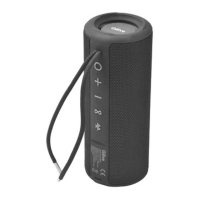
3. PRODUCT DESCRIPTION
1. Power on / off - Play /
Pause - Answer / End
phone call
2. Volume Up / Next Track
3. Volume Down / Previous
Track
4. TWS (True Wireless
Stereo)
5. Bluetooth/ Reset button
6. Power LED
7. Status LED
4. OPERATION
Charging your speaker
1. Connect one end of the USB charging cable to the charging port
on your speaker. Plug the other end of the cable into a suitable
USB port on your computer.
Note: A full charge takes approximately three hours.
2. A white LED light will turn on to indicate that the unit is charging.
The white light will turn off when the battery is fully charged.
Turning the speaker on/off
Power on: Press and hold the
button for 3 seconds to power on
Power off: Press and hold the button for 3 seconds to power off
the speaker. The white LED will turn off.
Pairing Bluetooth devices with your speaker
In order to pair your Bluetooth audio device with your Bluetooth
1. Make sure your Bluetooth audio source is close to the speaker.
2. Press the button for 3 seconds to power on the speaker. The
3. Enable Bluetooth on your device (phone or audio device). Refer
to the manufacturer’s instructions for details.
4. Search for Bluetooth devices and select “Q12P”.
the pairing process.
5. The speaker will beep when the devices are paired. The white
LED will switch on and your portable device will disp


 To Next Page