
 Need help?
Do you have a question about the QNAP QM2 Series and is the answer not in the manual?
Ensure system requirements are met and inspect all QM2 expansion card packet contents for damages or missing parts.
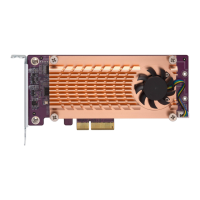
Lists the items included in the QM2 expansion card package, such as low-profile brackets and rubber pads.
Apply thermal and rubber pads to the M.2 SSD controller and bottom side for optimal heat dissipation.
Unscrew, remove, and reattach the QM2 cooling module while inserting and securing the M.2 SSD into its socket.
Reattach the cooling module back to the QM2 board and secure it with screws after M.2 SSD installation.
Power off the NAS, disconnect all peripherals, and remove the chassis cover to access the PCIe slot.
Identify the correct bracket (low-profile or full-height) and change it on the QM2 card if necessary for your NAS.
Hold the expansion card by edges and insert it into the available PCIe slot, then reattach the case cover.
Reconnect cables, power on the NAS, and confirm SSD recognition in QTS Storage Manager.
 General
| Product Series | QM2 Series |
|---|---|
| Category | PCI Card |
| Interface | PCIe |
| M.2 Form Factor | 2280 |
| Number of M.2 Slots | 2 or 4 (varies by model) |
| Form Factor | Low-profile |
| Supported RAID Levels | 0, 1 |
| Compatibility | QNAP NAS |
| Operating Temperature | 0°C to 40°C (32°F to 104°F) |
| Storage Temperature | -20°C to 70°C (-4°F to 158°F) |
| Humidity | 5-95% non-condensing |

 To Next Page