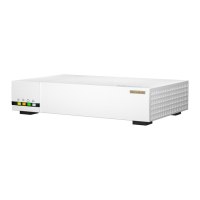
The QNAP QWA-AC2600 is an AC2600 Wireless Concurrent Dual Band PCIe Network Expansion Card designed to enhance the wireless connectivity of compatible QNAP devices. This expansion card provides high-performance Wi-Fi capabilities, leveraging the AC2600 standard to deliver fast and reliable wireless networking. Its dual-band operation allows for simultaneous connections on both 2.4 GHz and 5 GHz frequencies, optimizing performance for various applications and reducing interference.
Function Description:
The primary function of the QWA-AC2600 is to add or upgrade wireless networking capabilities to a QNAP NAS or other compatible system via a PCIe slot. It transforms a wired-only device into a wireless access point or client, enabling flexible network deployment and access. As an access point, it can provide Wi-Fi connectivity to other wireless devices, making the host system a central hub for wireless communication. When configured as a client, it allows the host system to connect to existing wireless networks, eliminating the need for Ethernet cables. The concurrent dual-band feature means it can operate on both 2.4 GHz and 5 GHz bands simultaneously. The 2.4 GHz band offers wider coverage and better penetration through walls, suitable for general internet browsing and tasks that are not highly sensitive to latency. The 5 GHz band provides higher speeds and lower latency, ideal for demanding applications such as 4K video streaming, online gaming, and large file transfers. The AC2600 standard indicates a theoretical maximum aggregate speed of 2600 Mbps (typically 800 Mbps on 2.4 GHz and 1733 Mbps on 5 GHz), providing ample bandwidth for multiple connected devices and high-throughput activities. This card is particularly useful for scenarios where running Ethernet cables is impractical or undesirable, offering a clean and efficient wireless solution. It also supports various wireless security protocols to ensure secure data transmission.
Important Technical Specifications:
- Wireless Standard: AC2600 (IEEE 802.11ac/a/b/g/n compatible)
- Frequency Bands: Concurrent Dual Band (2.4 GHz and 5 GHz)
- Interface: PCIe (PCI Express)
- Antennas: Typically includes multiple external antennas for enhanced signal strength and coverage. The provided diagrams show four external antennas, suggesting a MIMO (Multiple-Input Multiple-Output) configuration, likely 4x4 MIMO, which is common for AC2600 devices to achieve high speeds.
- Data Rate: Up to 800 Mbps on 2.4 GHz and up to 1733 Mbps on 5 GHz (aggregate 2600 Mbps).
- Form Factor: PCIe expansion card, designed to fit into a standard PCIe slot within a compatible QNAP NAS or PC.
- Connectivity: Features connectors for external antennas, which are crucial for optimal wireless performance. The diagrams show SMA-type connectors for the antennas.
- Cooling: The card includes a heatsink and a fan, indicating that it is designed for sustained high-performance operation and effective heat dissipation, which is important for maintaining stability during heavy wireless traffic.
Usage Features:
- Easy Installation: The manual illustrates a straightforward installation process involving inserting the card into a PCIe slot and securing it with screws. It also shows the attachment of external antennas to the card's connectors.
- Flexible Deployment: By providing wireless connectivity, the QWA-AC2600 allows the host device (e.g., QNAP NAS) to be placed in locations without direct Ethernet access, offering greater flexibility in network setup.
- Wireless Access Point (AP) Functionality: Can transform a QNAP NAS into a wireless access point, enabling other wireless devices (laptops, smartphones, tablets) to connect to the network through the NAS. This is particularly useful for creating a local Wi-Fi network or extending an existing one.
- Wireless Client Functionality: Allows the host device to connect to an existing Wi-Fi network as a client, eliminating the need for wired connections to the router.
- High Performance: AC2600 standard with concurrent dual-band operation ensures high-speed data transfer and low-latency connections, suitable for bandwidth-intensive applications.
- Enhanced Coverage: The use of external antennas, as depicted in the diagrams, helps in improving signal strength and extending wireless coverage, reducing dead zones.
- Compatibility: Designed specifically for QNAP NAS devices, ensuring seamless integration and software support. It may also be compatible with other systems that have available PCIe slots and appropriate driver support.
- Security: Supports standard wireless security protocols (e.g., WPA2/WPA3) to protect the wireless network from unauthorized access.
Maintenance Features:
- Passive Cooling with Fan: The integrated heatsink and fan system are designed for continuous operation, helping to dissipate heat generated during high-speed wireless data processing. This active cooling contributes to the longevity and stability of the card, reducing the risk of overheating and performance degradation.
- External Antennas: The detachable external antennas offer a degree of flexibility. In case of damage, they can often be replaced. Additionally, users might be able to upgrade to higher-gain antennas for improved signal strength and range, though this would depend on compatibility and regulatory compliance.
- Firmware/Driver Updates: As with most network hardware, the QWA-AC2600 will likely benefit from periodic firmware and driver updates provided by QNAP. These updates can improve performance, add new features, enhance security, and resolve compatibility issues. Users can typically download these from the QNAP website.
- WEEE Compliance: The product adheres to WEEE (Waste Electrical and Electronic Equipment) directives, indicating that it is designed with environmental considerations for end-of-life disposal. This means the device should be disposed of responsibly through designated collection points for recycling, rather than with general household waste, to minimize environmental impact and promote resource conservation. This commitment to responsible disposal is a key maintenance feature from an environmental perspective.
- Troubleshooting Resources: QNAP provides various support channels, including a helpdesk, documentation, and a download center (as indicated on the last page of the manual), which serve as resources for troubleshooting any issues that may arise with the QWA-AC2600. These resources help users maintain the optimal functioning of their device.

 Need help?
 General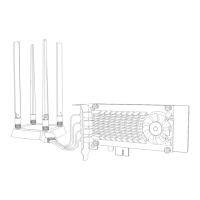

 To Next Page