
 Need help?
Do you have a question about the QPIX DIGITAL MDFC-1400 and is the answer not in the manual?
Lists important safety guidelines to follow when using the device.
Overview of the device's main menu options and icons.
Instructions on how to capture images using the device.
Selecting between negative, positive, and black & white film modes.
Navigating and managing captured photos, including playback and editing.
 General
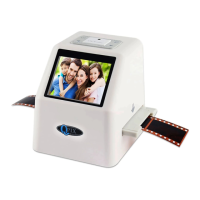
| Function : | Film scanner/USB MSDC |
|---|---|
| Interface: | USB 2.0 |
| TV-OUT type: | NTSC/PAL |
| Image Sensor : | 14.0 Mega pixels(4416*3312) 1/2.3” CMOS sensor |
| Exposure Control : | Automatic / Manual (-2.0 EV~ +2.0EV) |
| White Balance : | Automatic |
| Film type : | 135 Film(3624mm) / 126KPK Film(2727mm) 110 Film(1713mm)/Super8 Film(4.015.79mm) Monochrome, Slide |
| Picture Effects : | B&W, Slides, Negatives |
| Display: | Color 2.4" TFT LCD |
| Resolution : | 14.0 Mega pixels/ 22Mega pixels(interpolation) |
| File format : | Picture:JPEG |
| Language: | English, French, German, Italian, Spanish, Traditional Chinese, Simplified Chinese, Japanese |
| Support system: | Windows XP/vista/Windows7/ Mac10.7.3 |
| Built-in memory : | 128M |
| External memory card: | SD card up to 32GB |
| Power Supply: | DC 5V Adapter/ USB Port |
 Weight and Dimensions
| Product Size: | L91 x W104 x H105mm |
|---|---|
| Weight: | 272g |

 To Next Page