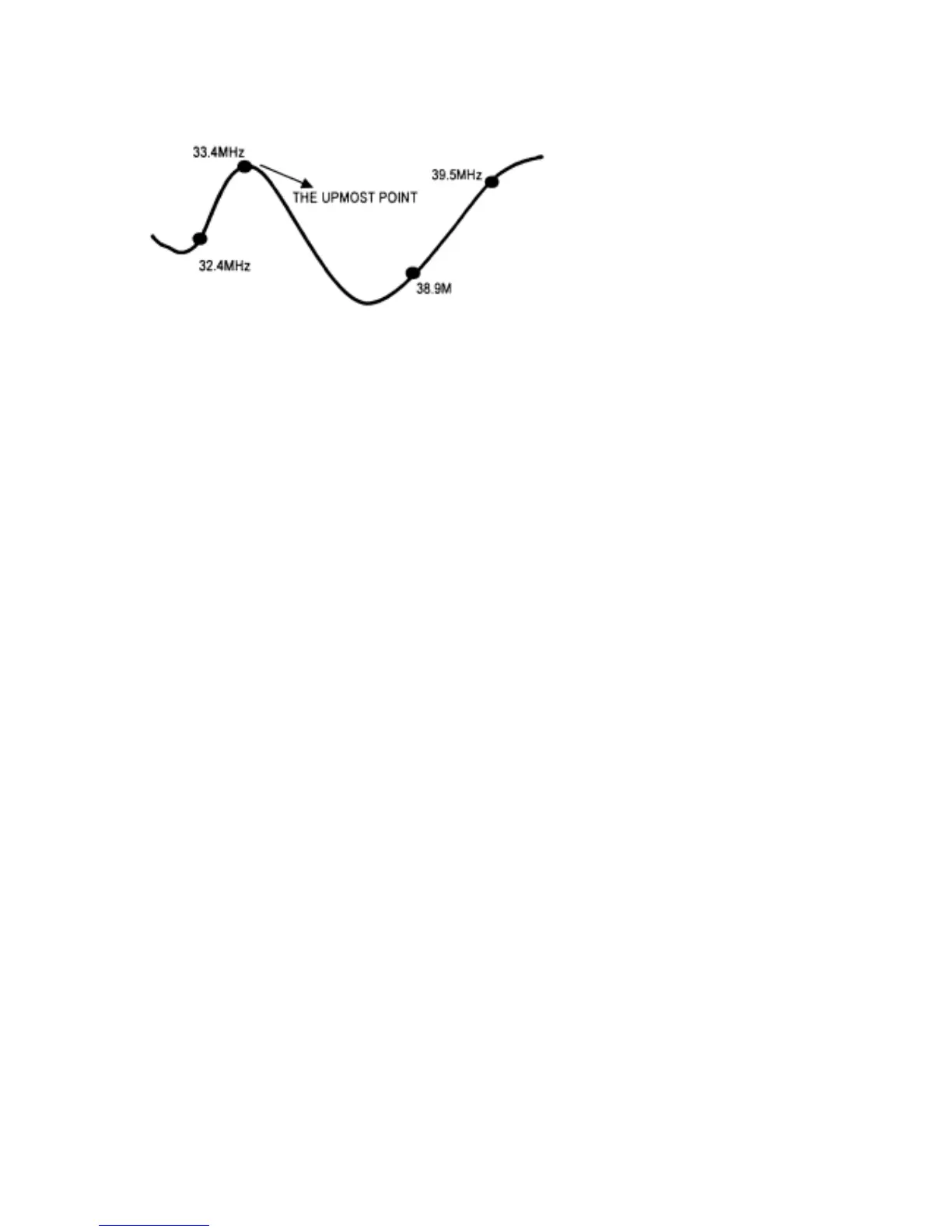
2-2 Apply +20V DC across IC302 as shown in FIG.2.
2-3 Adjust L108 to obtain waveform as following. There will be no alignment to it without NTSC
system.
3. B+ adjustment
3-1 Disconnect horizontal load. Connect a light bulb (100 W) AC 250V across C321.
3-2 Connect 220V AC 50 Hz to CN601 and switch on power switch.
3-3 Test the voltage with digital voltage meter between C321 two terminals.
3-4 Adjust VR601 to obtain +110V +/- 0.5V.
4. AGC alignment
4-1 Receive 60dB +/- 2dB RF signal. Connect Digital voltmeter positive terminal to AGC terminal of
TUNER and negative terminal to GND.
4-2 Press "MENU" key twin, till the PICTURE MENU appears, then press "Q.VIEW" key, "MUTE" key to
turn on CPU. TV SET will go to factory mode. Press "TIMER" key to go to the next factory menu. Go
to "MENU 3" status by this means.
4-3 Select RF.AGC by pressing "CH+" or "PROG+" and "CH." or "PROG-" keys. Adjust "VOL+" and
"VOL-" keys to obtain 4V Digital voltage meter reading.
4-4 Press "MENU" key to exit factory mode.



 To Next Page