6
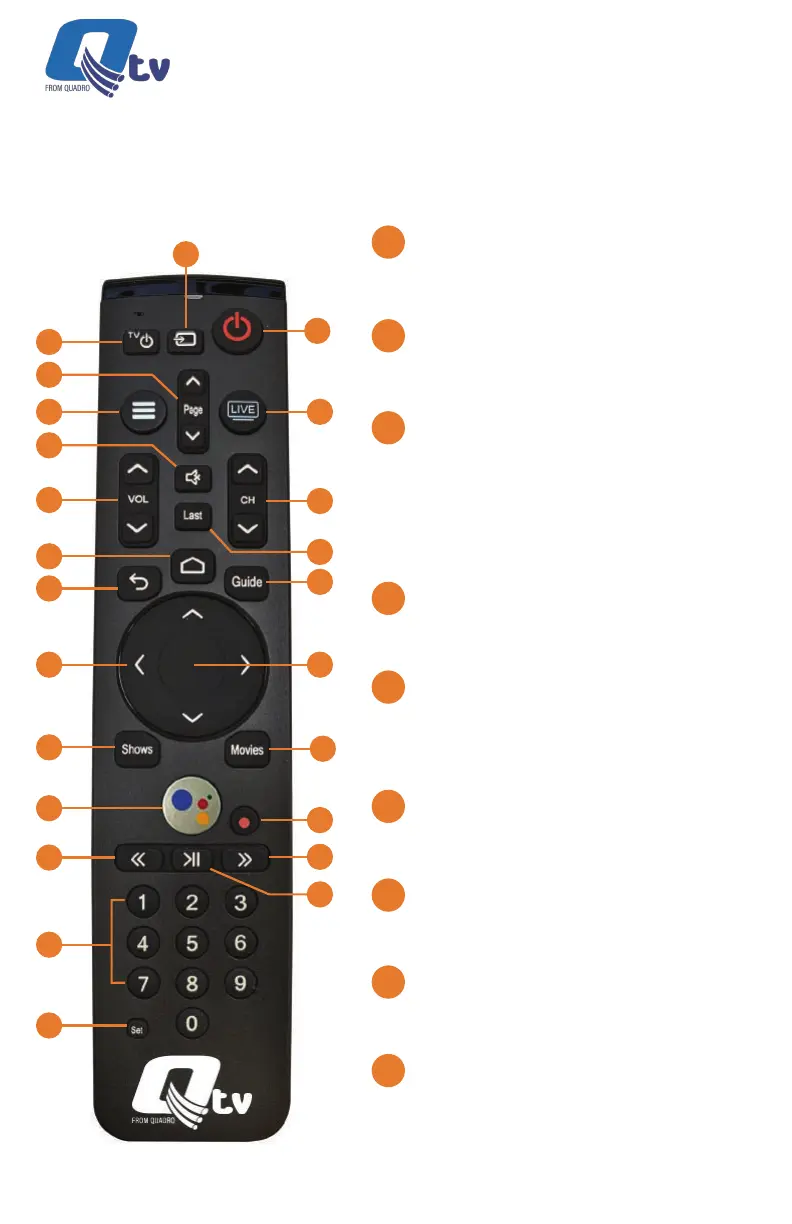
TV POWER:
Powers on or o TV if remote is
programmed with a TV infrared code.
TV INPUT:
Changes video input on TV if remote is
programmed with a TV infrared code.
POWER:
Switches STB power on or into standby
or o mode. Will also control TV power
and audio system after remote has
been programmed with a TV/Audio
Infrared code.
PAGE (Up or Down):
In the GUIDE or MENU screens, scrolls
one page up or down.
MENU:
Launches the MAIN MENU within the
App with Live Video or last viewed On-
Demand program.
LIVE TV:
Tunes to the last content viewed in the
App.
MUTE:
Mutes the audio on your audio device(s)
(TV, Audio System, or STB).
VOLUME (Up or Down):
Increases or decreases volume levels
on your audio device(s).
CHANNEL (Up or Down):
Selects the previous and next available
channels. (Hold for rapid advance.)
Within MENU or GUIDE acts the same
as Page Up/Page Down.
1
3
2
9
6
13
17
19
21
22
5
8
12
7
4
16
15
18
24
23
20
11
14
10
1
2
3
4
5
6
7
8
9
Button Functionality
KURV 2.0 Voice
Remote Control Shown
Qtv 2020 | Installation Guide



 To Next Page