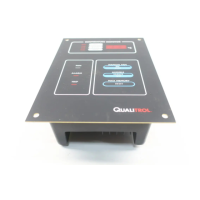
The QualiTROL 111-300 Series is an Electronic Temperature Monitor designed for liquid-cooled transformers. It is housed in a weatherproof enclosure and can contain either one or two Model 111L/111W Electronic Temperature Monitor (ETM) units.
Function Description:
The basic unit, Model 111W, monitors winding current to calculate winding temperature and provides four setpoint contacts that operate based on this temperature. An optional Model 111L can be included to independently monitor oil temperature, offering an additional four setpoint contacts. These ETMs use RTD (Pt100) temperature sensors in a thermal well to monitor oil temperature, and a clip-on CT to measure winding current without breaking existing CT wires.
Both 111L and 111W units offer several standard features:
- Temperature Display: Displays the current temperature and the maximum stored temperature, alternating every two seconds. A "MAX" icon indicates when the maximum stored temperature is shown.
- Relay Operation:
- Two SPDT relays control cooling fans (Fan #1 and Fan #2), each with independent setpoints. Icons on the display indicate when fans are ON.
- An ALARM relay (SPDT contact) activates when an input exceeds the ALARM setting or a fault is detected. An icon on the display indicates an ALARM state. This relay is normally energized (failsafe).
- A TRIP relay (SPDT contact) activates when the monitored temperature reaches the TRIP setting. An icon on the display indicates a TRIP state. This relay is normally de-energized (non-failsafe) by default, meaning power loss will not cause a trip. It can optionally be configured to operate from internal ambient temperature for heater control.
- Manual Fan Control: A "MAN/FAN" button allows forcing the fans ON. A "MAN" icon indicates manual fan mode. This function can force fans ON but not OFF.
- Fan Exerciser: If enabled, this circuit turns the fans ON for a short, programmable duration at periodic intervals, starting when power is applied or the unit is reset.
- Fan Bank Switching: If enabled, this feature swaps the setpoints of Fan #1 and Fan #2 after each actuation, evening out wear on fan motors and contactors.
- Fault Detection: If an internal or external fault (e.g., sensor lead open circuit) is detected, the Alarm relay and both Fan relays operate, the "FAULT" icon displays, and the temperature shows "---". A failed sensor will not cause a TRIP. A failed microprocessor activates Fan 1 and Alarm relays via hardware control.
- TEST Function: Initiated by the "TEST" button, this sequence displays stored setpoints (FAN #1, FAN #2, ALARM, TRIP), internal ETM temperature, present oil temperature, present winding current as a percentage of full scale (for 111W), and tests the digital display by showing "888" with all icons ON. This test does not change relay states.
- MAX RESET Button: Clears the memory of the maximum stored temperature, setting the current highest temperature as the new maximum.
- RS-232 Data Port: Used for setting up programmable parameters via QualiTROL software. Setpoints and some other functions can also be adjusted using front panel buttons.
- Optional mA Loop Output: Provides a current proportional to the present temperature (0-1mA or 4-20mA, configurable).
- Optional RS-485 Link: Uses Modbus RTU protocol for communication with a remote master station, allowing temperature data and unit status to be transmitted.
- Optional Heater Kit (KIT-031-1): Two adhesive-backed Kapton heaters (25 watts each) can be installed in the enclosure. The "Oil" temperature unit's trip relay can be configured to control the heater based on internal ambient temperature.
Important Technical Specifications:
- Input Power: 80-265 VAC or 20-280 VDC, 2 Watts.
- Measurement Range: 0°C - 200°C.
- Display Resolution: 1°C.
- Accuracy: ±1% (2°C).
- Memory Retention: 40 years (with power off).
- Contact Ratings (All Relays):
- 250 VAC, 5.0 amps (resistive), inductive rating not specified.
- 30 VDC, 5.0 amps (resistive), inductive rating not specified.
- 300 VDC, 0.2 amps (resistive), inductive rating not specified.
- Remote Output Current Loop (Optional):
- 0 to 1 mA: into 10,000 Ω max. load.
- 4 to 20 mA: into 500 Ω max. load.
- Accuracy: ±1% of full scale display.
- Operating Temperature: -30°C to +72°C.
- Storage Temperature: -50°C to +85°C.
- Relative Humidity: Up to 90% non-condensing.
- Hi-pot: 2,300 VAC 50/60 Hz for 1 minute (relay contact, power to sensor terminals, and earth ground).
- Vibration: 50/180 Hz @ .004 inch displacement.
- Shock: 10 G's in 3 orthogonal planes.
- Electromagnetic Compatibility: EN50081-2 (emissions), EN61000-6-2-2 (immunity), EN61010-1 (safety).
- Box Dimensions (Wall Mount Weatherproof Box): Height = 11.7" [297mm], Width = 9.3" [236mm], Depth = 7.13" [181mm].
- Weight: 6.5 lbs.
- Mounting: (4) #½ screws on a 10.74” [272.8mm] x 6.00" [152.4mm] pattern.
Usage Features:
- Installation: The 111-300 mounts on any flat surface using four fasteners. Each 111L/111W unit is mounted in a standard square ¼ DIN cutout in a swing-out panel.
- Wiring: Primary power connects to TB1-19 and TB1-21 with earth ground to TB1-20. Users must provide external fuse or circuit breaker protection. RTD sensors (preferably 3-wire Pt100) connect to TB1-34, TB1-35, and TB1-36. The clip-on CT for winding current connects to TB1-25 and TB1-26.
- Setup Software (KIT-032-1, sold separately): A Windows-based program allows configuration of parameters via the RS-232 port. It supports creating new configurations, opening existing ones, selecting the communication port, and viewing/changing settings.
- Winding Rise Calculation (111W): Stores winding rise tables to calculate winding temperature from oil temperature and current. Users can create winding rise data for convection cooling, first stage cooling, and all cooling stages, requiring a single winding rise temperature at a known current and an exponent for the winding rise equation.
- Manual Setpoint Adjustment: Allows changing setpoints (Fan 1, Fan 2, Alarm, Trip), mA loop type, Fan Bank Switching, and Fan Exerciser settings directly from the front panel buttons without a computer. The switching differential is preserved during manual adjustments.
- Modbus Communication (Optional): Supports Modbus RTU protocol via RS-485. Baud rate, parity, stop bits, and address can be configured using front panel switches.
Maintenance Features:
- Calibration: The "Calibrate CT" screen in the software allows checking and changing the calibration of the CT input for the 111W. This involves setting the current to zero, then to a known percentage of full scale (recommended 100% of the instrumentation CT secondary's full scale).
- Diagnostic Status: Modbus register 40009 provides diagnostic information, including failed terminal block temperature sensor, failed channel 1 sensor, and CT clamp error (for 111W).
- Reset Functions: Modbus registers allow resetting the Max stored temperature (40051) and resetting the entire unit (40052).
- The unit is intended for installation in a customer's panel or enclosure where only the face is accessible. Hazardous voltages are present on rear terminals.
- Appropriate wire dressing and strain relief for mains wiring must be supplied by the user.
- Designed for Installation category III per EN61010-1.
- An Earth Ground terminal (TB1-20) is provided.
- To meet EN 61010-1 paragraph 6.12.2.1, a switch or circuit breaker must be provided by the user to control power, be in close proximity, within easy reach, and marked as the disconnecting device.
- The user must provide external fuse or circuit breaker protection.
- There are no internal fuses in the 111L/111W ETM.

 Need help?

 To Next Page
 General