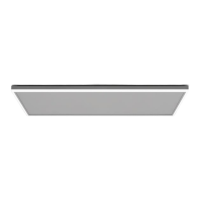
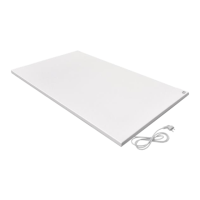
This document describes the QH-HH-L infrared panel heater, a device designed to provide efficient, comfortable, and healthy heating for domestic users. It features a sleek design with surrounding LED light and is controlled by a remote.
Function Description
The QH-HH-L infrared panel heater provides far infrared heating, utilizing a carbon heating element. It is designed for easy installation on ceilings and comes with a remote controller for both LED light operation and heating functions. The device offers various heating modes and programmable settings to maintain a comfortable room temperature.
Important Technical Specifications
The QH-HH-L infrared panel heater operates on an input voltage of 220-240V/50Hz. The surface temperature of the panel ranges from 130-150°C. The frame is made of aluminum. It includes overheating protection and has a power cord length of ≤1.9m.
Three models are available with different sizes and power ratings:
- HH0606L: 655*630mm, 400W, Rated Current 1.7A
- HH1006L: 1080*630mm, 700W, Rated Current 3A
- HH1206L: 1280*630mm, 840W, Rated Current 3.6A
The remote controller operates on DC 4x 1.5V AAA batteries (not included). It has a temperature setting range of 0°C~45°C with a resolution of 1°C. The room temperature display range is 0°C~50°C with a display resolution of 0.1°C. The accuracy of the measured temperature is ±0.5°C, and the working environment range is 1°C~50°C. The radio frequency is 433.92MHz.
Usage Features
The device is controlled via a remote, which allows users to:
- Turn the panel ON/OFF: Press the ON/OFF button on the thermostat.
- Adjust brightness of LED light: Use the +/- buttons to adjust brightness (100%, 75%, 50%, 25%, 5%).
- Lock/Unlock buttons: Press the LOCK button for 3 seconds.
- Change temperature display unit: Press the C/F button to switch between Celsius and Fahrenheit.
- Set time and date: Press the TIME button for 3 seconds to set year, month, date, and time.
- Adjust temperature: Use the UP and DOWN buttons to set the target temperature.
- Program weekly heating schedules: The thermostat supports 5+2 programming mode (weekday and weekend) and 1-7 programming mode (individual days). This allows users to set up to 4 time intervals per day.
- Favorite temperature setting: Press the FAV button for 3 seconds to store the current temperature as a favorite. Pressing FAV again will set the temperature to the favorite setting.
- Child lock function: The child lock function prevents children from misusing the device.
Installation:
Installation requires drilling four holes in the ceiling with specific distances (A and B) depending on the panel size. An 8mm rotary bit is recommended to avoid the panel falling. The panel is then mounted using screws and hanging units. It is crucial to ensure the ceiling is stable enough and that the power cord is well-grounded. Professional electricians should perform mounting work.
Maintenance Features
Regular maintenance ensures the device's longevity and safe operation.
- Cleaning: The device should be cleaned with a soft, damp, and lint-free cloth. Avoid using aggressive cleaning agents, sprays, solvents, alcohol-based or abrasive cleaners. Ensure no moisture enters the housing.
- Power cord: Do not touch the mains plug or power cord with wet or damp hands. Hold onto the mains plug while pulling the power cable out of the mains socket.
- Overheating/Fire hazards: Do not place objects (such as towels, clothes, etc.) above or directly in front of the device to prevent overheating and fire hazards.
- Repairs: If the housing needs to be opened, it must only be carried out by authorized specialist companies.
- Battery replacement: Replace batteries in the thermostat when the battery symbol flashes. Use alkaline batteries.
- Storage: When not in use, store the device in a dry place, protected from frost and direct sunlight. Cover it with a protective film to prevent dust and dirt. Do not place other devices or objects on top of the device.
Troubleshooting:
- Noise: If the device makes a sound, it is a normal phenomenon due to the structural stress of the heat insulator.
- Slightly raised surface: This is a normal phenomenon due to the thermal expansion of the surface material.
- Slightly warm surface: If the heating device surface is slightly warm, check if the voltage is low or if it's in a low-temperature environment. Installing a voltage regulator or ensuring a suitable environment can resolve this.
The device is marked with symbols indicating important safety information:
- No objects on device: Prohibits placing objects above or directly in front of the device to prevent overheating and fire hazards.
- Hot surface: Indicates dangers to life and health due to hot surfaces.
- No spray: Prohibits spraying the device.
- Read manual: Indicates that the operating manual must be observed for information.
The device should not be disposed of with household waste. It should be returned to designated collection points for electrical and electronic equipment recycling.

 Need help?
 General

 To Next Page