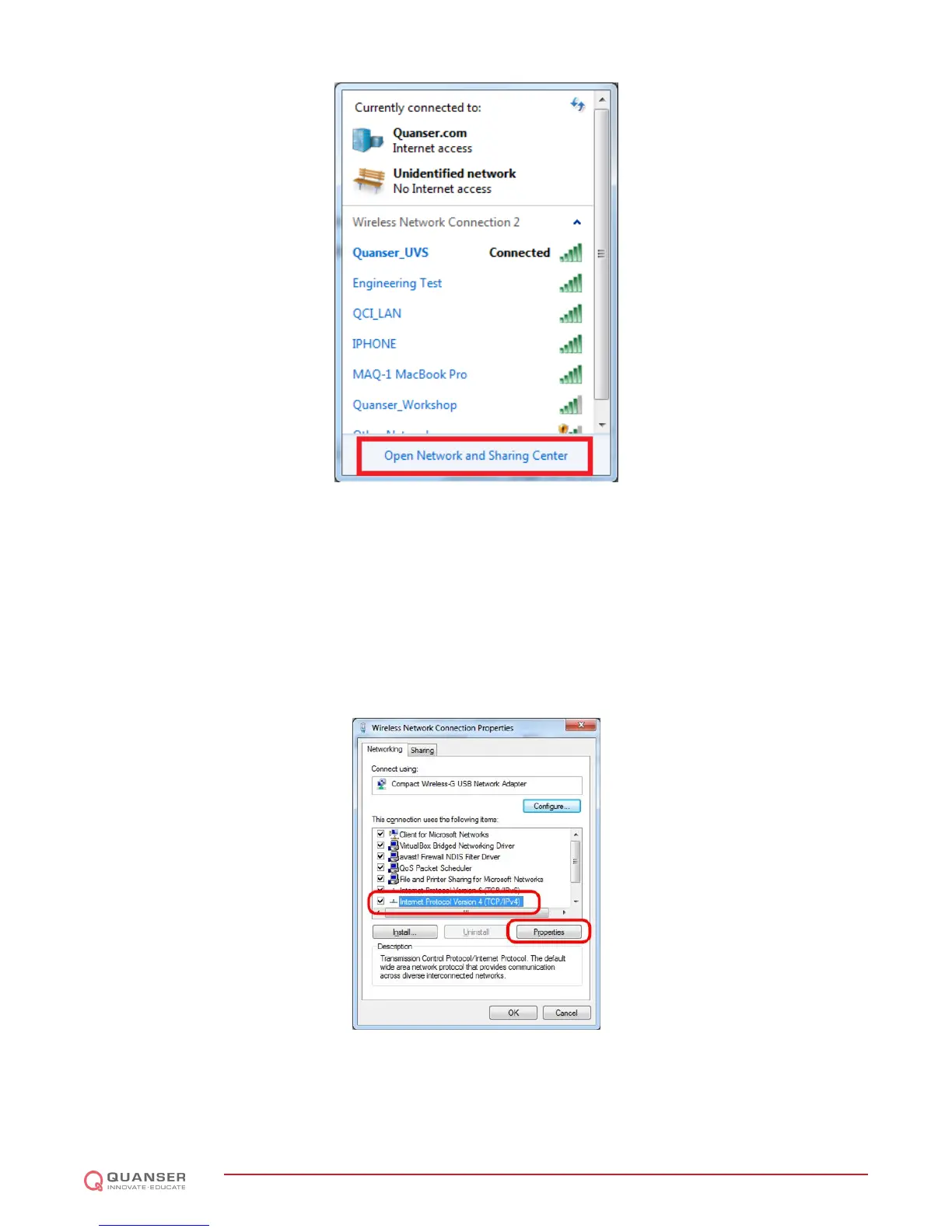
Figure 3.1: Open network settings. The Unidentified network is related to the wired connection to the router. If you are
using a wired connection to the router and you don't have wireless adapter, you will not see Quanser_UVS network.
5. Click on Change adapter settings.
6. Right-click on the Local Area Connection x, Unidentified network connection and click Properties. If you chose
wireless connectivity between your PC and the router, choose the Wireless Network Connection instead, right
click on it and click Properties.
7. Under This connection uses the following items:, select Internet Protocol Version 4 (TCP/IPv4) and click
Properties.
Figure 3.2: Network properties
8. Instead of obtaining an IP address of the computer automatically, select Use the following IP address and enter
the following:
QBOT 2 - User Manual
DRAFT - April 14, 2015


 To Next Page
 Loading...