1
3
2
4
5
6
7
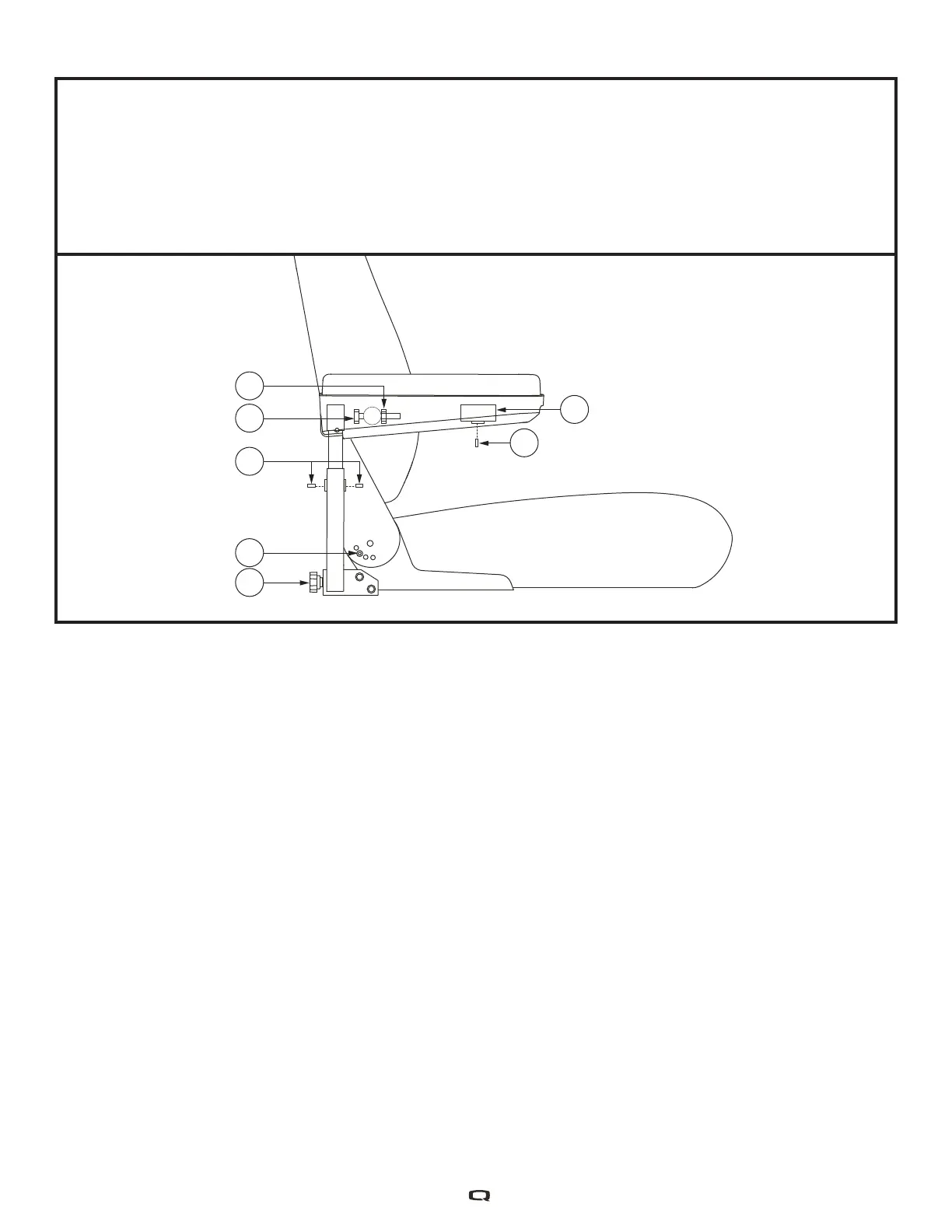
Figure 15. Seatback and Armrest Adjustments for Contour Seat
Seatback Angle Adjustment
If your power chair is equipped with an adjustable seatback, you can adjust it to four (4) different angles:
90°, 102°, 105°, or 107°.
To adjust the seatback angle:
1. Remove the adjusting screws from each seat hinge. See figure 15.
2. Set the seatback at the desired angle.
3. Reinstall the adjusting screws to each seat hinge and tighten.
Armrest Width Adjustment
You can change each armrest’s width independently of the other.
NOTE: Changing the armrest width may increase the overall width of your power chair.
To change the armrest width:
1. Locate the two armrest knobs on each side of the armrest receiver bracket.
2. Loosen the knobs.
3. Slide the armrests in or out of the desired width.
4. Tighten the knobs.
Identification Key
1. Jam Nut
2. Armrest Angle Adjusting Screw
3. Armrest Height Adjusting Setscrews
4. Seat Back Angle Adjusting Screw
5. Armrest Knob
6. Controller Bracket
7. Setscrew



 To Next Page