9
“Aspect Ratio” and press the “
/ ” button to select.
b. Press “
/ ” button to select “Noise Reduction” and press the “ / ” button to select.
c. Press “
/ ” button to select “Dynamic Contrast” and press the “ / ” button to select “On” or
“Off”.
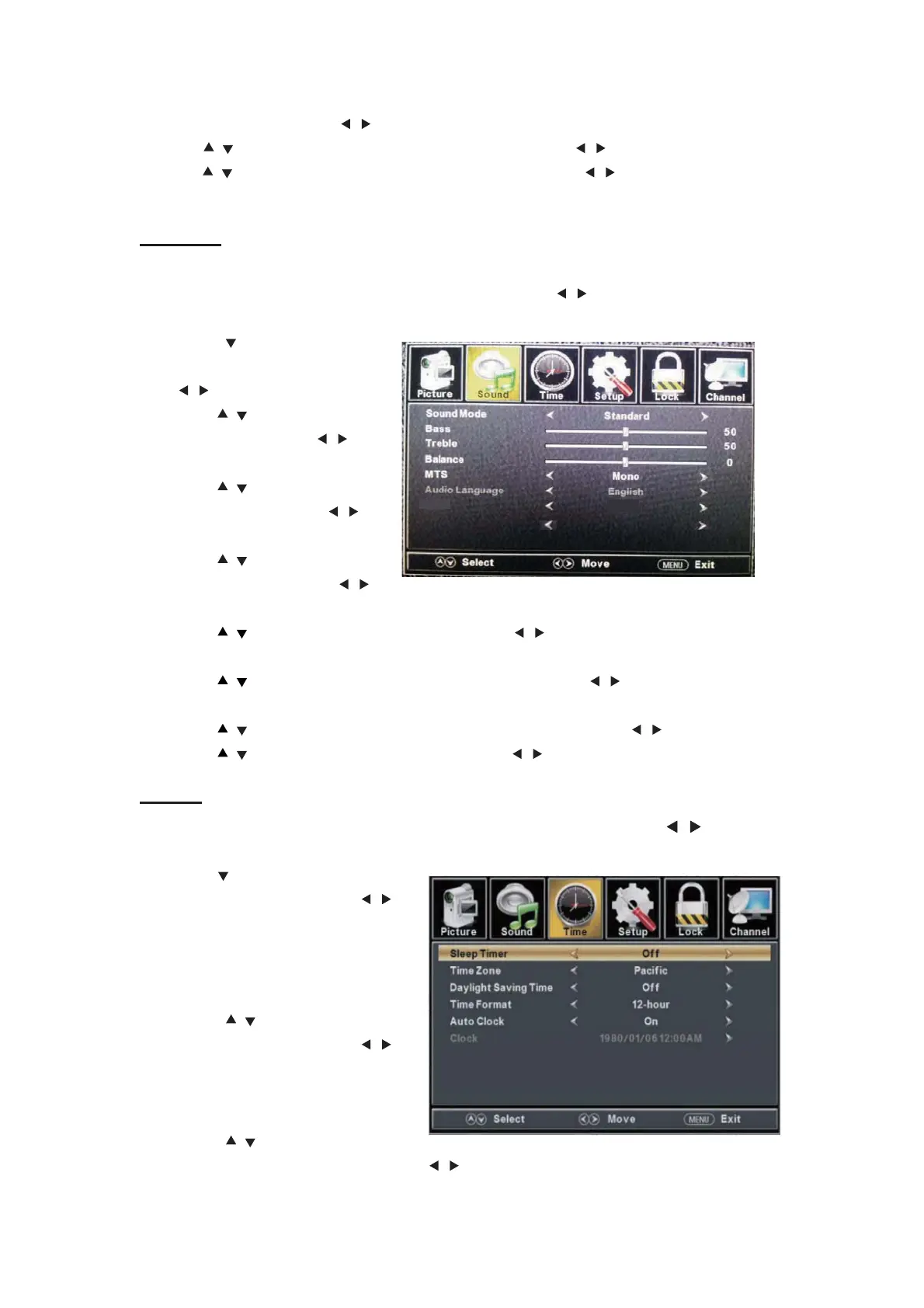
SOUND
You can select the type of sound, which best corresponds to your listening.
Press the “MENU” button to enter the OSD menu .Then press “
/ ” button to select the
“SOUND” menu.
1. Press “ ” button to select
“Sound Mode” and press the
“
/ ” button to select.
2. Press “ / ” button to select
“Bass” and press the “ / ”
button to adjust.
3. Press “ / ” button to select
“Treble” and press the “ / ”
button to adjust.
4. Press “ / ” button to select
“Balance” and press the “
/ ”
button to adjust.
5. Press “ / ” button to select “MTS” and press the “ / ” button to adjust.
Note: This setting is only for ATV.
6. Press “ / ” button to select “Audio Language” and press the “ / ” button to adjust.
Note: This setting is only for DTV.
7. Press “ / ” button to select “Digital Audio Output ” and press the “ / ” button to adjust.
8. Press “
/ ” button to select “AVL” and press the “ / ” button to select “On” or “Off”.
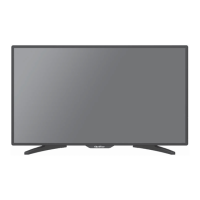
TIME
Press the “MENU” button to enter the OSD menu .Then press “
/ ” button to
select the “TIME” menu.
1. Press “ ” button to select “Sleep
Timer” and press the “
/ ”
button to enter sleep timer
adjustment menu to adjust sleep
timer.
2. Press “
/ ” button to select
“Time Zone” and press the “
/ ”
button to enter time zone
adjustment menu to select the local
time zone.
3. Press “
/ ” button to select
“Daylight Saving Time” and press the “
/ ” button to select “On” or “Off”.
AVL Off
Digital Audio Output RAW


 To Next Page