6
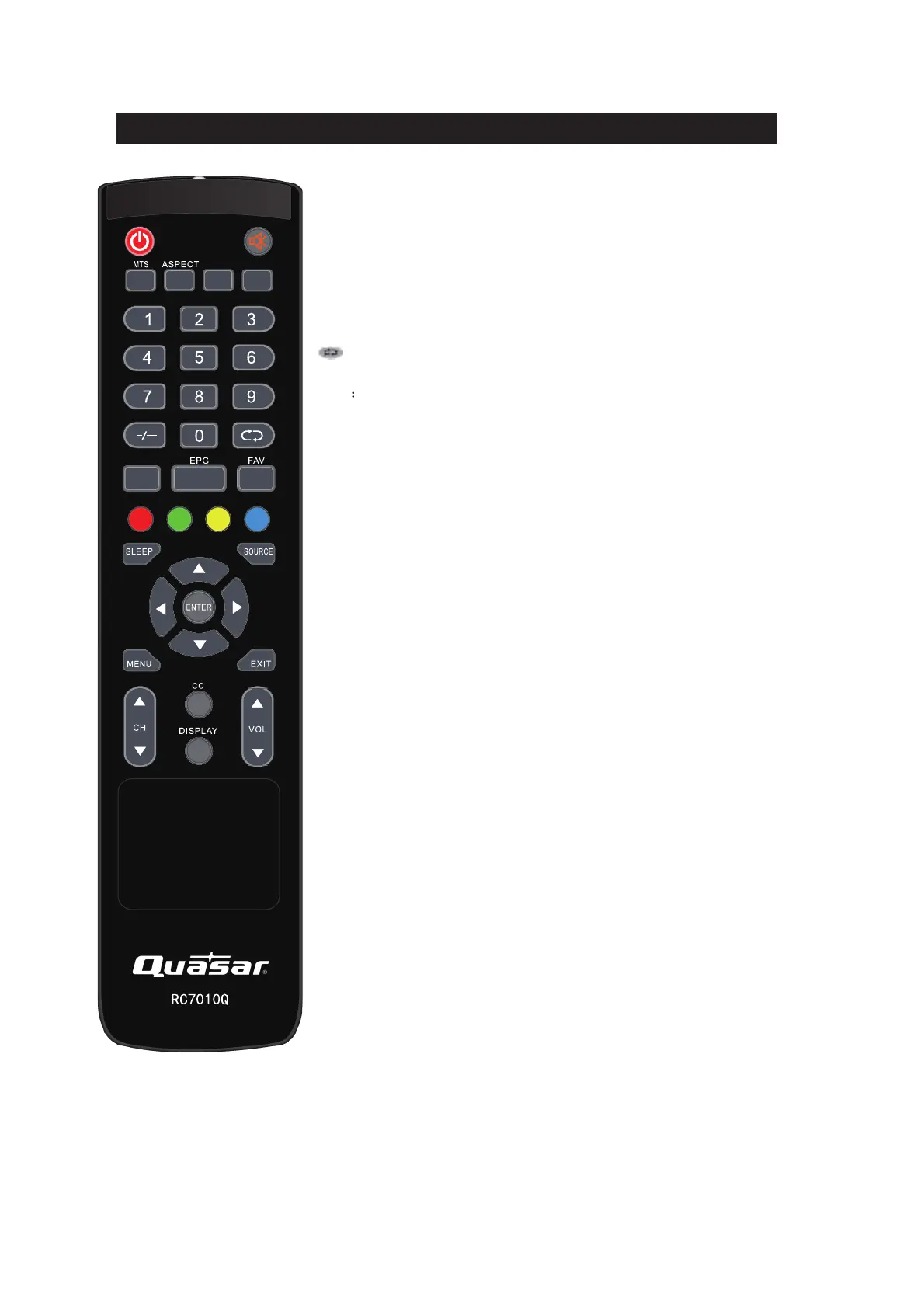
Remote control
POWER: Power on/off button, press once to turn the TV on and press
again to turn the TV off.
MUTE: Press this button to mute or restore sound.
MTS:
In the TV condition, press this key to select the stereo mode.
ASPECT: Press to adjust picture ratio.
PICTURE: Select picture mode.
SOUND: Select sound mode.
0-9: Select and switch to a channel using 0 - 9.
-/--:
Switch the program digit.
: Switch back and front between the current and previous channels.
AUTO: Adjust the picture automatically in pc mode.
EPG Enter electronic program guide
FAV: Switch between custom set "Favorite List"
RED, GREEN, YELLOW, CYAN:
This button is not available.
SLEEP: Set the sleep timer.
SOURCE: Press to change signal source.
ENTER: Enter the selected option or perform the selected operation.
MENU: Press this button to enter the main menu.
EXIT: Exit the OSD (On-screen display).
CH+/CH-: Change the channel.
CC: Press this key to select the CC ,ON or OFF mode
DISPLAY: Display TV information.
VOL+/VOL-: Adjust the volume.
PICTURE
SOUND
AUTO


 To Next Page