EasyManua.ls Logo

Qub Works QUB-60016 - User Manual

Qub Works QUB-60016
2 pages
Print Icon
To Next Page IconTo Next Page
Loading...
Features
•3 Watt Speakers
•Premium Sound Quality
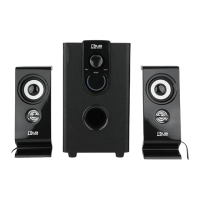
Thank you for purchasing the QUB Works Desktop 2.1 PC Bluetooth Sound System. 3 watt speakers that offer premium sound quality and can fit anywhere on your desk or shelves. Please read this manual carefully FIRST in order
to get the most out of your speakers.
Installation
•For best results, place the subwoofer on the ground and the speakers on a desktop or shelf. Connect the
speaker cables to the Output Port on the back of the subwoofer.
•Connect the USB cable to the USB port on your computer.
•Connect the Auxiliary cable into the computer’s audio input.
•Press the “On” button on the back of the subwoofer.
•Play music on your computer and adjust the volume using the wheel dial on the speakers.
•To connect via Bluetooth, open the Bluetooth Device Manager on your Bluetooth device. Select “QUB60016”
from the menu. The speakers should emit a tone when connection is successful. Use your Bluetooth device to play
or pause music and change tracks.
SPECIFICATIONS
•Output Power: 5W+2W×2
•Frequency Response: 60Hz-160Hz 140Hz-20KHz
•Power Supply: USB Power
Important safety precautions
•READ ALL INSTRUCTIONS BEFORE USING YOUR SPEAKERS
•Do not allow children or the infirm to play with your speaker without adult supervision.
•Do not expose your speakers to excessive heat, flames, or fire.
•Do not manhandle your speakers.
•Do not expose your speaker to temperatures above 40°C. Keep out of direct sunlight.
•Do not attempt to repair this product yourself. Contact a qualified service center if your
speakers are in need of service.
•Do not drop, puncture, or expose your speakers to excessive trauma.
•Do not submerge your speakers in water or liquids.
•Your speaker is not intended for commercial use.
•Do not place near objects that generate a strong magnetic field.
•Please recycle or dispose of your speakers properly based on the laws and rules of your
municipality. Contact local recycling facilities and/or the manufacturer of your speakers for
more information.
USER’S MANUAL
ITEM: QUB-60016
Auxiliary
Cable
Subwoofer
USB
Cable
Speakers
Volume
Question and Answer IconNeed help?

Do you have a question about the Qub Works QUB-60016 and is the answer not in the manual?

Summary

Important Safety Precautions

General Safety Warnings

Comprehensive list of safety guidelines for speaker usage, handling, and environment to prevent damage or injury.

Specifications

Output Power

Details the audio output power rating of the sound system, specifying wattage for the system and individual speakers.

Frequency Response

Specifies the range of audio frequencies the speakers can reproduce, indicating audio quality capabilities.

Power Supply

Indicates the power source required for the sound system, noting it uses USB power.

Features

Speaker Wattage

Highlights the power output of individual speakers, noting they are 3 Watt speakers.

Sound Quality

Describes the audio performance of the sound system as premium.

Installation and Connectivity

Physical Setup

Guidance on optimal placement of the subwoofer and speakers for best audio results.

Cable Connections

Instructions for connecting speaker cables, USB cable, and auxiliary cable.

Power On and Playback

Steps to power on the system and adjust volume using the dial.

Bluetooth Pairing

Instructions for connecting the sound system wirelessly via Bluetooth to a device.

FCC Compliance Information

RF Exposure and Installation

Details compliance with FCC radiation exposure limits and minimum installation distance requirements.

Interference Regulations

Explains FCC rules regarding harmful interference and measures to correct it.

Vivitar One Year Warranty

Warranty Coverage Details

Outlines what is covered by the product's limited warranty, focusing on defects in material or workmanship.

Warranty Exclusions

Details what is not covered by the warranty, including accidental damage or unauthorized repairs.

Obtaining Warranty Service

Provides contact information and procedures for seeking warranty service and troubleshooting.

Overview

The QUB Works Desktop 2.1 PC Bluetooth Sound System offers a premium audio experience for your computer setup. This system comprises 3-watt speakers designed to deliver clear sound and can be conveniently placed on your desk or shelves without taking up excessive space. It's engineered for ease of use and aims to provide an immersive listening experience for various applications, from music playback to general computer audio.

Function Description

The QUB Works Desktop 2.1 PC Bluetooth Sound System is a versatile audio solution designed to enhance your computer's sound output. It functions as a 2.1 channel speaker system, meaning it includes two satellite speakers for stereo sound and a dedicated subwoofer for rich, deep bass. This configuration ensures a balanced audio profile, with clear highs, detailed mids, and impactful lows, making it suitable for a wide range of audio content, including music, movies, and games.

The primary function of this system is to reproduce audio from your computer or other Bluetooth-enabled devices. It offers dual connectivity options: a wired connection via USB and an auxiliary cable, and a wireless connection via Bluetooth. This flexibility allows you to connect to your computer for a stable wired audio experience while also providing the convenience of streaming audio wirelessly from your smartphone, tablet, or any other Bluetooth-enabled device.

For wired connectivity, the system utilizes a USB cable to draw power from your computer and an auxiliary cable to receive the audio signal. This setup ensures a direct and reliable audio transmission, minimizing latency and potential interference. The USB power feature means you don't need an additional power adapter, simplifying cable management and making the system more portable.

The Bluetooth functionality allows for seamless wireless audio streaming. Once paired with a Bluetooth device, the speakers can play, pause, and skip tracks directly from your connected device, offering a hands-free and clutter-free listening experience. The system is designed to emit a clear tone when a successful Bluetooth connection is established, providing immediate feedback to the user.

The subwoofer, which is recommended to be placed on the ground for optimal bass resonance, handles the low-frequency sounds, adding depth and impact to your audio. The satellite speakers, ideal for desktop or shelf placement, deliver the mid and high frequencies, ensuring vocal clarity and instrument detail. This separation of frequencies across different speaker units results in a more dynamic and engaging soundstage.

Volume control is conveniently located on the speakers themselves, featuring a wheel dial that allows for easy and precise adjustment of the audio output. This intuitive control ensures that you can quickly fine-tune the sound level to your preference without needing to interact with your computer's software volume controls.

Usage Features

The QUB Works Desktop 2.1 PC Bluetooth Sound System is designed with user convenience in mind, offering several features that enhance its usability.

  • Dual Connectivity Options: The system provides both wired (USB and auxiliary) and wireless (Bluetooth) connectivity. This allows users to choose the most suitable connection method based on their device and preference. The wired connection ensures a stable and high-quality audio stream from your computer, while Bluetooth offers the flexibility of wireless streaming from various devices.
  • Easy Setup: Installation is straightforward. Users simply connect the speaker cables to the subwoofer's output port, plug the USB cable into a computer's USB port for power, and connect the auxiliary cable to the computer's audio input. For Bluetooth, pairing is initiated through the device's Bluetooth manager, selecting "QUB60016" from the available options.
  • Intuitive Controls: The system features a simple "On" button located on the back of the subwoofer for power control. Volume adjustment is managed via a convenient wheel dial on the speakers, allowing for quick and precise sound level changes.
  • Optimal Speaker Placement Recommendations: For the best audio experience, the manual suggests placing the subwoofer on the ground to maximize bass resonance and the satellite speakers on a desktop or shelf for clear stereo imaging. This guidance helps users achieve the best possible sound quality from their system.
  • Wireless Audio Control: When connected via Bluetooth, users can control music playback (play, pause, change tracks) directly from their Bluetooth-enabled device, offering convenience and freedom from being tethered to the computer.
  • Compact Design: The speakers are designed to be compact, making them suitable for various desktop setups and shelves without occupying excessive space. This ensures that the system can seamlessly integrate into different environments.
  • Premium Sound Quality: Despite its compact size, the system is engineered to deliver premium sound quality, providing a rich and clear audio experience for music, movies, and other multimedia content.

Maintenance Features

Maintaining the QUB Works Desktop 2.1 PC Bluetooth Sound System involves adhering to a set of safety precautions and general care guidelines to ensure its longevity and optimal performance.

  • General Handling: Users are advised to handle the speakers with care, avoiding rough treatment or "manhandling" that could lead to damage. This includes preventing drops, punctures, or exposure to excessive physical trauma.
  • Environmental Protection: The system should be kept away from extreme conditions. This includes avoiding exposure to excessive heat, direct flames, or temperatures above 40°C. It should also not be submerged in water or any other liquids, as this can cause severe internal damage.
  • Magnetic Field Awareness: To prevent potential interference or damage, the speakers should not be placed near objects that generate strong magnetic fields.
  • No User Servicing: Users are explicitly warned against attempting to repair the product themselves. Any repair needs should be directed to a qualified service center to ensure proper diagnosis and resolution, preserving the integrity of the device and its warranty.
  • Child Safety: The manual emphasizes that children or infirm individuals should not be allowed to play with the speakers without adult supervision, preventing potential misuse or damage.
  • Intended Use: The speaker system is designed for personal, non-commercial use. Using it for commercial purposes may void warranties or lead to issues not covered by standard support.
  • Proper Disposal and Recycling: At the end of its lifespan, the product should be recycled or disposed of properly, following local laws and regulations. Users are encouraged to contact local recycling facilities or the manufacturer for guidance on environmentally responsible disposal.
  • Cleaning: While not explicitly detailed, general electronic device cleaning practices apply: use a soft, dry cloth to wipe down the exterior, avoiding harsh chemicals or abrasive materials that could damage the finish. Ensure the device is powered off and unplugged before cleaning.
  • Storage: If the speakers are to be stored for an extended period, it's advisable to keep them in a cool, dry place, away from direct sunlight and extreme temperatures, to prevent material degradation.
  • Cable Management: While not strictly maintenance, proper cable management can prevent strain on the connections and reduce the risk of accidental disconnections or damage to the ports.

By following these guidelines, users can ensure the QUB Works Desktop 2.1 PC Bluetooth Sound System remains in excellent condition, providing reliable audio performance for an extended period.

Qub Works QUB-60016 Specifications

General IconGeneral
BrandQub Works
ModelQUB-60016
CategorySpeakers
Speaker TypePortable Bluetooth Speaker
ConnectivityBluetooth
Frequency Response20kHz