USER MANUAL
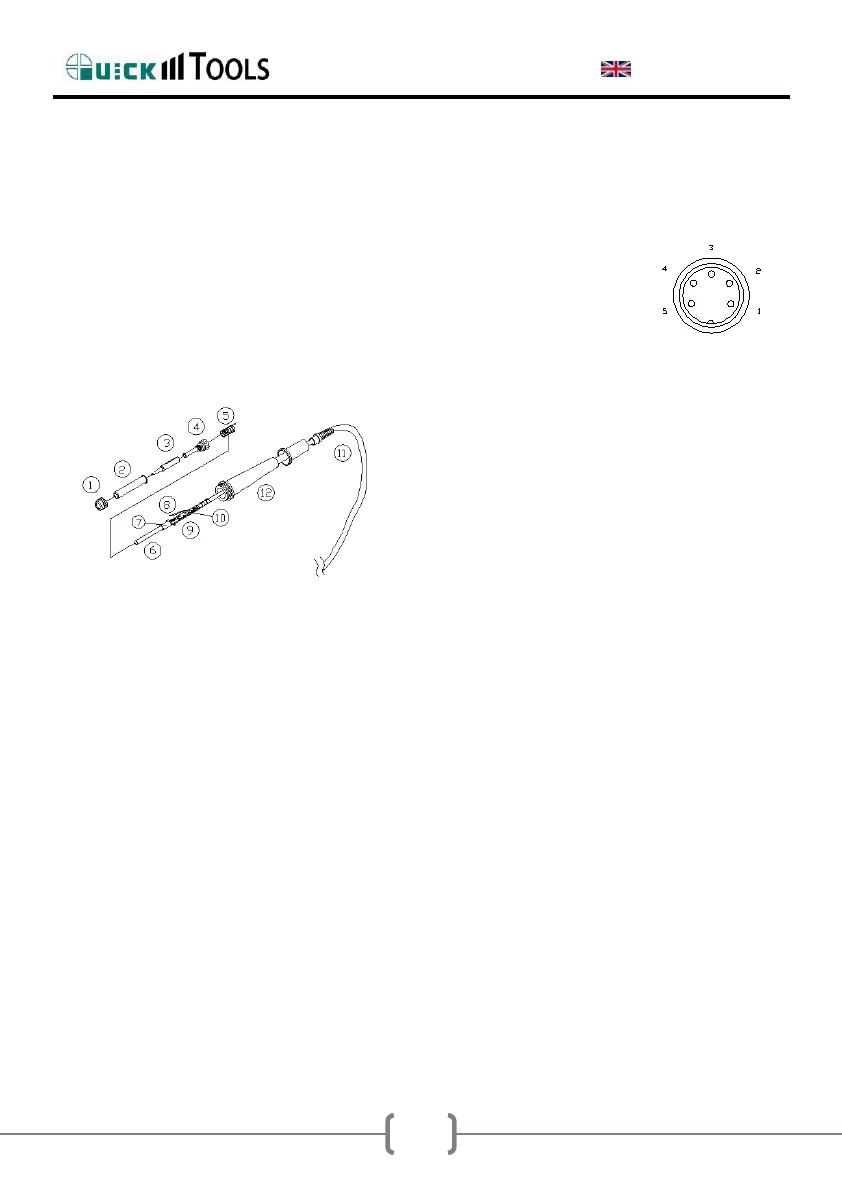
2.9.1. Check the Soldering Iron
Allow the heating element to cool down to room temperature and unplug the
soldering iron from the soldering station. Measure the resistance between
connections 1 & 5 on the plug. If you find a value that differs from the value
below, replace the heating element or the connecting cable.
Between pin 1 & 5 (heating element): 11Ω +/-2Ω
2.9.2.Disassembling the Iron Handle
1. Turn the nut① counterclockwise and
remove out the tip enclosure② and the
tip③.
2. Turn the nipple④ counterclockwise and
remove it from the iron.
3. Pull both the heating element⑥ and the
cord assembly ⑪ out of the handle ⑫
(Towards the tip of the iron).
4. Pull out the spring⑤ from the D-type.
NOTE: Do not use metal tools such as pliers to remove tip or Tip enclosure
from the handle.
2.9.3 Measure the Resistance before
Replacing
NOTE: Measure the resistance when the heating element is at room
temperature.
3. Resistance value of heating element (Red) is 3~4Ω(ceramic heater).
4. Resistance value of sensor (Blue) is 43~58Ω(ceramic heater).


 To Next Page
 Loading...