20
Quicksilver 555OP — System & Component Overview and Operaon
Wear the lanyard at all mes when operang the boat. Use
it to stop only in an emergency. DO NOT use it to shut o
the engine during normal operaon
7. Emergency Engine Shutdown Switch
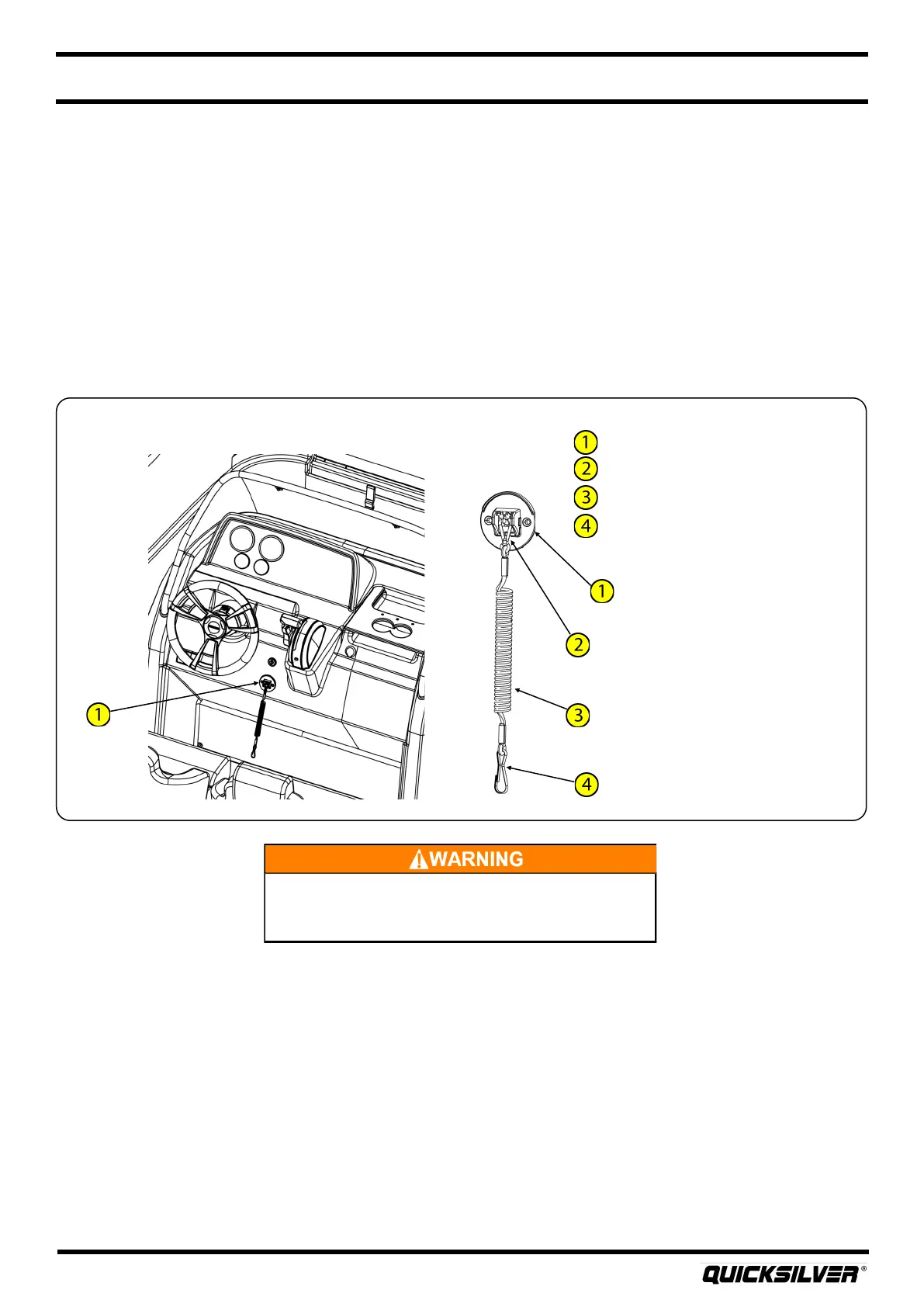
Your boat is equipped with an engine shutdown safety switch. The switch is located at the helm
between the steering wheel and the engine control unit. The ignion shutdown switch incorporates a
shut-o switch and a lanyard. Before operang the boat, one end of the lanyard must be connected to
the shut-o switch while the other end is connected to the operator. If an emergency arises where
the engine must be shut down, pull the lanyard cord to release it from the shut-o switch, which in
turn shuts down the engine. This switch is designed to shut the engine o when the operator of the
boat leaves the control staon, either accidently by falling into the boat, or by being ejected
overboard.
The lanyard should be long enough to prevent inadvertent acvaon. Do not let the lanyard become
entangled.
Emergency Engine Shutdown Switch
Engine shutdown safety switch
Switch clip (aached to switch)
Lanyard
Switch clip (aached to operator)
8. Instrumentaon Package
Depending on the type of engine installed on your boat, you will either have analog or SmartCra
TM
gauges installed. For boats with engines 60HP or less, analog gauges come standard. This gauge
package includes a tachometer, speedometer, fuel gauge and an engine trim gauge.
If the engine installed on your boat is larger than 60HP, the instrument package includes a
SmartCra
TM
tachometer and speedometer mul-gauge system. By pressing the “mode” buon on
the gauge, specic informaon vital to the safe operaon of the vessel can be displayed. Refer to
your SmartCra
TM
gauge owner’s manual for specic informaon on how to get the most out of the
mul-gauge display.



 To Next Page