
 Need help?
Do you have a question about the Quincy lab 140 Series and is the answer not in the manual?
Provides internal width, height, and depth in inches and centimeters.
Provides external width, height, and depth in inches and centimeters.
Details the unit's weight in pounds and its volume in cubic feet.
Specifies voltage and wattage requirements for the unit.
Defines the operating temperature limits relative to ambient conditions.
Specifies conditions for optimal and safe incubator operation.
Provides guidelines for storing the incubator when not in use.
Lists safety certifications and adherence to industry standards.
Details materials used for the outer casing and thermal insulation.
Describes interior materials, door type, and heating element.
Advises on safe operation, electrical requirements, and material handling.
Instructions for inspecting the incubator and its components after delivery.
Guidance on placement, ventilation, and electrical connections for setup.
Steps for correctly installing shelves and the thermometer.
Instructions for powering on, setting temperature, and achieving equilibrium.
Understanding load effects on temperature uniformity and processing times.
Factors affecting temperature stability and performance.
Information on minimum operating temperature and calibration adjustments.
Guidelines for cleaning interior/exterior surfaces and handling spills.
Contact information for assistance and details on the limited warranty.
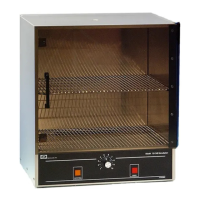
This document describes the Quincy Lab General Purpose Incubators, Model Series 140 & 180, providing an operating manual with specifications, usage, and maintenance information.
The Quincy Lab General Purpose Incubators are designed for indoor use, providing a controlled heated environment for various laboratory applications. They operate on a principle of light pressure thermal convection, where heat is generated at the lower part of the chamber and rises, creating a uniform temperature distribution. The incubators are suitable for tasks requiring stable temperature maintenance within a specified range, such as culturing, drying, and other general laboratory processes. The units are equipped with a bi-metal thermo-control system to regulate the internal temperature.
 General
| Brand | Quincy lab |
|---|---|
| Model | 140 Series |
| Category | Accessories |
| Language | English |

 To Next Page