EasyManua.ls Logo

Quincy lab Digital Series - User Manual

Quincy lab Digital Series
6 pages
Print Icon
To Next Page IconTo Next Page
Loading...
Quincy Lab, Inc.
Digital Lab Oven
POWER
DIGITAL MICROPROCESSOR
GCE SERIES
Switch
opening
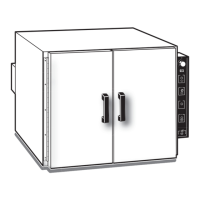
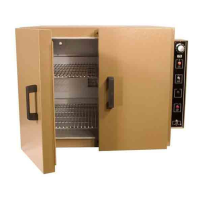
Digital Series Lab Oven
Operating Manual
(1) AFE or AFE-LT Series Lab Oven
(2) Adjustable nickel-plated wire shelf
(4) Shelf brackets
INTERIOR DIMENSIONS
INCHES W x H x D
(CM) W x H x D
EXTERIOR DIMENSIONS
INCHES W x H x D
(CM) W x H x D
WEIGHT (lbs)
SHIPPING
STAND ALONE
44
38
61
54
78
70
94
85
STANDARD ELECTRICAL
120/6.8*
822
5-15P*
120/8.5*
1022
5-15P*
120/13.1*
1572
115/13.1*
1572
SPECIFICATIONS
TEMPERATURE RANGE
450 / 232
450 / 232 450 / 232 450 / 232
CONTROL STABILITY
@ 75°C ±°F / °C
Common Unit Construction
Exterior: Powder Coated Steel Interior: Aluminized Steel
Insulation: Fiberglass Motor: N/A
Thermo-control: P.I.D. Microprocessor Heater: Resistive-Tubular Incoloy
Ambient + 25°F to: F / C
o
o
o
o
o
o
o
o
E5GC
Approvals:
Underwriter’s UL / CUL, United States/
Canadian for laboratory equipment.
Compliance: UL Standard 61010-1
IEC 61010-1.
Standard Contents
* Standard models voltage only, optional 220 voltage available. For power requirements, see electrical info on the label located on the back of the oven.
NOT FOR USE WITH FLAMMABLE
LIQUIDS OR GASES
uincy
ab
MODEL
Issue Rev 07.22
Quincy Lab Inc. 109 Shore Dr. Burr Ridge, Illinois 60527 1800-482-4328
Copyright Quincy Lab Inc. 2022
PAGE 6
300
OUT
RUN
L
PAGE 1
MENU / ADVANCE
INCREASE
DECREASE
FUNCTIONS / RETURN
For models AFE and AFE-LT
10AFE
10AFE-LT
MODEL
20AFE
20AFE-LT
MODEL
30AFE
30AFE-LT
MODEL
40AFE
40AFE-LT
AFE-LT - Ambient + 15°F to: F / C
225°/ 107°
AFE-LT - @75°C ±°F / °C
1.0° / 0.5° 1.0° / 0.5° 1.0° / 0.5° 1.0° / 0.5°
1.0° / 0.5° 1.0° / 0.5° 1.0° / 0.5° 1.0° / 0.5°
WATTS
VOLTS / AMPS
PLUG / NEMA
AFE-LT’s - VOLTS / AMPS
115 / 3.7* 115 / 3.7* 115 / 6.8* 115 / 6.8*
AFE-LT’s - WATTS
432
432 792 792
5-15P* 5-15P*
12x8.63x10
13x11.63x13
18x19.63x1418x14.63x12
14x20.5x12
15x24.5x15
20x28.5x14
20x33.5x16
30.5x22x25.4
33x29.5x33
45.7x50x35.545.7x37x30.5
35.5x52x30.5
38x61x38
52x72.4x35.5
52x85x40.63
225°/ 107° 225°/ 107° 225°/ 107°

Questions and Answers

Summary

Set-Up & Installation

Shelf Installation

Procedure for installing the adjustable wire shelf using brackets within the oven chamber.

Menu Functions Guide

Set-point Change

Instructions on how to modify the oven's temperature set-point using controller buttons.

Temperature Units

Guidance on selecting the temperature display unit between Celsius and Fahrenheit.

Temperature Offset; Calibration

Process for adjusting controller reading to match actual chamber temperature for accuracy.

AUTO-TUNING THE UNIT

CONTROLLER LOCK

CONTROLLER ALARM

Chamber Loading

Important Operational Notes

Thermal Safety Reset (Snap Disc)

Maintenance; Cleaning Procedures; Common Replacement Parts

Cleaning Procedure

Instructions for maintaining the oven by cleaning air vents, ports, exterior, and interior surfaces.

Common Replacement Parts

Identification of frequently replaced components such as controllers, relays, and motors.

Troubleshooting

Technical Support

Limited Warranty

Overview

This document describes the Digital Series Lab Oven, models AFE and AFE-LT, manufactured by Quincy Lab Inc. This lab oven is designed for various laboratory applications, providing precise temperature control and reliable performance. It is UL/CUL listed for laboratory equipment and complies with UL Standard 61010-1 and IEC 61010-1.

Function Description

The Digital Series Lab Oven is a heating device used in laboratories to maintain a stable and controlled temperature environment. It utilizes natural convection for air circulation and is equipped with a P.I.D. microprocessor for accurate temperature control. The oven's primary function is to heat samples or materials to a desired set-point temperature, which can be adjusted and calibrated by the user. It is suitable for applications requiring consistent heat, such as drying, baking, and conditioning. The oven is not intended for use with flammable liquids or gases.

Important Technical Specifications

The oven comes in several models, each with distinct interior and exterior dimensions, and electrical specifications:

  • Model 10AFE / 10AFE-LT:

    • Interior Dimensions: 12 x 8.63 x 10 inches (30.5 x 22 x 25.4 cm) WxHxD
    • Exterior Dimensions: 14 x 20.5 x 12 inches (35.5 x 52 x 30.5 cm) WxHxD
    • Electrical (AFE): 120V / 6.8A, 822 Watts
    • Electrical (AFE-LT): 115V / 3.7A, 432 Watts
    • Shipping Weight: 44 lbs, Stand Alone Weight: 38 lbs
  • Model 20AFE / 20AFE-LT:

    • Interior Dimensions: 13 x 11.63 x 13 inches (33 x 29.5 x 33 cm) WxHxD
    • Exterior Dimensions: 15 x 24.5 x 15 inches (38 x 61 x 38 cm) WxHxD
    • Electrical (AFE): 120V / 8.5A, 1022 Watts
    • Electrical (AFE-LT): 115V / 3.7A, 432 Watts
    • Shipping Weight: 61 lbs, Stand Alone Weight: 54 lbs
  • Model 30AFE / 30AFE-LT:

    • Interior Dimensions: 18 x 14.63 x 12 inches (45.7 x 37 x 30.5 cm) WxHxD
    • Exterior Dimensions: 20 x 28.5 x 14 inches (52 x 72.4 x 35.5 cm) WxHxD
    • Electrical (AFE): 120V / 13.1A, 1572 Watts
    • Electrical (AFE-LT): 115V / 6.8A, 792 Watts
    • Shipping Weight: 78 lbs, Stand Alone Weight: 70 lbs
  • Model 40AFE / 40AFE-LT:

    • Interior Dimensions: 18 x 19.63 x 14 inches (45.7 x 50 x 35.5 cm) WxHxD
    • Exterior Dimensions: 20 x 33.5 x 16 inches (52 x 85 x 40.63 cm) WxHxD
    • Electrical (AFE): 115V / 13.1A, 1572 Watts
    • Electrical (AFE-LT): 115V / 6.8A, 792 Watts
    • Shipping Weight: 94 lbs, Stand Alone Weight: 85 lbs

Common Unit Construction:

  • Exterior: Powder Coated Steel
  • Interior: Aluminized Steel
  • Insulation: Fiberglass
  • Thermo-control: P.I.D. Microprocessor
  • Heater: Resistive-Tubular Incoloy
  • Motor: N/A (natural convection)

Temperature Range:

  • AFE: Ambient + 25°F to 450°F (232°C)
  • AFE-LT: Ambient + 15°F to 225°F (107°C)

Control Stability:

  • @75°C: ±1.0°F / 0.5°C for both AFE and AFE-LT models.

Usage Features

The oven is supplied with standard contents including the oven itself, two adjustable nickel-plated wire shelves, and four shelf brackets. It is ready for immediate use upon installation, with factory-set control parameters, calibration, and tuning.

Installation:

  • Position the unit with a minimum of 4 inches of airspace around it and 18 inches above it to allow for natural convection through the top portholes.
  • Install shelves by inserting brackets into corresponding holes on the inner sides of the oven, pushing until the first bends are against the wall, then rotating the brackets down.
  • Plug the unit into a grounded outlet rated for its voltage.

General Operation:

  • Turn the power switch ON (UP) to activate the temperature controller, which will display the current chamber temperature. The OUT and RUN indicators will illuminate.
  • The temperature control is factory-set to read in 1/10th degree Fahrenheit units.
  • Setting Temperature: Press 'P' once to see 'SP', then use the up/down arrows to adjust the set-point. Press 'P' three times to return to chamber temperature display.
  • Temperature Units: Press 'P' twice to see 'unit', then use up/down arrows to select Celsius or Fahrenheit. Press 'P' three times to return.
  • Auto-Tuning: The controller can be auto-tuned for maximum efficiency. Users can choose between "FAST Tuning" (prioritizes speed) or "FULL Tuning" (prioritizes accuracy). To auto-tune, set the desired set-point, enter the factory passcode (1111), and select the tuning option. The 'AT' indicator will light up during the process.
  • Controller Lock: The controller buttons can be locked to prevent accidental changes. This involves pressing 'P' three times to see 'PASS', entering the password (1111) by holding the up arrow, pressing and holding 'P' until 'CALib' displays, pressing 'P' three times to see 'Prot', changing the value from 4 to 5 using the up arrow, and pressing 'P' four times to return to temperature display.
  • Chamber Loading: To optimize performance, load the oven to ensure heated air circulation is not impaired. Leave space between articles, avoid large solid trays on lower shelves, and avoid extremely large or high-density loads. For small items, center them on a single shelf. Avoid placing items against or within an inch of the walls, especially on the lower shelf.

Safety Precautions:

  • Use only a grounded outlet.
  • Do not modify the oven or operate above maximum stated temperature.
  • Exterior surfaces may become hot at higher set temperatures.
  • Do not leave the oven unattended.
  • Do not place volatile, combustible, flammable, or toxic materials inside.
  • Do not use open liquids in the oven.
  • Conduct periodic maintenance.
  • Thermal Safety Reset: If the unit exceeds its maximum temperature, an internal "snap disc" will cut power. To reset, unplug the oven, lay it on its back, remove the bottom cover, locate the round safety "snap disc," and push the button.
  • Controller Alarm: If the unit exceeds the high limit alarm value, the controller will stop heating and display 'ALM'. To reset, power the unit OFF, allow it to cool, then power ON.

Maintenance Features

The Lab Series Ovens are designed for minimal maintenance, but periodic cleaning and temperature accuracy verification are necessary for operational safety.

Cleaning Procedure:

  • Periodically check and clean the rear air intake vents for dirt or dust build-up.
  • Keep intake and exit ports clear of obstruction.
  • Remove the bottom plate cover to clean or vacuum any dirt and dust build-up to reduce fire risk.
  • Clean exterior and interior surfaces with a damp cloth and an all-purpose cleaner. Avoid commercial oven cleaners.

Temperature Offset / Calibration:

  • The unit is factory-calibrated with NIST-certified instruments.
  • It is recommended to verify temperature consistency twice a year using a trusted, certified digital temperature probe placed at the chamber's center.
  • To perform an offset, record the temperature readings from the controller and the probe. Access the 'OFFS' parameter (by pressing 'P' three times to see 'PASS', entering passcode 1111, pressing 'P' once to see 'OFFS'), and input the temperature difference (positive or negative) from the controller to the probe. Allow time for stabilization after adjustment.

Troubleshooting:

The manual provides a troubleshooting guide for common issues:

  • Unit not turning ON: Check for tripped GFCI outlet, damaged/missing fuse, disconnected/loose wires, or tripped thermal safety disc.
  • Oven not heating or overheating: Check if the set temperature is correct and above the minimum range, if the unit overheated and alarmed (reset by turning OFF/ON), or if the OFFSET value is incorrect (verify it's between -10°F to 10°F).

Common Replacement Parts:

The manual lists common replacement parts and their part numbers:

  • Digital P.I.D Controller (AFE & AFE-LT Series): PART # 101-1230
  • S.S. Relay (AFE Series): PART # 701-6252
  • S.S. Relay (AFE-LT Series): PART # 201-2310
  • Motor (AFE & AFE-LT Series): PART # 205-2030 A QR code is provided for a full list of replacement parts.

Limited Warranty:

Quincy Lab, Inc. offers a 24-month warranty from the date of shipment for defects in material and workmanship under normal use. The heating element has a separate three-year warranty. The warranty covers parts and labor (at factory only) and shipping costs for replacement parts.

Quincy lab Digital Series Specifications

General IconGeneral
BrandQuincy lab
ModelDigital Series
CategoryOven
LanguageEnglish

Related product manuals