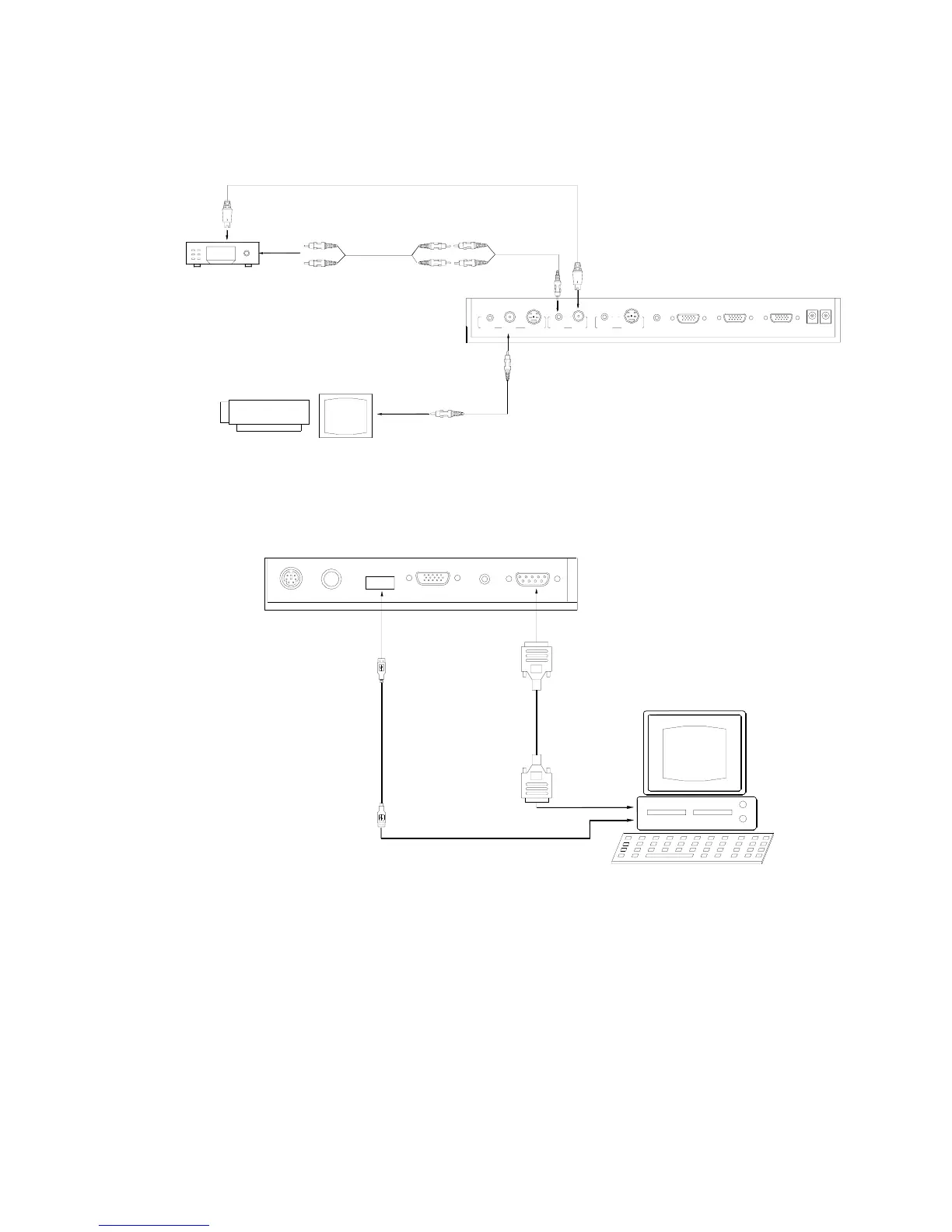
Remarks: RGB IN signal can not go to S-VIDEO OUT or VIDEO
OUT port to be displayed on the screen.
Step 5: Connect to the second video equipment with video input.
Step 6: Connections for external control from the computer.
Use the computer RS232 cable (9-pin to 9-pin) to make the
RS 232 connector
USB connector
of the computer
of the computer
USB cable
RS-232 cable
Side Panel
USB
PROJECTOR
MIC
RGB IN AUDIO IN
RS232
Video in
Projector Color monitor
S-VIDEO
AUDIO
OUTOUT
AUDIO
VIDEO
S-VIDEO
VIDEO
IN IN
AUDIO
Rear Panel
AUDIO IN
PROJECTOR
OUT -COMPUTER- IN
OUT-12V- IN
Video equipment
Audio out
Video Cable
Video out
connections shown below to control the visualizer from an external
computer.
USB connection enables capturing still images / video streams from
the visualizer to the computer. Special software is required for this
operation.
4. Turn on the power by pressing the “POWER” button.


 To Next Page