HDMI 2CH/5.1CH Audio Extractor
3
1)Power and Active LED
With a double color LED when supplying power to this unit the light is red and
when it starts to work normally the light is purple(red and blue mixed).
2)DC/5V
Connect this port to power adapter.
3)HDMI In
Connect this port to HDMI source device.
4)2.0CH/5.1CH LED
When 2.0CH is being selected it is off and when 5.1CH is being selected it is on.
5)2.0CH/5.1CH button
Pressing “button” to switch 2.0/5.1CH manually.
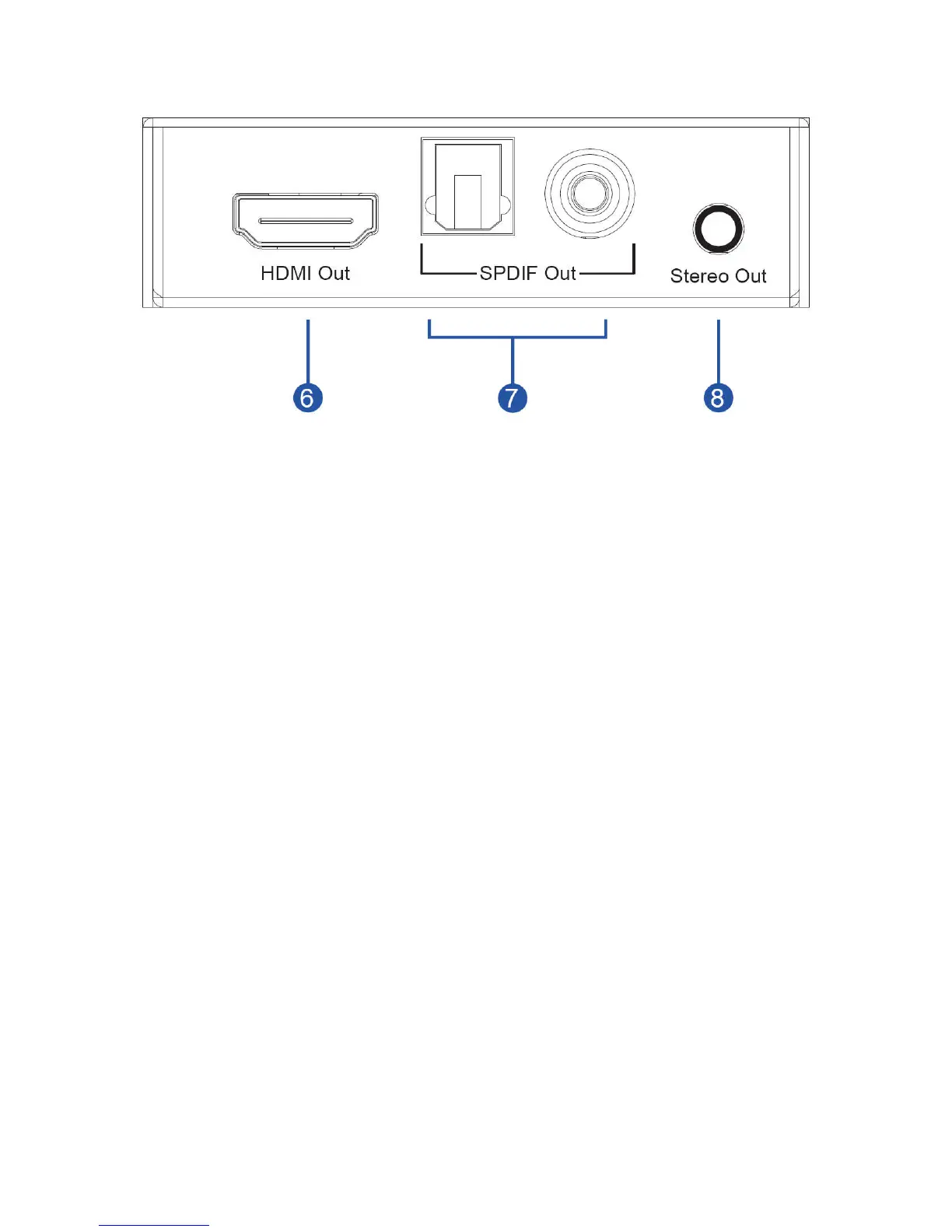
6)HDMI Out
Connect this port to HDMI Display.
7)SPDIF Out
Connect Toslink or Coaxial port to Amplifier Receiver.
8)Stereo Out
Connect this port to Amplifier Receiver.
Note:Only when the source supports 5.1CH output (including CD), this
function is effective and it realizes through the 2.1CH/5.1CH buttons. The
product default output is 5.1CH, and LED turns on at the time. Press the
button a time again, the product outputs 2CH audio and the LED turns off. If
the source can only supports 2CH audio output, the “2CH/5.1CH” button will
become invalid, that is, although you press “2CH/5.1CH” button, the
product still outputs 2CH audio and the LED is still on.



 To Next Page