EasyManua.ls Logo

QYSEA FIFISHV-EVO - User Manual

QYSEA FIFISHV-EVO
24 pages
Print Icon
To Next Page IconTo Next Page
Loading...
FIFISH V- EVO
Quick Start Guide
V 1.0
Question and Answer IconNeed help?

Do you have a question about the QYSEA FIFISHV-EVO and is the answer not in the manual?

Summary

Safety and Regulations

General Safety Precautions

Important safety warnings and guidelines for operating the ROV.

Marine Environment Protection

Guidance on protecting marine life and coral reefs during operation.

Introduction

About FIFISH V-EVO

Overview of the FIFISH V-EVO underwater drone and its capabilities.

ROV Components Identification

Identification and description of key ROV parts and their functions.

RC (Remote Controller)

Remote Controller Components

Identification of all buttons, sticks, and parts of the remote controller.

Spool and Tether

Spool and Tether Components

Identification of the spool and tether parts.

Preparation & Connection

Charging Procedures

Instructions for charging the ROV and remote controller before use.

Install FIFISH APP

APP Download and Installation

Steps to download and install the FIFISH mobile application.

Hardware Connection Overview

Overview of connecting the ROV, controller, and spool.

Software Connection

Wi-Fi Setup and Connection

Steps to connect the remote controller to the Wi-Fi network.

Live Streaming and Control

Activate Live-Streaming

Activating live streaming and understanding the main control interface.

Deployment and Retrieval

Deploying the ROV

Steps for deploying the ROV into the water and starting a dive.

Retrieving the ROV

Steps for safely retrieving the ROV from the water.

Introduction of Control

ROV Maneuverability and DOF

Explanation of the ROV's 6 degrees of freedom and movement capabilities.

Methods of Control

Control Modes (Attitude, Sport, Combination)

Description of Attitude, Sport, and Combination control modes.

Robotic Arm Installation (Optional)

Mounting the Robotic Arm

Step-by-step guide for installing the optional robotic arm.

Maintenance Procedures

Motors Maintenance (After Every Dive)

Procedures for cleaning and maintaining ROV motors after use.

Battery Maintenance

Guidelines for long-term battery storage and care.

Specifications Overview

ROV Specifications

Detailed technical specifications for the FIFISH V-EVO ROV.

Camera Specifications

Detailed technical specifications for the ROV's camera system.

Additional Specifications

LED Beams, RC & Charger Specs

Specifications for LED beams, remote controller, and chargers.

Spool, Tether & Arm Specs

Specifications for spool, tether, and optional robotic arm.

Disclaimer and Support

Warranty Exclusions and Limitations

Conditions under which after-sale services do not apply.

Support and Contact Information

How to contact QYSEA for help and support.

Summary

Safety and Regulations

General Safety Precautions

Important safety warnings and guidelines for operating the ROV.

Marine Environment Protection

Guidance on protecting marine life and coral reefs during operation.

Introduction

About FIFISH V-EVO

Overview of the FIFISH V-EVO underwater drone and its capabilities.

ROV Components Identification

Identification and description of key ROV parts and their functions.

RC (Remote Controller)

Remote Controller Components

Identification of all buttons, sticks, and parts of the remote controller.

Spool and Tether

Spool and Tether Components

Identification of the spool and tether parts.

Preparation & Connection

Charging Procedures

Instructions for charging the ROV and remote controller before use.

Install FIFISH APP

APP Download and Installation

Steps to download and install the FIFISH mobile application.

Hardware Connection Overview

Overview of connecting the ROV, controller, and spool.

Software Connection

Wi-Fi Setup and Connection

Steps to connect the remote controller to the Wi-Fi network.

Live Streaming and Control

Activate Live-Streaming

Activating live streaming and understanding the main control interface.

Deployment and Retrieval

Deploying the ROV

Steps for deploying the ROV into the water and starting a dive.

Retrieving the ROV

Steps for safely retrieving the ROV from the water.

Introduction of Control

ROV Maneuverability and DOF

Explanation of the ROV's 6 degrees of freedom and movement capabilities.

Methods of Control

Control Modes (Attitude, Sport, Combination)

Description of Attitude, Sport, and Combination control modes.

Robotic Arm Installation (Optional)

Mounting the Robotic Arm

Step-by-step guide for installing the optional robotic arm.

Maintenance Procedures

Motors Maintenance (After Every Dive)

Procedures for cleaning and maintaining ROV motors after use.

Battery Maintenance

Guidelines for long-term battery storage and care.

Specifications Overview

ROV Specifications

Detailed technical specifications for the FIFISH V-EVO ROV.

Camera Specifications

Detailed technical specifications for the ROV's camera system.

Additional Specifications

LED Beams, RC & Charger Specs

Specifications for LED beams, remote controller, and chargers.

Spool, Tether & Arm Specs

Specifications for spool, tether, and optional robotic arm.

Disclaimer and Support

Warranty Exclusions and Limitations

Conditions under which after-sale services do not apply.

Support and Contact Information

How to contact QYSEA for help and support.

Overview

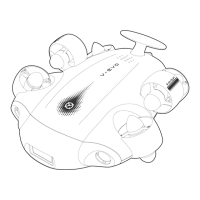
The FIFISH V-EVO is a compact, omni-directional Remotely Operated Underwater Vehicle (ROV) designed for underwater exploration and cinematic filmmaking. It integrates advanced drone robotics and AI technology to provide an immersive underwater experience, breaking the limits of traditional dive photography.

Function Description:

The FIFISH V-EVO is an underwater drone equipped with a 4K 60FPS high frame-rate camera and capable of 360-degree autonomous movements. It allows users to capture unique and cinematic underwater films and conduct explorations. The ROV features six thrusters (four vector and two horizontal) that enable six degrees of freedom (6 DOF) movement, including moving left and right, up and down, forward and backward, and 360-degree rotation in yaw, pitch, and roll. This omni-directional capability allows for precise control and maneuverability in various underwater environments.

The ROV is controlled via a remote controller (RC) and a dedicated FIFISH APP, which can be installed on a smart device. The RC features dual control sticks for movement, buttons for thruster lock/unlock, depth holding, taking pictures, and video recording/stopping. It also includes wheels for LED brightness control and, optionally, for operating a robotic arm. The RC connects to the ROV via a tether, which also serves as a communication link.

The FIFISH V-EVO supports three control modes: Attitude Auto mode (A), Sport mode (S), and Combination mode (C).

  • Attitude Auto Mode (A): This mode is designed for beginners. In Attitude mode, the ROV will not roll, and when depth holding is ON, it will maintain a constant depth even with pitch angle changes.
  • Sport Mode (S): Intended for skillful pilots, Sport mode enables full rolling freedom, providing access to all 6 degrees of freedom. Control is based on a First Person View (FPV), and users are advised not to operate in a third-person view. Similar to Attitude mode, the ROV will maintain depth when depth holding is ON and no command input is received.
  • Combination Mode (C): This mode is activated by placing a mobile phone into VR glasses after turning on VR mode in the FIFISH APP toolbox and switching the controller to C mode. Combination mode enables head tracking control via VR Goggles, allowing the pilot to use head movements for pitch, roll, and yaw. This delivers intuitive control and immersive experiences, supporting both head tracking and remote controller operation simultaneously.

The ROV is equipped with two 2,500 lumens LEDs for illumination, a mounting port for accessories, vent holes, a Q-interface, and a tether port. An optional robotic arm can be installed, which is activated only in Attitude mode (Mode A) and controlled using the right wheel on the RC to open and close its claws.

Usage Features:

  • Charging: The ROV and remote controller must be charged before first use. The ROV's RED LED indicator illuminates during charging and turns green when fully charged. For the RC, pressing the power button checks the battery level (Red: <30%, Yellow: 30-70%, White: >70%). A flashing POWER button indicates charging, and a steady white light indicates a full charge.
  • APP Installation: The FIFISH APP can be downloaded by scanning a QR code, searching on app stores (iOS/Android), or from the QYSEA website.
  • Hardware Connection: The tether (3.5 mm head) plugs into the remote controller. A protective cap must be removed from the ROV's rear wing, and the tether's knot tied around it. Plugging the tether (ROV end) into the ROV automatically turns it on, accompanied by a 5-chime music sequence (Do, Re, Mi, Do, Mi).
  • Remote Controller Activation: To turn on the RC, press and hold the ON/OFF button until 7 low-to-high chimes are heard (Do, Re, Mi, Fa, Sol, La, Si). The ON/OFF, Depth Holding, and LOCK/UNLOCK buttons will then rotate clockwise, signaling "Ready to be connected."
  • Software Connection: Connect to the RC's Wi-Fi network, named "FIFISHRC_xxxx," using the password "1234567890."
  • Live Streaming: Once connected, click 'GO DIVE' in the FIFISH APP to activate live streaming and begin operation.
  • Deployment: The ROV should be deployed into the water by pulling ONLY on the tether. Thrusters must be unlocked before diving. For optimal experience, the depth should be greater than 1 meter (about 3 feet).
  • Retrieval: Before retrieving, lock the thrusters and stop video recording in the FIFISH App. Pull ONLY on the tether to retrieve the ROV.
  • Safety: Users are advised not to touch running propellers or look directly at or touch the LEDs when they are ON. Awareness of the underwater environment (tide, water level, traffic) is crucial. Avoid throwing the ROV into the water. Prevent motor overheating by not running thrusters in air for more than 30 seconds. Steer clear of reefs, rocks, seaweeds, fishlines, or other objects that could damage or entangle the ROV or tether. Users are encouraged to participate in marine protection and conservation.

Maintenance Features:

  • Post-Dive Cleaning: After each dive, the ROV should be soaked in fresh water for at least 1 hour. Then, run the motors in fresh water for at least 10 minutes and rinse the ROV with fresh water. Air dry the ROV, avoiding direct sunlight. The FIFISH App includes a "Cleaning Program" (found under "Help" -> "Maintain") that rotates all motors slowly for about 10 minutes to help remove salt residues, salt crystallization, and chlorine from pool water.
  • Connector Care: All connectors (ports and plugs) must be kept dry and clean at all times, with protective caps on. Salt and moisture can cause corrosion. Clean plugs with running fresh water and dry with a cotton pad or tissue paper.
  • Propeller Inspection: After every dive, check the propellers for entanglement (e.g., seaweed, fishing lines). Turn on the ROV and test thruster movement and rotation.
  • Sand Removal: Regularly clean sand by soaking the ROV in clean fresh water for at least 1 hour. Shake the ROV (tail down or head down) to allow sand to wash out through the venting holes until clean water drips out.
  • Tether Check: Inspect the tether regularly for breaks or damage and replace it if necessary.
  • Storage: Store the ROV and RC in a dry and cool environment (temperature range: 5°C to 25°C or 41°F to 77°F).
  • Battery Maintenance: For long-term storage, maintain a battery level of 50% to 60%. Charge the battery to full once every 90 days to preserve the activation of the Lithium battery. If the V-EVO has not been used for over 40 days, a charger is required to activate it.

QYSEA FIFISHV-EVO Specifications

General IconGeneral
Camera Resolution12MP
Depth Rating100 m
Battery Life4 hours
Max Speed3 Knots
FOV166°
Photo Resolution12 MP
ConnectivityWi-Fi, Bluetooth
Video Resolution3840 x 2160
ISO Range100-6400
Operating Temperature0 to 40 °C
ControlRemote Controller
BatteryLithium-ion 98Wh
Thrusters6 thrusters