To Next Page
М
МихаилAug 25, 2025
Здравствуйте.как скачать инструкцию на qyt kt 7900d на русском языке?

Здравствуйте.как скачать инструкцию на qyt kt 7900d на русском языке?
Помогите пожалуйста в инструкции к qyt kt 7900d на русском языке. Мой адрес silymikhail@yandex.ru.Михаил.
Procedures for checking the radio kit upon arrival and verifying contents.
Overview of front/rear panel buttons, microphone keys, and display elements.
Essential information on selecting and grounding antennas for effective radio transmission.
Covers powering the unit on/off, adjusting volume, and making basic calls.
Explains keypad lock function and how to initiate scanning for active signals.
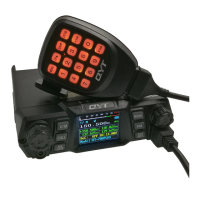
Detailed explanation of buttons and connectors on the Model 1 front panel.
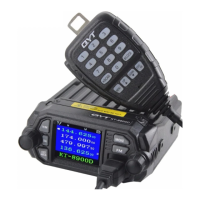
Detailed explanation of buttons and connectors on the Model 2 front panel.
Identifies and describes the purpose of each port on the radio's rear panel.
Explains the function of each key on the handheld microphone, including numerical inputs.
Explains the top line display, current channel settings, and selected channel information.
Defines the meaning of various icons used on the radio's display for functions and status.
Details antenna requirements for SWR, impedance, grounding, and inspection of coax.
Discusses magnetically mounted and NMO/PL-259 base antennas and their grounding needs.
Specifies SWR rating, impedance, grounding, and inspection of coax for optimal performance.
Explains the keypad lock and the # key's function for toggling power levels.
Instructions for turning the unit on/off and adjusting audio volume.
Steps for transmitting using the PTT button and microphone for communication.
Explains VFO (Frequency) and MR (Channel/Memory) modes for radio operation and selection.
How to toggle between VFO and MR modes for simultaneous monitoring of channels.
How to access and change settings using the menu options and selector knob.
Details settings like TMR, STEP, SQL, TXP, WN, BEEP, R-DCS, R-CTCS, T-DCS, T-CTCS, DTMFST.
Covers settings for OPTSIG, SPMUTE, PTT-ID, PTT-LT, S-INFO, EMC-TP, EMC-CH, SIG-BP, CHNAME.
Covers DTMF, 2TONE, 5TONE signaling, SPMUTE, and PTT-ID settings.
Details alarm modes, alarm channel, pager ring settings, and channel name editing.
Options for setting display modes (A, B, C, D), language, and auto-lock.
Options for setting foreground and background colors for various display elements.
Covers saving/deleting channels, frequency shift direction, and offset adjustments.
Details repeater activation tones, forwarding modes, and squelch tail elimination.
Settings for repeater squelch tail delay and DTMF tone gain.
Options for resetting settings and a table defining menu items and their values.
Summarizes settings for optional signaling, mute, PTT-ID, and busy channel lockout.
Details scan settings (add/remove) and resume methods (TO, CO, SE).
Settings for channel display modes (FREQ, CH, NAME) for displays A, B, C, D.
Settings for foreground and background colors of main, menu, status, and signal bars.
Settings for transmit display options, channel memorization, and deletion.
Covers frequency shift, offset, ANI, repeater activation, forwarding, delay, and DTMF gain.
Explains the difference between VFO and MR modes and their use in programming.
Steps to set up PTT-ID code, signal mode, and transmission timing via PC and radio.
Information on DTMF coding/decoding and TX settings for automation systems.
Table showing DTMF frequencies and corresponding codes for various keys.
Procedures for setting up remote stun, kill, and revive functions using DTMF tones.
Steps to configure DTMF and 2TONE signaling for receive and transmit functions.
Steps to configure 5TONE signaling for receive and transmit functions.
Details Time (TO), Carrier (CO), and Search (SE) operation modes for the scanner.
Provides key specifications like frequency range, memory channels, stability, and dimensions.
Details receiver sensitivity, channel choice, intermodulation, and audio response.
Details transmitter output power, modulation mode, signal to noise ratio, and audio response.
States compliance with FCC Part 15 rules and potential for interference.
Information on US radio use, FCC requirements, and authorized transmitter adjustments.
 General
| Voltage | 13.8V DC ±15% |
|---|---|
| Antenna Impedance | 50 Ohms |
| Modulation Mode | FM |
| Channel Capacity | 200 channels |
| Channel Spacing | 25kHz/12.5kHz |
| Operating Temperature | -20°C to +60°C |