3
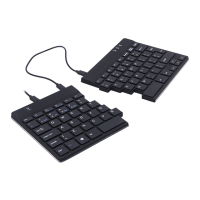
Our ergonomic R-Go Split Break keyboard offers all the ergonomic
features you need to type in a healthy way. The two keyboard parts can
be placed in any desired position. This unique design prevents reaching
with the arm and ensures a natural and relaxed position of the shoulders,
elbows, and wrists. Thanks to the light keystroke, minimal muscle tension
is needed while typing. Its thin design ensures a relaxed, flat position of
hands and wrists while typing. The R-Go Split Break keyboard also has an
integrated break indicator, which indicates with colour signals when it is
time to take a break. Green means you are good to go, orange means it is
time to take a break and red means you have skipped a break. #stayfit
System requirements/Compatibility: Windows XP/Vista/10
Welcome


 To Next Page