EasyManua.ls Logo

Radialight WINDY - Page 23

Radialight WINDY
Print Icon
To Next Page IconTo Next Page
To Previous Page IconTo Previous Page
Loading...
23
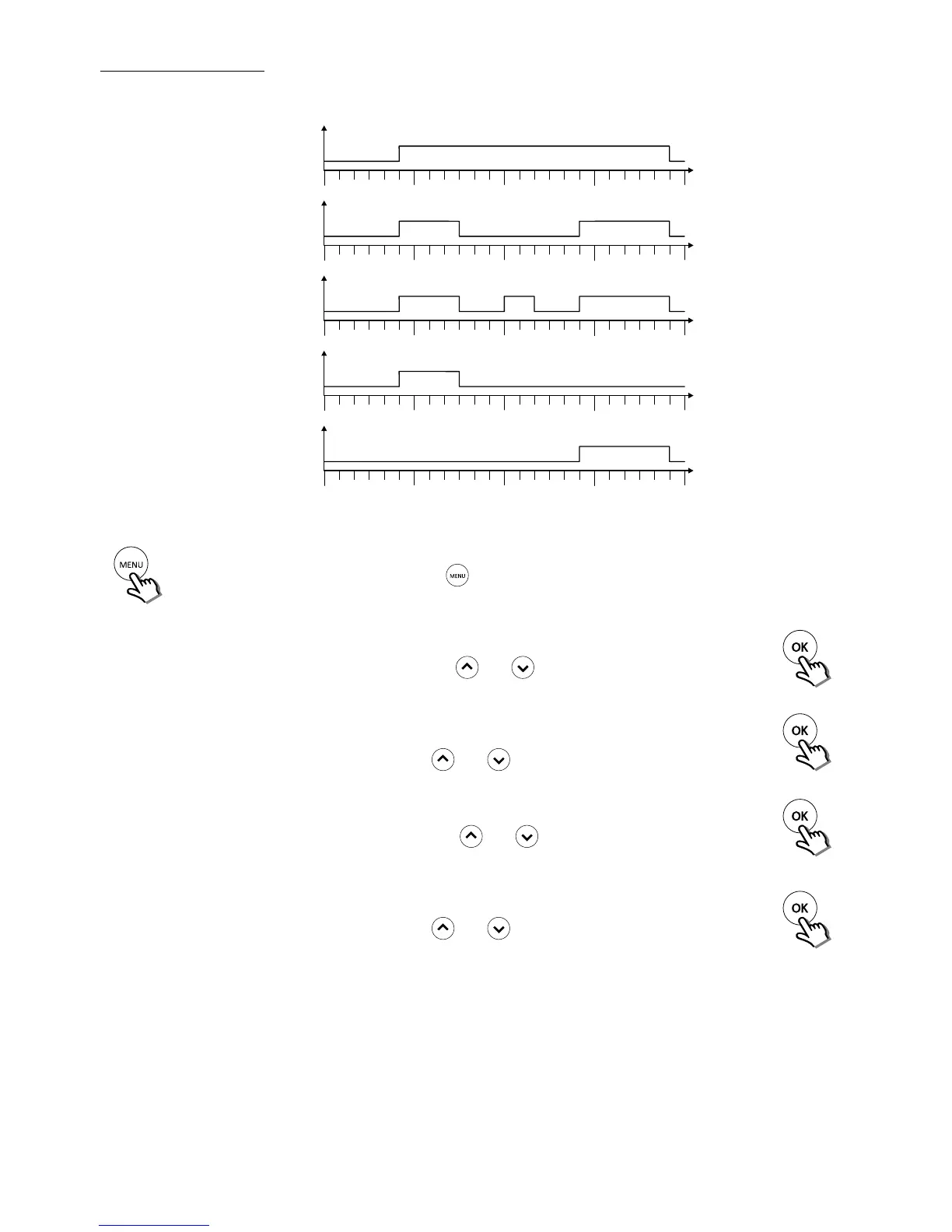
Weekly program setting
The programming function allows you to choose - for each day of the week - one of the following three preset operating
program:
0h 6h
12h
18h
24h
Comfort
Eco
P1
0h 6h
12h
18h
24h
Comfort
Eco
P2
0h 6h
12h
18h
24h
Comfort
Eco
P3
0h 6h
12h
18h
24h
Comfort
Eco
P4
0h 6h
12h
18h
24h
Comfort
Eco
P5
ProG
Activate programming display/change
by pressing the
button untile the writing "ProG" appears.
After 3 seconds:
Mo
:
P1
The 2 digits representing
the rst day blink
Select the day by using
the
and keys
Press the OK key
to conrm
Mo
:
P1
The 2 program digits
blink
Select the desired pro-
gram by using the
and keys
Press the OK key
to conrm
Mo
:
P1
The 2 digits representing
the selected day blink
again to proceed with
selecting another day
Select the day by using
the
and keys
Press the OK key
to conrm
Tu
:
P2
The 2 program digits
blink
Select the desired pro-
gram by using the
and keys
Press the OK key
to conrm
Proceed like this for all the days you wish to view and/or modify.

Related product manuals