EasyManua.ls Logo

RADIOMETER TCM3 - Page 12

RADIOMETER TCM3
145 pages
Print Icon
To Next Page IconTo Next Page
To Previous Page IconTo Previous Page
Loading...
2.
TCM3
TCM3
and
TCM30
Service
Manual
General
Information,
Continued
Main
PCB
2-6
Includes
the
microcomputer
system,
the
parallel
and
serial
input/output
ports,
the
electrode
heating
supply,
the
5
V
supply
and
the
LED
display
control
system.
The
two
parallel
ports
interface
the
microcomputer
with
the
analog
signals,
the
front
panel
keys
and
the
heat
control.
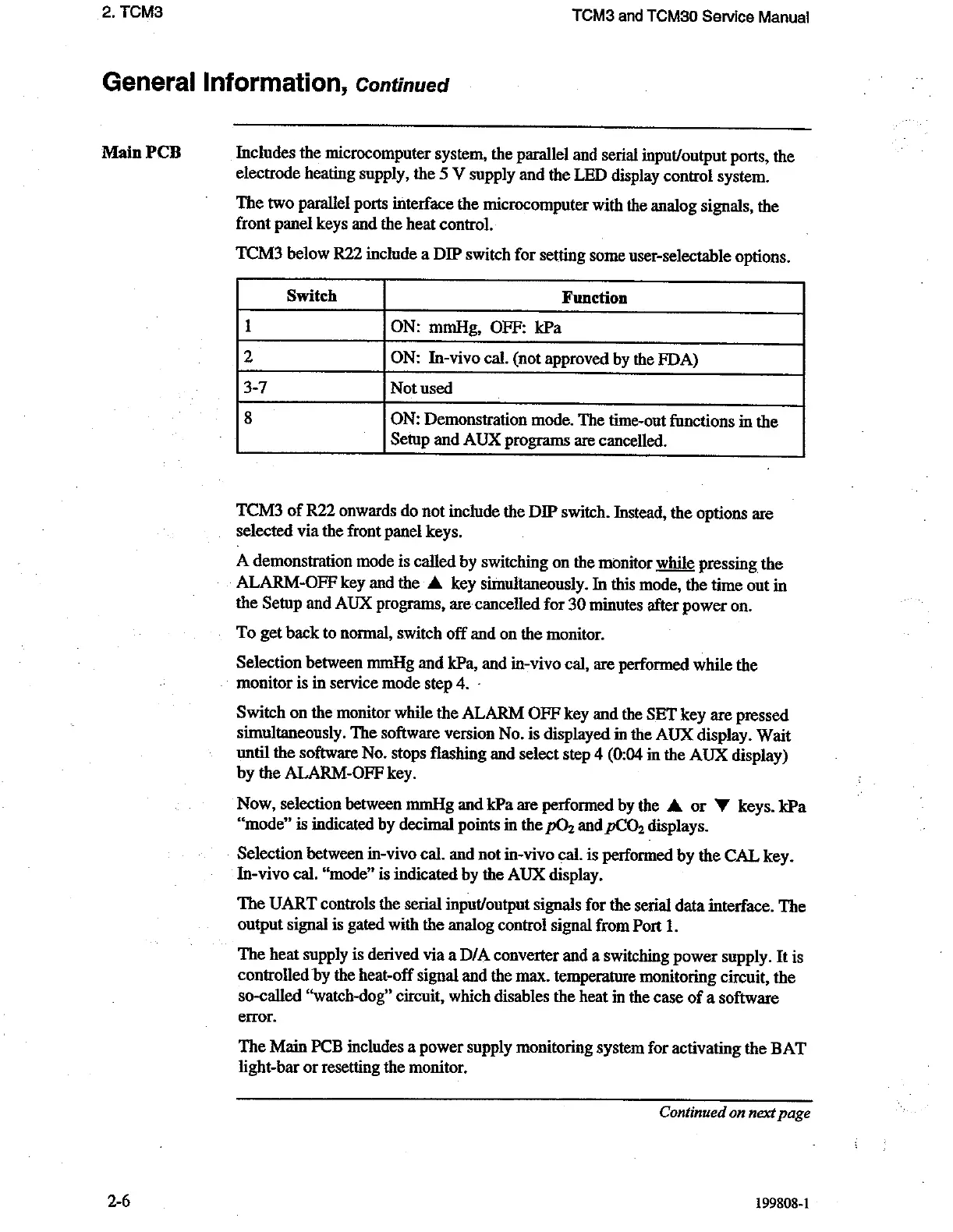
TCM3
below R22
include
a
DIP
switch
for
setting
some
user-selectable
options.
Switch
Function
ON:
mmHg,
OFF:
kPa
2
ON:
In-vivo
cal.
(not
approved
by
the
FDA)
3-7
Not
used
8
ON:
Demonstration
mode.
The
time-out
functions
in
the
Setup
and
AUX
programs
are
cancelled.
TCM3
of
R22
onwards
do
not
include
the
DIP
switch.
Instead,
the
options
are
selected
via
the
front
panel
keys.
A
demonstration
mode
is
called
by
switching
on
the
monitor
while
pressing
the
ALARM-OFF
key
and
the
A
key
simultaneously.
In
this
mode,
the
time
out
in
the
Setup
and
AUX
programs,
are
cancelled
for
30
minutes
after
power
on.
To
get
back
to
normal,
switch
off
and
on
the
monitor.
Selection
between
mmHg
and
kPa,
and
in-vivo
cal,
are
performed
while
the
.
monitor
is
in
service
mode
step
4.
-
Switch
on
the
monitor
while
the
ALARM
OFF
key
and
the
SET
key
are
pressed
simultaneously.
The
software
version
No.
is
displayed
in
the
AUX
display.
Wait
until
the
software
No.
stops
flashing
and
select
step
4
(0:04
in
the
AUX
display)
by
the
ALARM-OFF
key.
Now,
selection
between
mmHg
and
kPa
are
performed
by
the
A
or
W
keys.
kPa
“mode”
is
indicated
by
decimal
points
in
the
pO,
and
pCO,
displays.
Selection
between
in-vivo
cal.
and
not
in-vivo
cal.
is
performed
by
the
CAL
key.
In-vivo
cal.
“mode”
is
indicated
by
the
AUX
display.
The
UART
controls
the
serial
input/output
signals
for
the
serial
data
interface.
The
output
signal
is
gated
with
the
analog
control
signal
from
Port
1.
The
heat
supply
is
derived
via
a
D/A
converter
and
a
switching
power
supply.
It
is
controlled
by
the
heat-off
signal
and
the
max.
temperature
monitoring
circuit,
the
so-called
“watch-dog”
circuit,
which
disables
the
heat
in
the
case
of
a
software
error.
The
Main
PCB
includes
a
power
supply
monitoring
system
for
activating
the
BAT
light-bar
or
resetting
the
monitor.
Continued
on
next
page
199808-1

Related product manuals