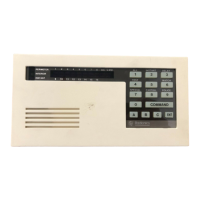
The Radionics 6112 is a security system command center, available in both 8-zone and 16-zone configurations, designed for monitoring and controlling security functions within a premises. It serves as the primary interface for users to interact with their security system, allowing for arming, disarming, bypassing zones, and managing various system settings.
Function Description:
The core function of the Radionics 6112 is to provide a user-friendly interface for managing a security system. It allows users to:
- Arm the system: This can be done in two primary modes:
- AWAY mode: For when the premises are vacant, arming all sensors. This is activated by entering the security code followed by [COMMAND].
- STAY mode: For when occupants are present but wish to secure the perimeter, typically bypassing interior motion sensors. This is activated by pressing [COMMAND] + [3].
- Disarm the system: To deactivate the alarm system, users enter their security code followed by [ENTER].
- Bypass protected areas: This feature allows users to intentionally disarm specific zones while the rest of the system remains armed. This is useful for accessing a protected area or when a sensor in a particular zone is faulty. Bypassing a zone involves entering the security code, then [ENTER], [COMMAND], [0], the zone number, and finally [ENTER]. To unbypass a zone, the security code followed by [OFF] is used.
- Manage security codes: The system supports up to 60 different security codes for various users. User codes and their attributes can only be programmed by a Master user or Partition programmer. To change a user code, the sequence is [COMMAND] + [5] + [user code] + [ENTER] + [new user code] + [ENTER]. It's important to note that when changing user codes, the new code must start with the same first digit as the old one, as the first digit designates the user code's position in the system.
- Change date and time: The system allows for setting the current date and time. This is done by pressing [COMMAND] + [4] + [5], then entering the time in a 24-hour format (e.g., 16:34 for 4:45 PM) followed by [COMMAND].
- Control chimes and beeps: When in chime mode, the system will sound three tones whenever a protected door or window is opened. This feature can be toggled on or off by pressing [COMMAND] + [6].
- Reset the display: After an alarm event, the display can be cleared by pressing [COMMAND] + [4].
- Indicate trouble conditions: The panel's display and beeping from the touchpad will alert users to various trouble conditions, which are issues requiring attention. These can include open protected areas, issues with wireless sensors, or other system malfunctions. Once a problem is corrected, pressing [COMMAND] + [4] will silence the system.
Important Technical Specifications:
While the manual does not explicitly list detailed technical specifications like power consumption or specific sensor types, it highlights key operational aspects:
- Zone Capacity: Available in 8-zone and 16-zone configurations, indicating its scalability for different property sizes.
- User Code Capacity: Supports up to 60 different security codes, allowing for multiple users with individual access.
- Wireless Sensor Compatibility: The troubleshooting section mentions checking wireless sensors, implying the system supports wireless components.
- Battery Backup: The system relies on a battery, and users are advised to contact ADT services for battery-related information, indicating a power backup feature to maintain operation during power outages.
- Volume: The volume on the Radionics 6112 is explicitly stated as not adjustable.
Usage Features:
The Radionics 6112 is designed for straightforward interaction:
- Keypad Interface: The system uses a numeric keypad with dedicated function keys like [COMMAND], [ENTER], [OFF], and numbered keys (0-9) for input.
- Display: The panel includes a display to show system status, prompts, and trouble conditions.
- Audible Alerts: Chimes and beeps provide feedback for events like door/window openings and trouble conditions.
- Clear Arming Modes: Distinct AWAY and STAY arming modes cater to different occupancy scenarios.
- Flexible Zone Management: The bypass feature offers flexibility in how specific areas are secured.
- Multi-User Support: The ability to program multiple security codes makes it suitable for households or small businesses with several users.
Maintenance Features:
Maintenance aspects primarily involve user interaction and troubleshooting:
- Battery Maintenance: Users are directed to ADT services for information regarding the system's battery, suggesting that battery replacement or servicing might require professional assistance.
- Trouble Condition Monitoring: The system actively alerts users to trouble conditions, prompting them to investigate and resolve issues such as open protected areas or wireless sensor problems. The ability to silence the system after correcting a problem ([COMMAND] + [4]) is a key user-level maintenance feature.
- Regular Checks: The manual implicitly encourages users to regularly check protected areas and wireless sensors as part of routine maintenance to ensure system integrity.
- User Code Management: The ability for a Master user to change and manage other user codes contributes to system security and maintenance, allowing for updates when personnel changes or security concerns arise.
For a comprehensive understanding and detailed troubleshooting, users are consistently referred to the complete Radionics 6112 manual, indicating that this quick guide provides an overview of the most common functionalities.

 Need help?
 General

 To Next Page