
 Need help?
Do you have a question about the RadioPopper L-358 and is the answer not in the manual?
Remove battery cover, existing module, and connect the RadioPopper module to the light meter.
Enable radio triggering, select channel, and confirm module operation via indicator light.
Replace the battery cover to finalize the installation process.
Contact information and online resources for product support and assistance.
Details on power requirements and radio frequency band used by the module.
Information regarding FCC compliance, potential interference, and operational conditions.
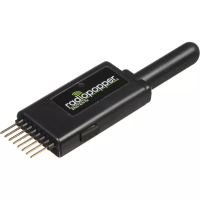
The RadioPopper Sekonic Module is a compatible transmitter module designed to be installed into specific Sekonic brand light meters, including models L-358, L-758D, L-758DR, L-758Cine, and C-500R. This module enables wireless flash radio triggering, allowing the light meter to communicate with and activate wireless lights for taking light readings.
The primary function of the RadioPopper Sekonic Module is to integrate wireless flash radio triggering capabilities into compatible Sekonic light meters. Once installed, the module allows the light meter to wirelessly activate external flash units, facilitating accurate light readings for photography. The module operates by receiving a radio channel selection from the light meter and then transmitting a signal on that corresponding channel to trigger wireless lights. A green indicator light on the module provides visual feedback on its operational status and confirms successful triggering.
Installation of the module is a straightforward process:
The equipment has been tested and found to comply with the limits for a Class B digital device, pursuant to Part 15 of the FCC Rules. These limits are designed to provide reasonable protection against harmful interference in a residential installation. The device generates, uses, and can radiate radio frequency energy. If not installed and used according to instructions, it may cause harmful interference to radio communications. In case of interference, users are encouraged to try measures such as:
Leap Devices LLC, DBA RadioPopper, is not affiliated with, maintained by, or in any way officially associated with Sekonic Corporation. Sekonic is a registered trademark of Sekonic Corporation.
 General
| Brand | RadioPopper |
|---|---|
| Model | L-358 |
| Category | Control Unit |
| Language | English |

 To Next Page