The Rage RC Stinger 3.0 is a Ready-To-Fly (RTF) FPV (First-Person View) drone designed for both beginner and experienced pilots, offering a comprehensive set of features for aerial photography and videography. It comes factory-assembled with all necessary components to begin flying immediately.
Function Description:
The Stinger 3.0 is a full-featured FPV drone equipped with a 1080p HD camera that offers 1-axis control (up and down) directly from the transmitter. A second, downward-facing fixed camera provides an alternative viewing angle during flight. For enhanced safety, especially indoors or in low sunlight environments, the drone includes a Collision Avoidance feature. Standard flight features include Altitude Hold, which maintains a steady altitude after the throttle stick returns to its center position, and One-Touch Take-Off and Landing for simplified operation. Heading Lock (Headless Mode) assists pilots who may lose orientation of the aircraft at a distance, allowing control based on the pilot's perspective rather than the drone's front. The drone also features 6-Axis Gyro Stabilization Control for stable flight and high-visibility LEDs for improved visibility. For quick returns, the One Key Return function brings the aircraft back to its starting point. The Stinger 3.0 supports three flying rates (low, intermediate, and high) selectable via the transmitter. Photos and videos can be recorded directly to a connected mobile device via WiFi using the dedicated app.
Important Technical Specifications:
- Total width (motor shaft to motor shaft): 10.5" (270mm)
- Prop size: 5.75" (146mm)
- Height: 2.28" (58mm)
- Weight (with battery): 7 oz. (213g)
- Battery: 3.7V 1S 2000mAh Cartridge Style LiPo battery, providing up to 15 minutes of flight time.
- Motors: 8620 Coreless (4 total)
- Charger: 0.5 to 2.0A USB charger
- Transmitter: 4-channel, 2.4GHz with a built-in smartphone holder. It requires 3 AA batteries (included).
- Camera: 1080p HD camera with 1-axis control (up/down) and a second fixed downward-facing camera.
- Connectivity: WiFi for FPV viewing and app control.
Usage Features:
The Stinger 3.0 is designed for ease of use. To set up for flight, the drone's power button is pressed until LEDs flash, then it's placed on a flat surface. The transmitter is turned on by pressing and holding its power button, and once the aircraft's LEDs turn solid, it's bound and armed. A gyro calibration step, involving moving both control sticks to the bottom outside corners, is recommended before each flight.
Flight controls are intuitive:
- Ascending & Descending: Controlled by moving the left stick (throttle) up or down.
- Yaw (spin) Left or Right: Controlled by moving the left stick left or right.
- Forward & Backward: Controlled by moving the right stick up or down.
- Move Aircraft Left or Right: Controlled by moving the right stick left or right.
Trimming instructions are provided to correct any drifting during stable hover. The transmitter has dedicated buttons for Headless Mode, One Key Return, Speed Selection, Auto Take-Off/Land, Photo/Video capture, and Emergency Stop. The built-in phone holder on the transmitter allows for easy mounting of a smartphone for FPV viewing and app control.
The Stinger 3.0 app, downloadable via QR code for both iOS and Android, offers additional control and viewing options. Key app features include:
- Gesture Control: Allows drone control using specific hand gestures (peace sign for photo, open palm or "ok" hand gesture for video).
- View Switching: Toggles between the front and downward-facing cameras.
- Picture in Picture: Displays both camera views simultaneously, with the ability to switch between them.
- VR Mode: Converts the screen view into a dual VR display for use with VR goggles.
- Lens Reverse: Flips the screen view upside down.
- Take Picture/Video: Allows capturing photos and videos directly from the mobile device.
- Airplane Mode: Enables aircraft control via the phone when the transmitter is off, though transmitter control is strongly recommended for accuracy.
- Album: Accesses recorded photos and videos.
- Calibration: An alternative method to calibrate the drone.
- 3D Mode: Allows moving objects on the screen within the video.
Maintenance Features:
- Blade Guard Installation: Blade guards are included and recommended for beginner pilots to protect blades and surroundings. They attach by aligning and inserting prongs into slots on the arms after removing inserts.
- Blade Replacement: The drone uses two types of blades, labeled A and B, which must be matched to the corresponding labeled arms. Replacement blades are identified by a label near the hub. To access the blade removal screw, the cap at the center of the blade must be removed.
- Storage: For safe and convenient storage in the included hard-sided travel case with soft foam packing, the drone's arms can be folded.
- Transmitter Sticks: The control sticks are stored in compartments at the bottom of the transmitter and are press-fitted into receptacles for use.
- Battery Charging: The LiPo battery charges via a Mini USB connector plugged into the integrated charge port on the battery, which then connects to a 5V USB charge port (e.g., computer). A red light indicates charging, turning off when complete. Important safety requirements for LiPo batteries are provided, including not charging unattended, allowing the battery to cool after discharge, using only the included charger, and discontinuing use if the battery swells.
- Troubleshooting Guide: A comprehensive guide is included to address common issues such as transmitter power problems, uncontrollable aircraft, inability to climb, and fast landing, providing reasons and solutions for each.
- Parts List: A detailed list of replacement parts is provided, along with contact information for ordering.
The Stinger 3.0 is packaged in a quality, hard-sided travel case with soft foam packing, ensuring the unit and its components remain safe during transport and storage.

 Need help?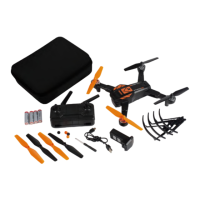

 To Next Page
 General