ENGLISH
RAIN s.p.a.
via Kennedy 38/40
20023 Cerro Maggiore
ITALY (MI)
23
• It will be necessary to open the terminal to
allow for wire insertion or removal.
To do this you will need to use a small phillips
head screwdriver.
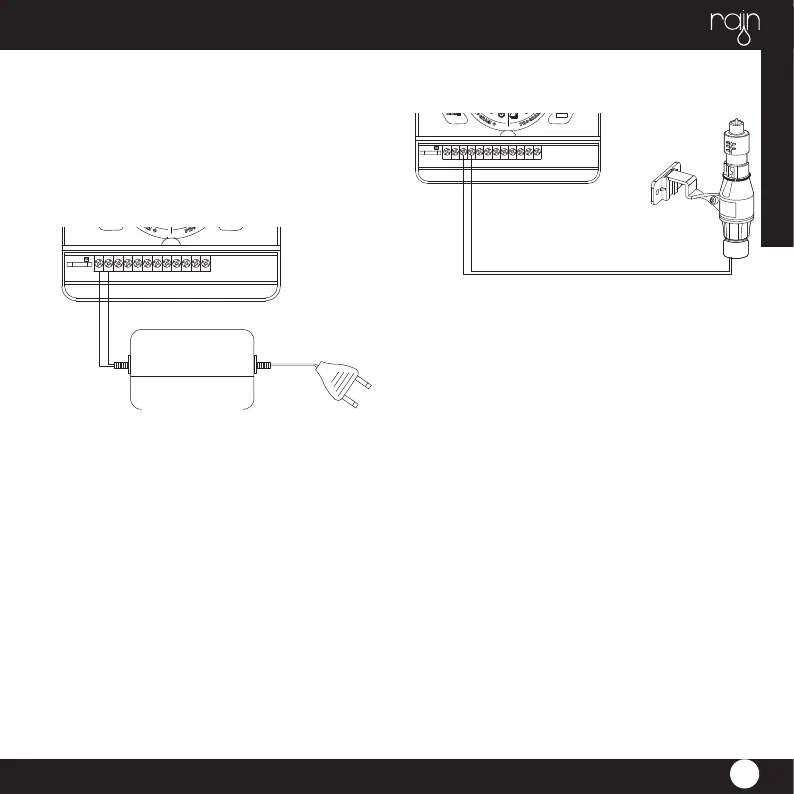
• Connect the common wire to the terminal
labeled “com”
CONNECTING THE TRANSFORMER
• With the wiring terminal shroud off, fi nd the
two terminal holes labeled “24vac”.
Make sure the transformer is not plugged in.
Insert one of the two power leads
from the transformer into each terminal.
• It will be necessary to open the terminal to
allow for wire insertion or removal.
To do this you will need to use a small phillips
head screwdriver.
• Plug in transformer
WARNING: DO NOT LINK TWO OR MORE TI-
MERS TOGETHER WITH ONE TRANSFORMER.
• Slide the shroud back on.
RAIN SENSOR
• A rain sensor or other type of micro-switch
weather sensor may be connected to
the controller. The rain sensor will pause the
programs during rain fall - preventing over
watering.


 To Next Page