Programming
TIMER CONTROL OVERVIEW
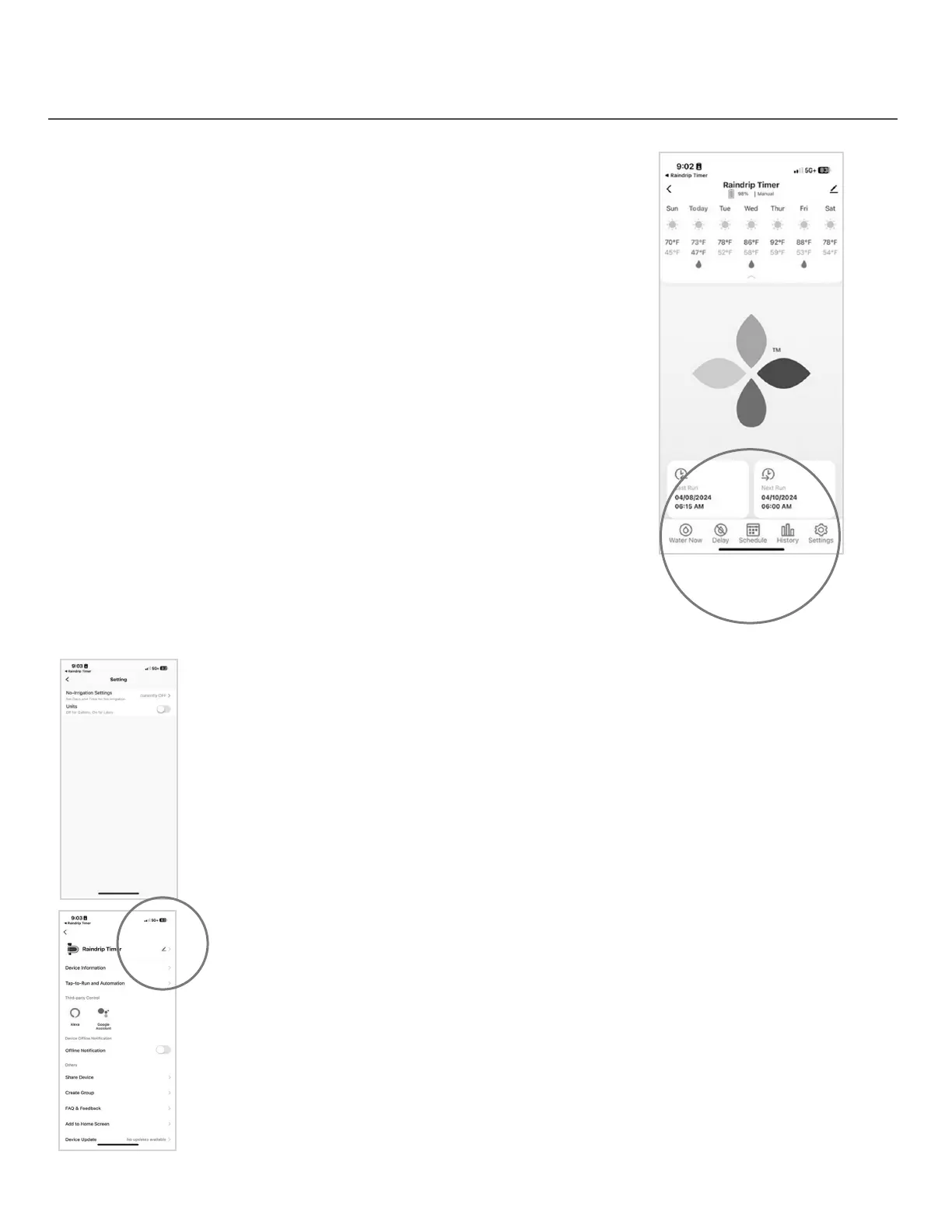
• Water Now – enables a manual watering cycle for a duration
of your choosing
• Tap “Water Now” to choose the duration of the water cycle
and tap “Conrm” to begin watering
• If you want to stop watering before the countdown is over,
tap the “PAUSE” button to stop watering
• No irrigation times - set days and times that you don’t want watering to occur
• Enter Begin and End time, and set “How Often” to apply this setting
• Switch water units
• Toggle the switch to move from gallons to liters
• Delay – enables a manual delay of watering, allowing you to stop
any scheduled waterings for a specic time period
• Tap “Delay” and select how long to delay watering, then tap “Conrm”
• If you want to cancel the delay before the countdown is over,
tap “Delay,” select “OFF,” then tap “Conrm”
• Schedule – program watering schedules
• Tap the “+” to program a new schedule
• History
• See total water consumption and watering details by week,
month, or year
10
Settings
Rename
• To rename the timer, tap “Raindrip Timer” (default name), tap the pencil icon,
enter the desired name, then tap “Conrm”


 To Next Page