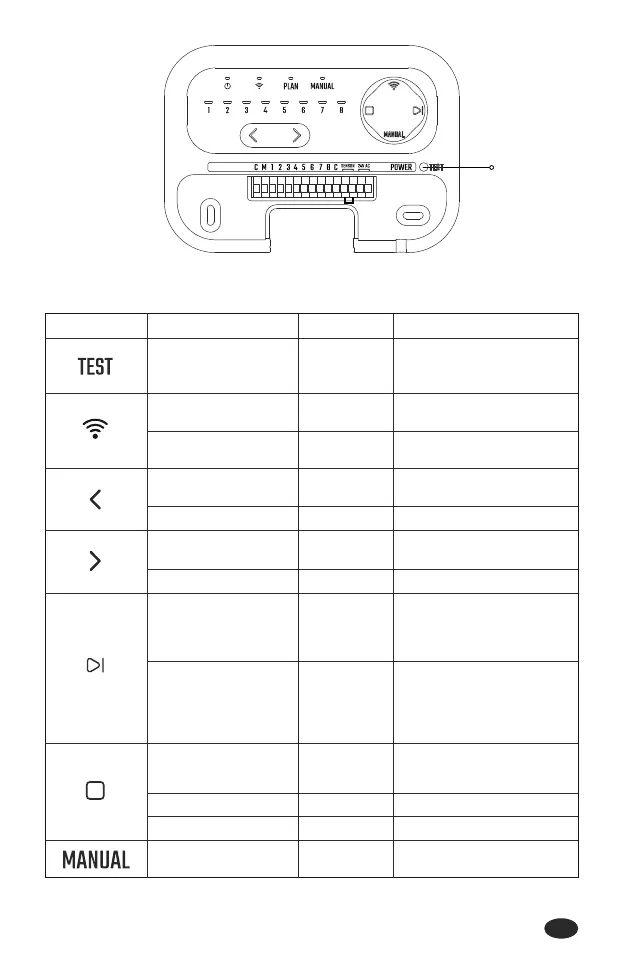
Test Button
-02-
2.2 Button Introduction
BUTTON MODE OPERATE FUNCTION
Test the connection status of
valves from zone 1 to zone 8
pairing
Standby mode/ Zone
selecting mode
Press for 2
seconds
Enter into Wi-Fi pairing
(Default: Automatic Pairing)
Standby mode/ Zone
selecting mode
Press for 5
seconds
Enter into zone selecting
(sta from zone 1)
Standby mode Sho press
When multiple zones under
irrigation plan, press to stop
watering of current zone and
sta watering of next zone
Plan mode Sho press
Stop watering of current
zone, cancel the plan of
other zones
Plan mode Sho press
Sta watering of the
selecting zone
Zone selecting mode Sho press
Stop wateringManual mode Sho press
When multiple zones are
waiting for irrigation, press
to stop watering of current
zone and sta watering of
next zone
Manual mode Sho press
Enter into zone selecting
(sta from zone 8)
Standby mode Sho press
Switch from zone 8 to zone 1Zone selecting mode Sho press
Cancel the selected zoneZone selecting mode Sho press
Switch from zone 1 to zone 8Zone selecting mode Sho press
Switch automatic pairing or
AP pairing
Wi-Fi pairing mode Sho press
EN



 To Next Page