1.WI-FI DISPLAY HUB HIS019WRF-V2
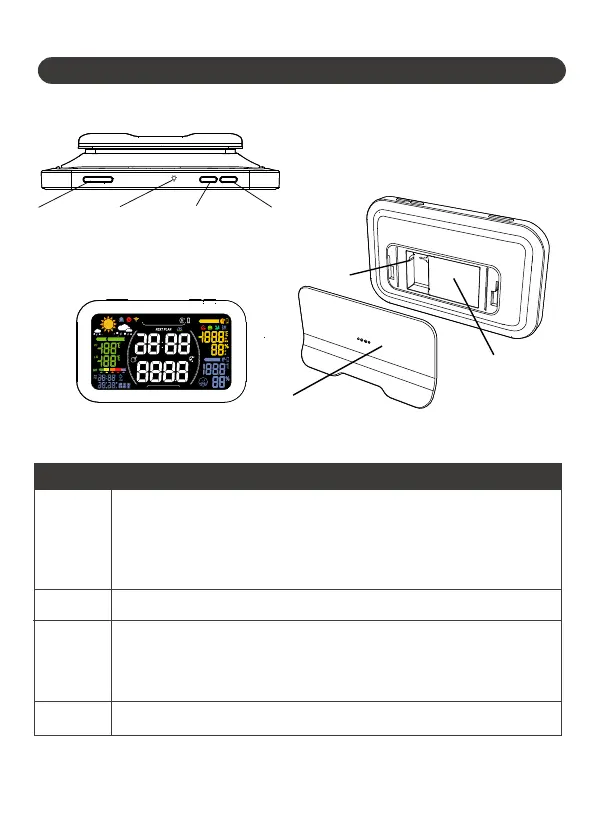
1.1 Product Overview
1.2 Button Introduction
Wi-Fi
•Hold the button for 5 sec to sta Sma Connection Mode
•When the device is already in connecting mode, release
and then hold the button again for 2 sec to enter
AP connection mode
•Press to adjust the LCD screen backlight brightness
•Press to check each sma garden zone(water timer outlet)
•Hold for 2 sec in the chosen zone to manually sta
watering for 10 mins
•Press to switch the sensor channels
Light
ZONE
SENSOR
AM
PM
M
D
D
M
GAL
LAST USAGE
NEXT PLAN
L
SENSOR NO.
INDOOR
TODAY TOMORROW
24H
SMART GARDEN ZONE.
Note: WIFI connection
will consume a lot of
batte, please use DC
power supply, batte
is only used as backup
power.
Batte Cover
WIFI
WIFI
LIGHT
LIGHT
ZONE
ZONE
SENSOR
SENSOR
Buttons
Functions
- 01 -
Cable Po
(Always keep the
cable powered when
pairing and remote control)


 To Next Page