
 Need help?
Do you have a question about the RainPoint Smart+ HIS019 and is the answer not in the manual?
Overview of the Wi-Fi Display Hub, identifying key components and ports.
Details the functions of the Wi-Fi, Light, Zone, and Sensor buttons on the hub.
Explains each numbered indicator and section of the hub's LCD screen.
Guides on downloading and installing the HOMGAR app for device management.
Lists essential requirements and tips for successfully connecting the hub to Wi-Fi.
General information and steps for connecting the hub to your network.
Step-by-step instructions for establishing a Smart Wi-Fi connection for the hub.
Alternative method to connect the hub via AP Connection Mode if Smart Connection fails.
Provides an overview of the HOMGAR app's main features and interface sections.
Explains the various sections and functionalities available on the app's home page.
Describes how to view, manage, and set rain delays for irrigation plans.
Details how to review past system events and operational logs.
Covers managing account details, home settings, and other application preferences.
Explains the information displayed on the device detail page within the app.
Outlines various settings available for connected devices, including display and timing options.
General guidance on connecting sub-devices to the hub via the app.
Instructions for adding and operating the 1-Zone Smart Water Timer sub-device.
Instructions for adding and operating the 2-Zone Smart Water Timer sub-device.
Guide for connecting and using the Outdoor Thermo-Hygrometer Sensor.
Instructions for adding and operating the Soil Moisture Sensor sub-device.
Guide for connecting and operating the Water Flow Meter sub-device.
Solutions for common power-related issues with the display hub.
Steps to resolve disconnection problems between the hub and sub-devices.
Explains reasons for rapid battery drain in outdoor sensors and potential solutions.
Steps to troubleshoot when a device appears offline in the app.
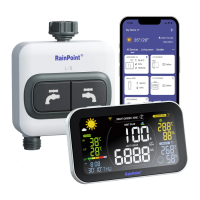
The RainPoint Smart+ Garden Irrigation System Hub is designed to be the central control unit for your smart garden, offering comprehensive monitoring and intelligent irrigation management. More than just a display, it acts as the brain of your system, connecting various sensors and water timers to provide an integrated and efficient watering solution.
The Hub serves as a Wi-Fi display and control center, integrating data from multiple smart garden devices to provide a holistic view of your garden's conditions and irrigation schedule. Its primary function is to facilitate smart watering, ensuring your plants receive the right amount of water at the right time, thereby conserving water and promoting healthier growth.
The device displays a wealth of information on its LCD screen, including a weather forecast for reference, which can help in making informed watering decisions. It features a freezing point alert to protect your plants from frost and a Wi-Fi signal indication to ensure stable connectivity. The hub shows the next watering plan time and the remaining watering time, keeping you updated on your irrigation schedule. It supports multiple smart garden zones, each representing a water timer outlet, allowing for customized watering across different areas of your garden. A watering reminder ensures you don't miss any critical irrigation events.
Battery levels for both the water timers and the hub itself are displayed, prompting you to replace batteries when necessary. The hub also integrates indoor thermo-hygrometer readings, providing information on the temperature and humidity within your home. For outdoor conditions, it connects to external sensors to display outdoor thermo-hygrometer data, soil moisture levels, and rainfall information, if these sensors are connected. The display also indicates the UV level, current time, and calendar, along with the highest and lowest temperatures for the day.
A key feature is its ability to display sensor data. If external sensors are connected, the screen will show their readings; otherwise, it will display data obtained from the network. The hub also provides an indoor comfort level indicator, categorizing the environment as dry, comfortable, or wet based on humidity and temperature. It can initiate a rain delay, automatically pausing irrigation plans if rain is detected or forecasted. Water usage is tracked and displayed, helping you monitor consumption. Manual watering can be initiated directly from the hub for a chosen zone, providing flexibility for immediate needs. The smart backlight mode adjusts the screen brightness for optimal visibility.
The RainPoint Hub is designed for intuitive interaction, both through its physical buttons and the accompanying HOMGAR mobile application.
The HOMGAR APP is central to setting up and managing your RainPoint system.
Sub-devices like water timers, thermo-hygrometer sensors, soil moisture sensors, and water flow meters can be connected in two ways: via the "Add Device" button on the APP home page or through the "Sub-devices" management section on the hub's device page within the app.
The RainPoint Hub is designed with ease of maintenance in mind, primarily focusing on power management and connection stability.
 General
| Connectivity | Wi-Fi |
|---|---|
| App Control | Yes |
| Timer Function | Yes |
| Remote Control | Yes |
| Power Source | AC |
| Frequency | 60Hz |
| Certification | FCC |
| Voice Control | Amazon Alexa, Google Assistant |

 To Next Page