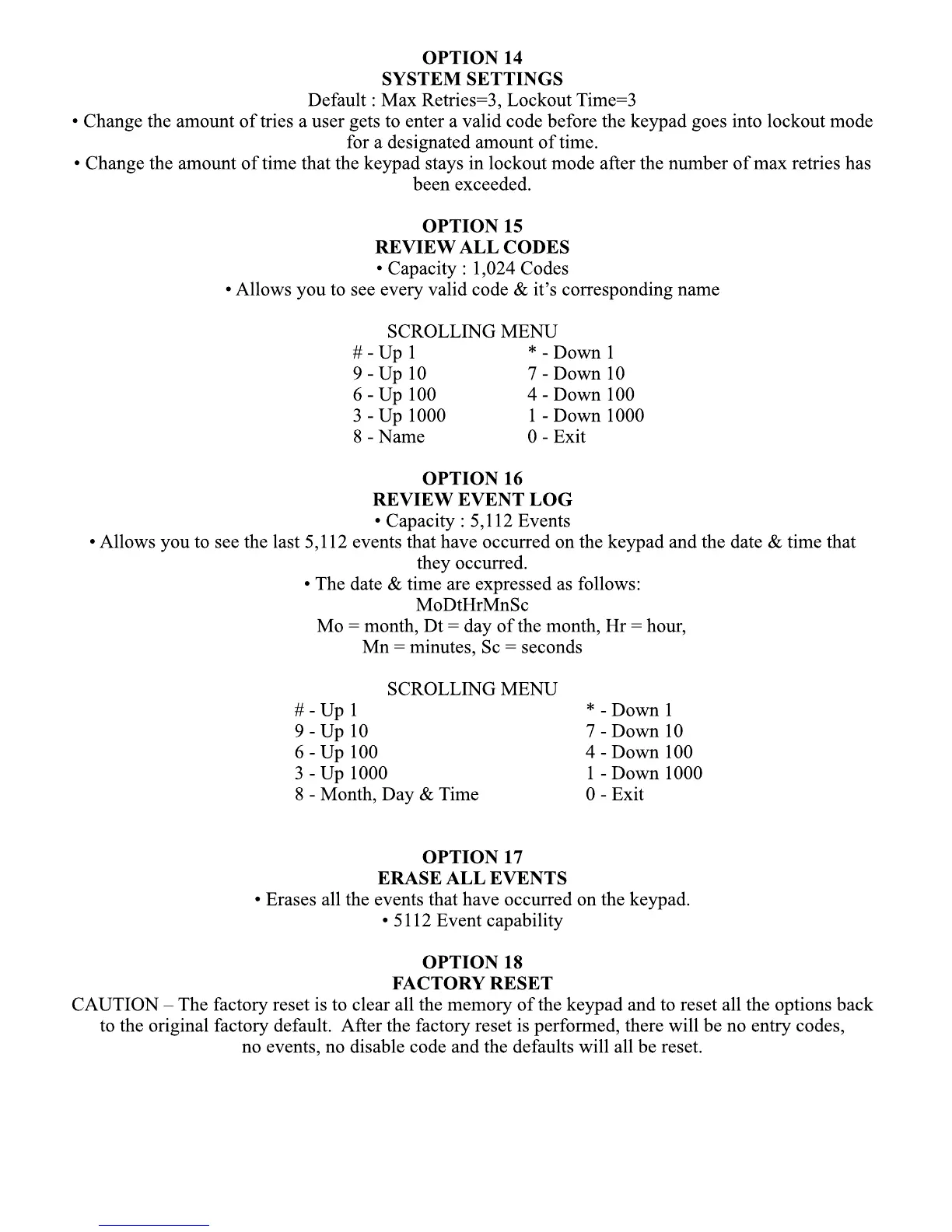
OPTION 14
SYSTEM SETTINGS
Default : Max Retries=3, Lockout Time=3
• Change the amount of tries a user gets to enter a valid code before the keypad goes into lockout mode
for a designated amount of time.
• Change the amount of time that the keypad stays in lockout mode after the number of max retries has
been exceeded.been exceeded.
OPTION 15
REVIEW ALL CODES
• Capacity : 1,024 Codes
• Allows you to see every valid code & it’s corresponding name
SCROLLING MENU
# - Up 1 * - Down 1
9 - Up 10 7 - Down 10
6 - Up 100 4 - Down 100
3 - Up 1000 1 - Down 1000
8 - Name 0 - Exit
OPTION 16
REVIEW EVENT LOG
• Capacity : 5,112 Events
•• Allows you to see the last 5,112 events that have occurred on the keypad and the date & time that
they occurred.
• The date & time are expressed as follows:
MoDtHrMnSc
Mo = month, Dt = day of the month, Hr = hour,
Mn = minutes, Sc = seconds
SCROLLING MENU
# - Up 1 * - Down 1
9 - Up 10 7 - Down 10
6 - Up 100 4 - Down 100
3 - Up 1000 1 - Down 1000
8 - Month, Day & Time 0 - Exit
OPTION 17
ERASE ALL EVENTS
• Erases all the events that have occurred on the keypad.• Erases all the events that have occurred on the keypad.
• 5112 Event capability
OPTION 18
FACTORY RESET
CAUTION – The factory reset is to clear all the memory of the keypad and to reset all the options back
to the original factory default. After the factory reset is performed, there will be no entry codes,
no events, no disable code and the defaults will all be reset.


 To Next Page
 Loading...