EasyManua.ls Logo

Ramsond CMVS-32V9A-A27A - Page 6

Default Icon
12 pages
Print Icon
To Next Page IconTo Next Page
To Previous Page IconTo Previous Page
Loading...
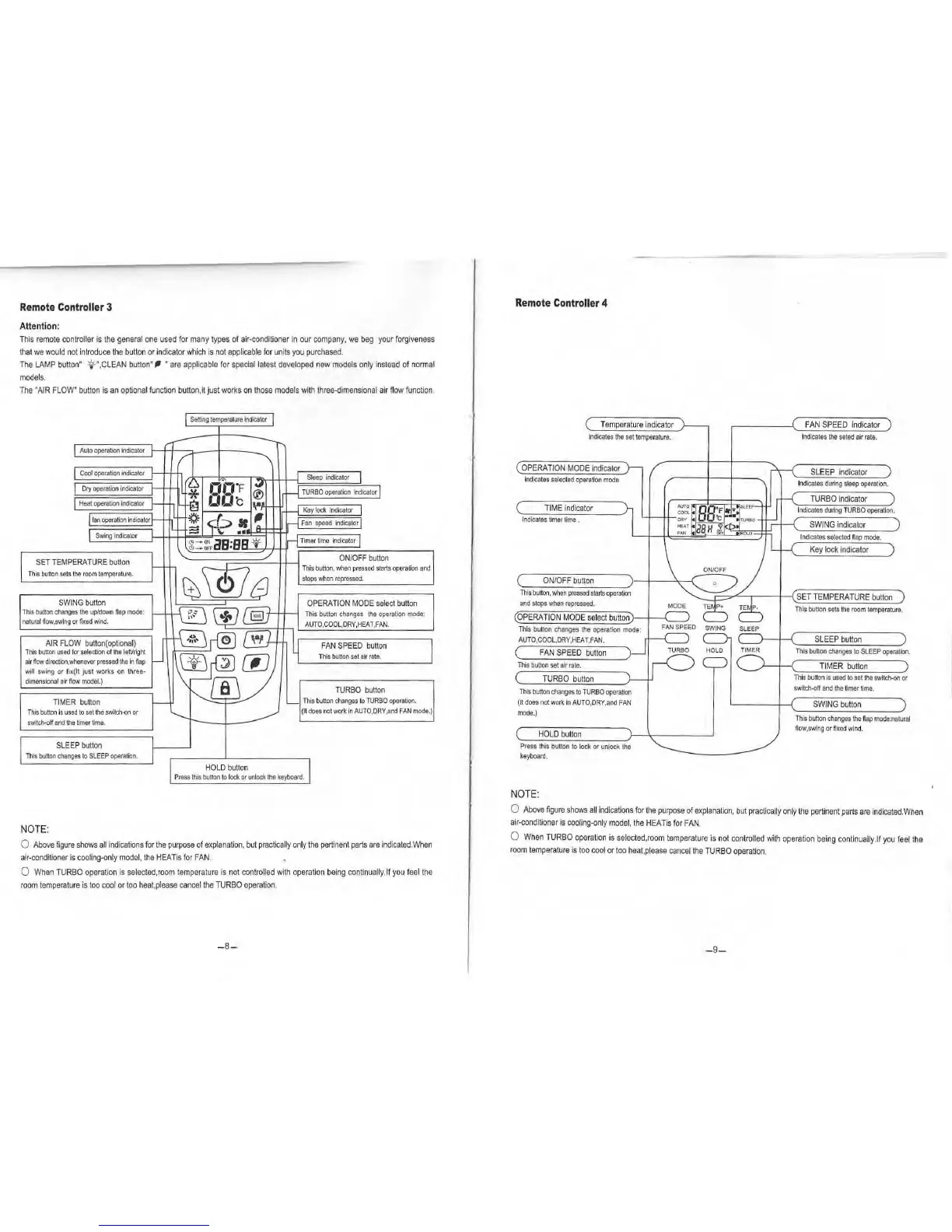
Remote
Controller
3
Attention
:
T
his
remote
controller
is
the
general
o
ne
used
for
many
types
of
ai
r-co
n
dit
io
ner
in
our
company,
we
beg
your
fo
rgiveness
th
at
we
w
ould
not
i
nt
r
oduce
the
bu
tto
n
or
indicator
wh
ich
is
not
applicab
le
for
units
you
pur
chased.
The
LAM
P
button"
1f!'-',
CLEAN
button
"
~
·are
applicab
le
for
special
latest
developed
new
mode
ls
only
i
nstead
of
normal
mode
l
s.
The
"AIR
F
LOW"
button
is
an
optiona
l
function
bu
tton
, it j
ust
works
on
those
models
with
t
hr
e
e-dimensional
ai
r
flow
function
.
Au
to
operation
indicator
SET
TEMP
E
RATUR
E
button
Thi
s
button
sets
the
room
temperature.
SW
I
NG
button
This
button
changes
the
up/down
ftap
mode:
natura
l
flow,swing
or
fixed
w
ind
.
AIR
FLOW
b
utton
(
optiona
l)
Thi
s
button
used
for
selection
of
the
left/right
air
flow
di
rection,whenever
pressed
the
in
fla
p
will
sw
i
ng
or fix(lt just works
on
three-
dimensiona
l air
now
model.)
TI
MER
button
Th
is
button
is
used
to
se
t
the
switch·on
or
switch-on
and
the
timer
time.
SLEEP
b
utto
n
Th
is
bullon
changes
to
SLE
EP
opera
t
ion.
NOTE
:
HOL
D b
utt
on
OPERAT
I
ON
MODE
se
l
ec
t butt
on
This
button
changes
the
operation
mode
:
AUTO
,C
OOL,DRY,HEAT.FA
N.
FAN
SPEED
button
T
his
butt
on
set
ai
r
rate.
TURBO
button
Thi
s
button
changes
to
TURBO
operation.
(It
does
not
work
In
AUTO,DRY,and
FAN
mode.)
P
ress
this
button
to
1ocl<
or
unlock
the
keyboard.
0
Above
figure
shows
all
in
d
icatio
ns
for
the
purpos
e
of
explanation,
but
practically
on
ly
the
pertine
nt
p
arts
are
indicated
.When
air-conditioner
is
cooling-only
mode
l,
the
HEA
T
is
for
FAN
.
0
When
T
URBO
ope
rat
ion
is
selecled,room
temperatu
re
is
not
controlled
with
o
pe
ration
being
continually.
lf
you
feel
th
e
room
temperatu
re
is
too
c
ool
or
too
heat,p
l
ease
ca
ncel
the
T
URBO
operation
.
-8-
Remote
Controller
4
Te
mperat
u
re
indicator
I
ndicates
the
set
temperature.
OPERATION
MODE
indicator
i
ndica
tes
se
l
ected
operation
mode
T
IME
indicato
r
Indicates
timer
time
.
F
AN
SPE
ED
indicator
I
ndicates
the
seted
air
ra
te.
SLEE
P i
ndicator
I
ndicates
during
sl
eep
operation.
TURBO
In
dicator
I
ndicates
during
TURBO
operat
i
on.
SWING
indicato
r
Indi
cates
selected
nap
mode.
Key
lock
indicator
C
ON
/O
FF
button
-+-
-
~-r---;;--;
~--~~~
~~-+~~~~~
Th
is
button,
when
pressed
sta
rts
operation
£ SET T
EMPERATURE
button
and
st
ops
When
repressed.
This
button
sets
t
he
room
temperature.
(OPERA
T
ION
MODE
se
l
ec
t
button)
--,--'-----'
This
button
changes
the
operation
mode:
AUTO
,
COOL,DRY,H
EAT
,
FAN.
(
FAN
S
PEED
b
utt
on
This
button
set
air
rate.
TURB
O
button
Th
is
button
changes
to
TURBO
operation
(tt
does
ne
t
work
In
AUTO,DRY,and
FAN
mode.)
HOL
D
button
Press
this
button
to
lock
or
unlock
the
keyboard.
NOTE:
SLEEP
button
This
bu
tt
on
changes
to
SLEEP
operation.
TI
MER
b
utton
This
button
is u
sed
to
set
the
switch-on
or
swi
tch-off
and
the
timer
time.
SW
ING
button
Th
is
button
changes
the
flap
mode
:
natural
now,swing
or
fixed
wind.
0
Above
figure
shows
a
ll
i
ndicat
io
ns
for
the
purpose
of
exp
l
anation,
but
pra
ctically
only
the
pert
in
ent
pa
rts
are
i
ndicated
.
When
air-conditioner
is
cooling-only
model
, t
he
HEATis
fo
r
FAN
.
0
When
TU
RBO
opera
t
ion
is
se
l
ected,room
temperature
is
n
ot
cont
ro
lle
d with
ope
ra
tio
n
be
in
g
cont
in
ually.lf
you
feel
the
roo
m
temperature
is
too
coo
l or
too
heat
,
please
cancel
t
he
TURBO
ope
r
ation
.
-9-

Related product manuals