EasyManua.ls Logo

Ramsond CMVS-32V9A-A27A - Use of Remote Controller

Default Icon
12 pages
Print Icon
To Next Page IconTo Next Page
To Previous Page IconTo Previous Page
Loading...
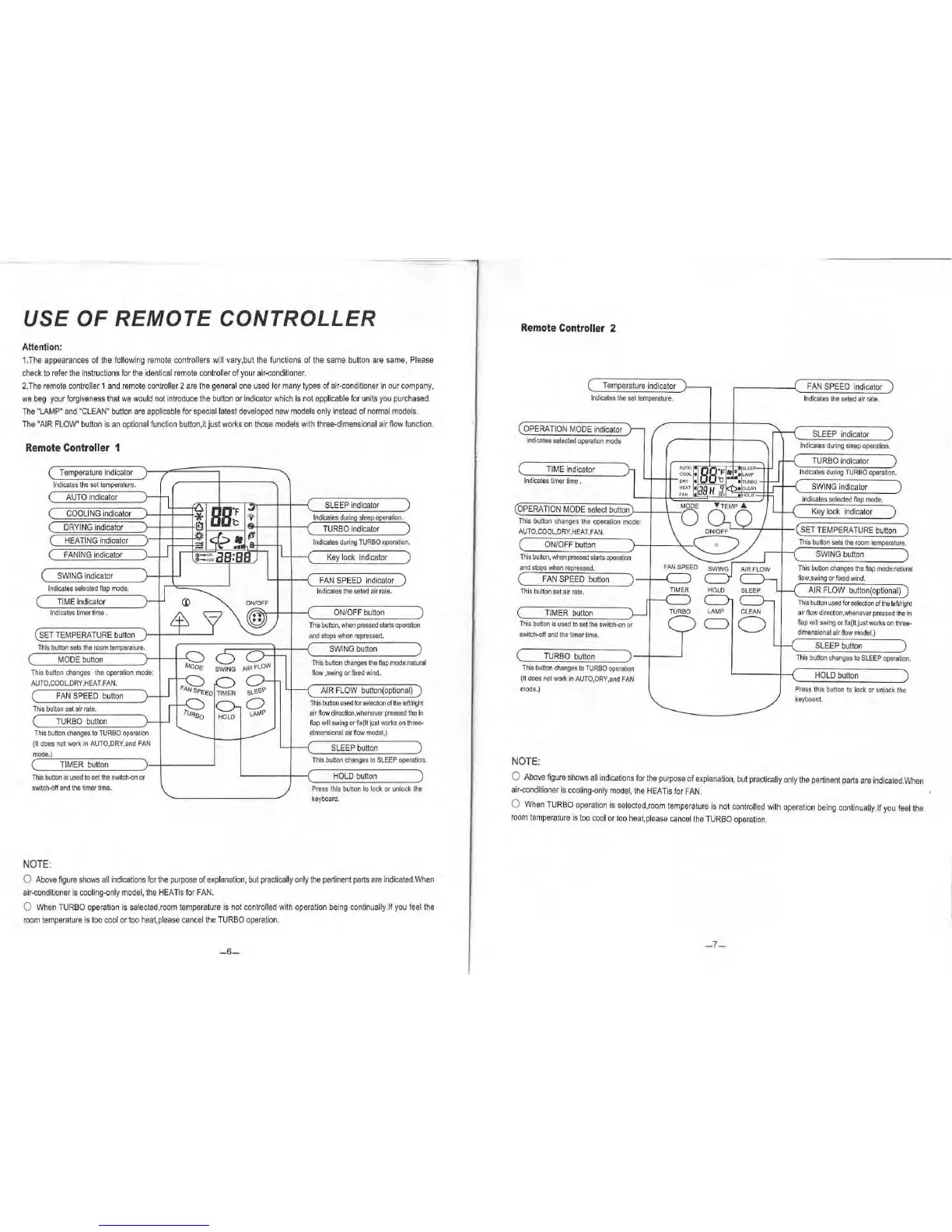
USE
OF
REMOTE
CONTROLLER
Attention:
1.
The
appearances
of
the
follow
ing
remote
controllers
will
vary,but
the
func
t
ions
of
the
same
button
are
same,
Please
check
to
refer
the
ins
truct
i
ons
for
th
e
id
ent
i
cal
r
emote
co
ntroll
er of
you
r ai
r-cond
iti
oner
.
2.
The
remote
con
troller
1
and
remote
contro
ll
er
2
are
t
he
general
one
used
for
many
types
of a
ir-condi
tion
er
In
our
compa
ny
,
we
beg
your
forgiveness
that
we
would
n
ot
i
ntroduce
the
button
or
indicator
w
hi
ch
Is
not
applicab
le
for
un
it
s
you
purchased
.
The
"
LAMP"
and
'
CLEAN"
button
are
appl
icab
le
for
spec
i
al
latest
developed
new
models
only
instead
of
normal
models
.
The
'AIR
FLOW"
button
is
an
optiona
l f
un
ct
ion
button
,
it
just
works
on
those
models
with
t
hree-dime
n
sional
air
flow
funct
ion.
Remote
Controller
1
Temper
ature
ind
i
cator
I
ndica
t
es
th
e
set
temperature
.
AUTO
indicator
COO
LING
in
dicator
DRYI
NG
indicator
(
HEATING
indi
cator
FAN
I
NG
indicator
SWING
i
nd
icator
Indicates
selected
flap
mode.
TIME
indicator
In
dicates
t
imer
time.
Indicates
during
TURBO
operation.
Key
lock
indicator
FAN
SPEED
ind
icator
Indica
t
es
th
e
se
te
d
air
rate.
ON/OFF
button
This
button,
wt.m
pressed
starts
operation
SET
TEMPERATURE
b
utton
and
stops
when
repressed.
C
=T=h=is=oo}tt~on~s~e[
t
s~th~e~room~
=
te
=
m~p=era=t
=u
r=e.
)-
t-
~=s~:---;:==::;;;;::+-1--<
swt
NG
button
MODE
button
This
button
changes
the
flap
mode:natu
r
al
This
button
changes
the
operation
mode:
AUT
O,COO
L
,D
RY
,
HEA
T
,FAN
.
(
FA
N
SPEED
button
This
button
se
t
air
rate.
TURBO
b
utto
n
This
button
changes
to
TURBO
operation
(It
does
not
work
in
AUTO,DRY
,
and
FA
N
mode
.)
( TI
MER
button
)
--4------'
This
button
is
used
to
set
the
switch-()n
or
s
witch-()ff
and
the
timer
time.
NOTE
:
flow
,s
w
ing
or
fiXed
wind.
AIR
FLO
W b
utt
on(
optiona
l)
This
button
used
for
selection
of
lhe
l
efllright
a
ir
flow
direc
ti
on
,
when
eve
r
pressed
th
e
in
flap
will
swing
or
fix(lt
jus
t
wor1<s
on
three-
dimensional
ai
r
flow
model.)
SLEEP
button
This
button
changes
to
SLEEP
operation.
HOLD
button
Press
this
butto
n
to
lock
or
unlock
the
keyboard.
0
Above
f19ure
shows
all
indicat
i
ons
for
the
purpose
of
exp
l
anation,
but
practically
only
th
e
pertinent
parts
are
Indicated
.Wh
en
air-conditioner
is
cooling-only
model,
the
HEATis
for
FAN.
0
When
TUR
BO
op
eration
is
selected,room
temperature
is
not
cont
r
olled
with
operatio
n
being
continually
.lf
you
feel
the
room
temperature
is
too
cool
or
too
h
eat,
please
cancel
the
TURBO
operation.
- 6-
Remote
Controller
2
Te
mpe
rature
ind
i
cator
Ind
i
cates
the
set
tempe
r
ature
.
OPERATION
MODE
indicator
ind
icates
selected
operation
mode
TIME
i
ndicator
Ind
i
cates
timer
time
.
O
PE
RA
T
ION
MODE
se
l
ec
t
button
Th
is
bu
tton
ch
a
nges
the
operation
mode:
AUTO,COOL
,
DR
Y,
HEAT
,F
AN.
ON
/
OF
F
button
This
button
,
when
pressed
starts
operation
and
stops
when
re
pressed
.
(
FAN
SPEED
button
Th
is bu
tto
n
set
ai
r
ra
te
.
TIMER
butto
n
T
hi
s
button
is
used
to
set
the
switch-(10
or
swi
tch-off
and
lhe
timer
~me.
('":
__
T.:...:
U
:.:.R:.:.B..::.O...:b:.:.
UI:.::IO::.:.
n
__
_..
)
-+---'
This
button
changes
to
TURBO
operation
(It
does
n
ot
work
in
AUTO
,DR
Y,a
nd
FAN
mode.
)
NOTE:
FA
N
SPEED
in
dicator
I
nd
ica
t
es
the
seted
a
ir
rate
.
SLE
EP
indica
tor
Indicates
during
sleep
opera
tion.
TURBO
ind
i
ca
tor
I
nd
i
ca
tes
duri
ng TU
RBO
operat
i
on.
SW
I
NG
in
dicator
I
ndicates
selected
fl
ap
mode.
Key
lock
ind
ic
ator
~...-::t:.....-+-t-(SETT
E
MPERATURE
bu
tto
n )
Th
is
button
sets
the
room
t
empe
ra
tur
e.
SWING
button
This
button
changes
the
flap
mode
:
na
tu
ral
flow,swing
or
fixed
wi
nd.
AIR
FLOW
button(
op
tio
na
l)
This
but
ton
used
tor
selection
of
the
lefVrigh
t
air
flow
direct
i
on,
whe
n
eve
r
pr
essed
t
he
in
flap
wi
ll
swing
or
fix(
It
ju
st
works
on
three·
d•mensional
air
flow
model.)
SLEEP
button
Thi
s
button
changes
to
SLE
EP
ope
ra
tion
.
HO
LD
button
Press
thi
s b
utto
n
to
l
oc
k or unl
ock
the
keyb
oAr
d.
0
Abo
ve
figure
shows
all
indicat
i
ons
for
the
pu
rpose
of
explanation,
but
practically
only
the
pe
rtinen
t
parts
are
indica
ted
.Wh
en
air-condi
tion
er
is
cooling-only
model,
the
HEATis
for
FAN.
0
When
TURBO
operation
is
selec
t
ed,room
temperature
is
not
controlled
with
opera
ti
on
being
continually.
lf
you
f
ee
l the
room
temperat
ure is
too
coo
l or
too
heat
, pl
ease
cancel
the TU
RBO
operat
ion.

Related product manuals