EasyManua.ls Logo

Ramsond CMVS-32V9A-A27A - Page 8

Default Icon
12 pages
Print Icon
To Next Page IconTo Next Page
To Previous Page IconTo Previous Page
Loading...
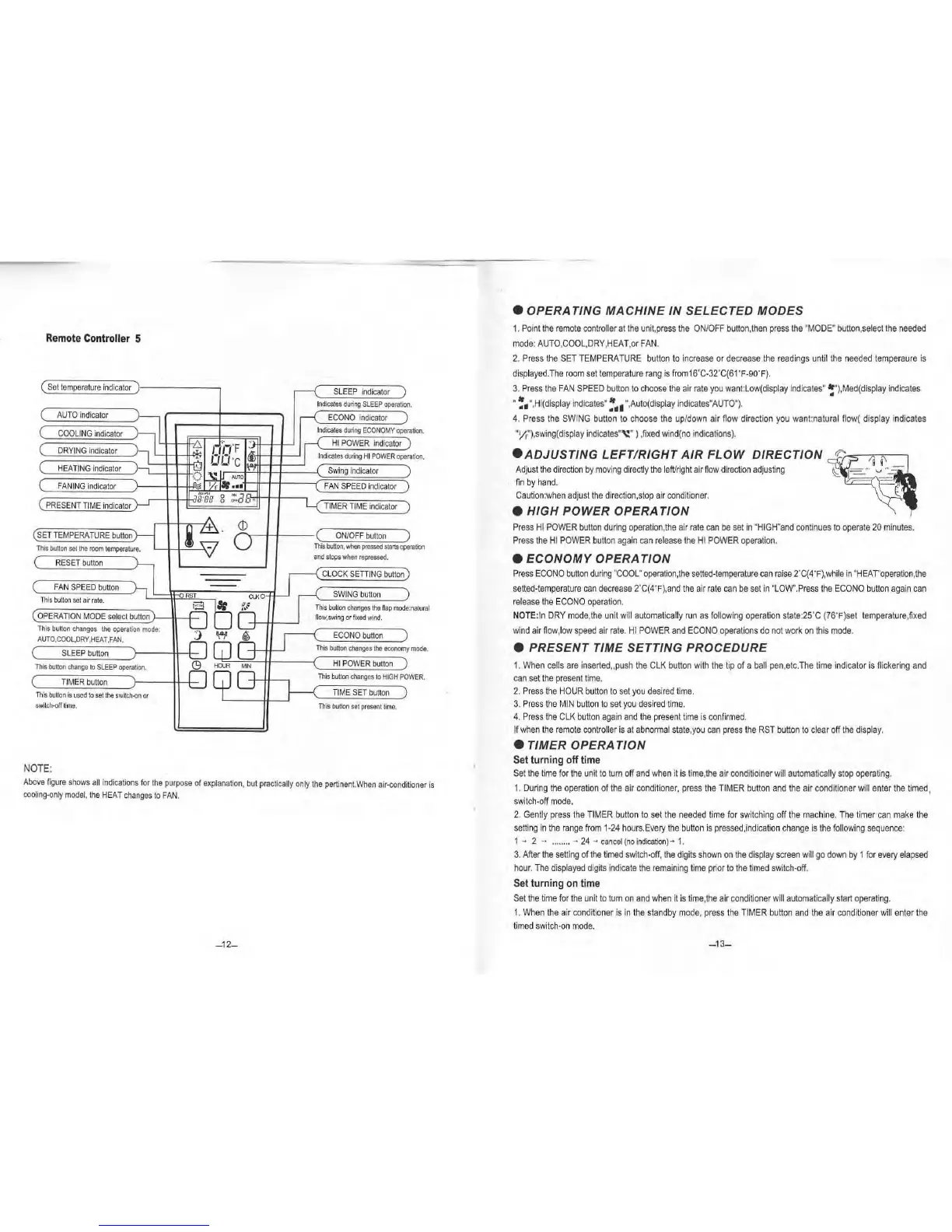
Remote
Controller
5
(Set
tempera
ture
indicato
r )
,---{
SLEEP
ind
i
cator
)
I
ndicates
during
SLEEP
operation.
(
AU
TO
in
dicator
rl
ECONO
in
dicator
)
(
COOLI
NG in
dicator
I
ndicates
during
ECONOMY
opera
tlon.
~
rt'n
'F
.,
HI
POWER
ind
ica
tor
(
DRYING
indica
tor
I'
Ind
ica
te
s
during
HI
POWER
oper
,;;
OO
·c
(
H
EA
TI
NG
indica
tor
)
{5
Swing
indica
t
or
~
-0
(
FANI
NG
indicator
\
;;:.
••••
\..
FAN
SPEED
indicator
'B:ae
0
ON
::1
I
(
PRESENT
TIME
ind
i
ca
tor
0
OI'F
I)(I
H
)
TIMER
TIM
E i
ndi
cator
ation.
12
'f
(SE
T
TEMPERATURE
button
(
ONJOF
F bu
tton
)
0
This
button
set
the
room
temperature.
-
This
button,
YAlen
pressed
starts
ope
ration
(
RESET
bu
tton
~
and
stops
when
repressed
.
---
L
CLOCK
SETTING
button)
(
FAN
SPEED
button
--
T
hi
s
butto
n
se
t
air
rate.
rORS
T
CU<O
SWING
button
1~
,
!1::
"'
This
button
changes
the
flap
mode:
(O
PERATION
MO
DE
se
l
ect
button
now,sw
ing
or
fixed
wind.
na
tural
T
his
button
changes
the
operation
mode:
AUTO,COOL,DRY,HEAT,FAN.
J
w '
ECON
Obutton
)
GJG
This
button
changes
the
economy
(
SLEEP
button
This
button
cflange
to
SLEEP
operation.
<9
~
MN
HI
PO
WE
R
button
)
( TI
MER
button
This
button
changes
to
HI
GH
PO
This
button
is
u
sed
to
set
the
switch-on
or
TIME
SET
button
mode.
WER.
switch-orr
time.
This
bu
tt
on
se
t
present
ti
me.
NOTE:
Above
figure
shows
all
i
ndicat
i
ons
f
or
the
purpose
of
explanation,
but
practically
only
th
e
pert
in
ent.When
air
-
condi
t
ion
er
is
ccoling-only
model,
the
HEAT
changes
to
FAN.
-12-
e
OPERATING
MACHINE
IN
SELECTED
MODES
1.
P
oint
t
he
remote
controller
at
the
unit,pre
ss
the
ON/OFF
butto
n,
then
press
the
"
MOD
E"
button
,s
elect
the
need
ed
mode
:
AUTO
,
COOL,DRY,HEAT
,
or
FAN.
2.
P
ress
the
SE
T
TEMPERATURE
b
utton
to
increase
or
decrease
the
readi
ngs
unti
l
the
needed
tempera
ure
is
di
sp
l
ay
ed.
The
roo
m
se
t
te
mpera
ture
r
ang
is
f
ro
m16
'C
-32
'C
(6
1'
F-90'
F
).
3.
Press
t
he
F
AN
SPEED
b
utton
to
choose
the
air
rate
you
want:
lo
w(
display
ind
i
ca
t
es
" !
"),Me
d(d
isplay
ind
i
cates
"
~~~
",Hi(d
ispl
ay
indi
cates"~
~~~
",A
ut
o(
d
isp
l
ay
ind
i
cates"
AUTO'
).
4. P
ress
t
he
SW
IN
G b
utton
to
choose
the
up
/
down
air
flow
di
rec
ti
on
you
want:na
tur
al
now(
display indicates
"Yr"),sw
ing
(
display
indicates"\:
")
,
fixed
wind
(
no
indica
t
ions).
e
ADJUSTING
LEFT
/
RIGHT
AIR
FLOW
DIRECTION
Adjus
t
the
direc
ti
on
by
mov
i
ng
di
r
ectly
t
he
le
ft/righ
t
air
fl
ow
di
r
ect
i
on
ad
ju
sting
fi
n
by
hand.
Caution:when
ad
just t
he
dire
ct
l
on,stop
air
cond
it
ione
r.
e
HIGH
POWER
OPERATION
Press
HI
PO
WER
bu
tt
on
du
ring
ope
rat
i
on
,
the
air
ra
te
can
be
set
in "
HI
GH"and
continues
to
operate
20
m
inutes.
Press
the
HI
POWER
button
again
can
release
t
he
HI
POWER
oper
a
tion
.
e
ECONOMY
OPERATION
Press
ECONO
butt
on
duri
ng
"
COOL"
operation,
the
setted
-
tempe
rature
can
raise
2'
C(4'F),while
in
"HEAr'ope
rat
i
on,the
setted
·
temp
erature
can
decrease
2'
C(4
'
F),
a
nd
t
he
air
ra
te
can
be
set
in
"
LO
W".
Press
the
ECONO
butto
n
aga
in
can
re
lease
the
ECONO
operat
i
on
.
NOTE:
In
DR
Y
mo
de
,the unit will
automat
i
cally
run
as
f
ollowing
operat
i
on
state:25
'C (76'F
)se
t t
empe
ratur
e,
fixed
win
d
ai
r
flow
,l
ow
speed
air
ra
t
e.
HI
POW
ER
a
nd
ECONO
operations
do
not
work
on
th
is
mo
de
.
e
PRESENT
TIME
SETTING
PROCEDURE
1.
Wh
en
cells
are
inse
rt
ed
,push
the
CLK
b
utt
on
wi
th
the
tip
of a
ball
pen,etc.The
time
in
dica
tor
is
flicke
rin
g a
nd
can
set
the
prese
nt
time.
2.
Pre
ss
th
e
HOUR
bu
tton
to
set
you
des
i
red
t
ime.
3.
Press
th
e M
IN
butto
n to
se
t
yo
u
des
i
red
ti
me.
4.
Press
t
he
CLK
butto
n
again
and
t
he
prese
nt
tim
e
is
con
f
irme
d.
If
when
t
he
remote
controller
is
at
a
bno
rmal
st
ate,
you
can
press
t
he
RST
bu
tton
to
clea
r
off
the
display.
e TIMER
OPERATION
Set
turning
off
time
Se
t
the
time
fo
r
the
unit
to
turn
off
and
when
it is
time
,
the
air
conditio
iner
will
automatically
st
op
operati
ng.
1.
During
t
he
oper
ati
on
of
th
e
air
co
nditione
r,
press
the
TIMER
button
and
t
he
air
conditioner
will
enter
t
he
t
imed
,
switch-off
mo
de
.
2.
Gently
press
t
he
TIME
R
button
to
set
the
needed
ti
me
for
sw
it
ch
i
ng
off
th
e m
ac
hi
ne.
The
ti
mer
can
make
the
setting
in
the
r
ange
f
ro
m
1-
24
ho
ur
s.
E
very
t
he
button
is
pressed,
i
ndicat
i
on
change
is
t
he
fo
llowi
ng
sequence
:
1
- 2 -
........
-
24
-
cancel
(no
indica
tion)
-
1.
3.
After
the
se
ttin
g of
the
ti
med
sw
itch
-
off,
the
dig
i
ts
shown
on
th
e
display
screen
will
go
down
by
1
for
every
ela
psed
hou
r.
The di
splayed
digits
ind
ic
ate
th
e
remain
ing
time
prior
to
th
e t
im
ed
sw
i
tch-
off.
Set
turning
on
time
Set
the
ti
me
fo
r
the
u
nit
to
tum
on
and
when
it
is
t
ime
,
the
air
cond
iti
o
ne
r
wi
ll
automatically
start
o
per
ating.
1.
W
he
n t
he
air
cond
iti
o
ne
r
is
in
t
he
standb
y
mod
e,
press
the
TIM
ER
b
utto
n a
nd
the
ai
r
conditioner
w
ill
enter
the
t
im
ed
switch-on
m
ode
.
-1
3-

Related product manuals