10
DRIVING
General: Use for typical road surfaces.
Grass-Gravel-Snow: Suitable for surfaces
which are firm but have a slippery surface,
e.g., grass, snow, loose gravel, pebbles, or icy
conditions.
Mud-Ruts: Suitable for soft, muddy, uneven,
or rutted ground.
Sand: Suitable for soft, predominantly dry,
yielding sandy ground, e.g., sand dunes and
deserts. If the sand is damp or wet, the Mud-
Ruts program may be more beneficial.
Dynamic: Associated with driving style, rather
than with a type of terrain. Dynamic selection
allows the vehicle’s full on-road potential to be
explored. Handling and driving characteristics
are optimised for normal road surfaces.
TERRAIN RESPONSE
When the vehicle is started, Terrain response normally
starts in its General program.
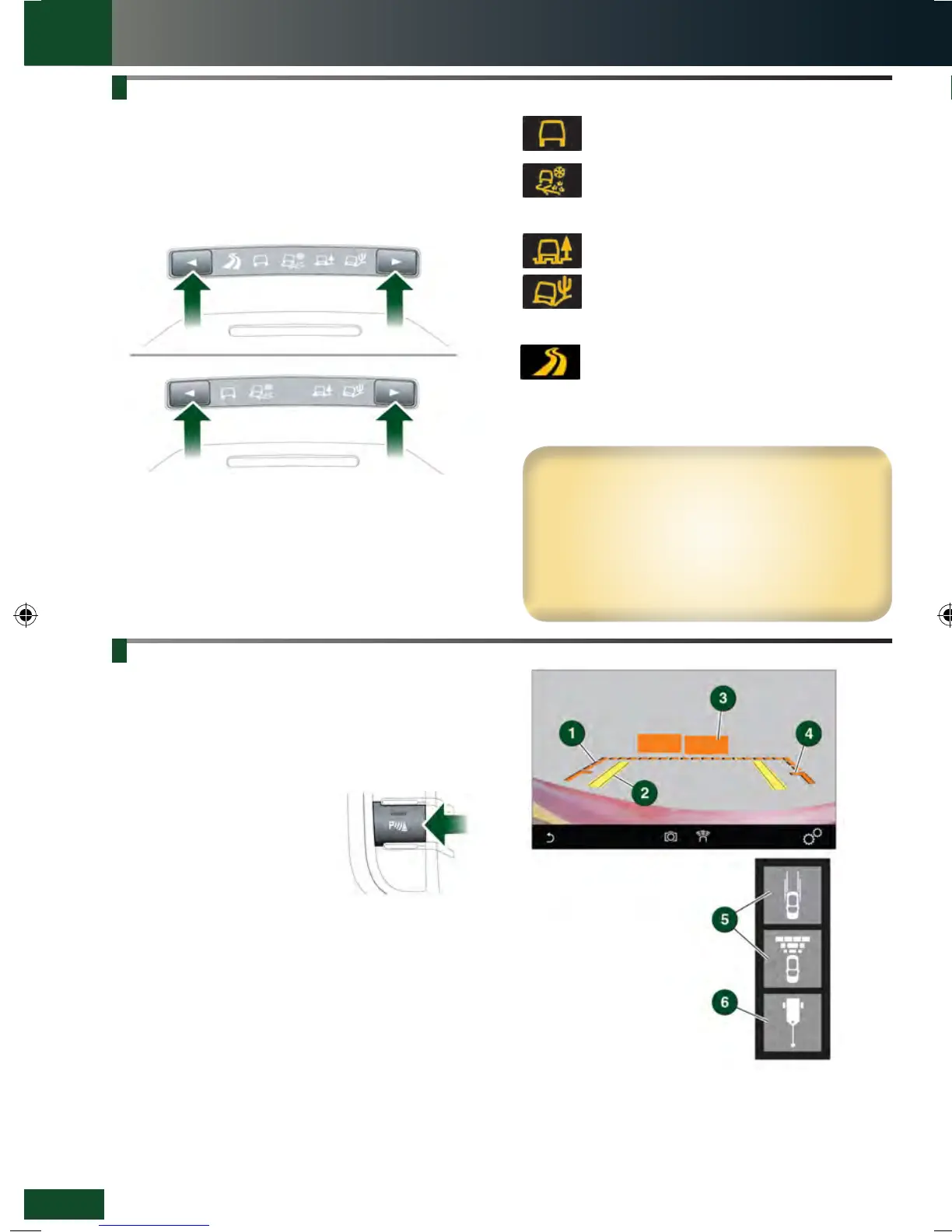
Program selection is via one of two types of centre
console switches. Depending on the vehicle’s
specification, the control switches may include a
Dynamic setting.
Use the switches to select a program. Icons illuminate, as
selected. The Message centre also displays an icon.
It is recommended that a special program be engaged
whenever driving conditions are difficult, and then moved
back to the General program, once those conditions are
no longer present.
See page 2, item 14.
6. Hitch guidance: To aid the process of guiding the
vehicle to the trailer’s tow hitch. A single hitch line
is displayed as the reversing guidance line. As the
vehicle closes to within 0.6 m of the tow hitch, an
automated zoom is operated.
PARKING AIDS
Front and rear Parking aids are activated when transmission
R is selected. When a forward gear is subsequently
selected, the Parking aids remain active until the vehicle’s
forward speed exceeds 16 km/h (10 mph).
If an obstruction is detected, an intermittent tone sounds.
Moving closer to the obstruction increases the frequency of
the tone.
The Parking aid switch is located
next to the Touch screen. Press
the switch to deactivate. Press
again to activate; the switch
illuminates.
Rear camera
Activates when transmission R is selected. The Touch
screen displays guidance lines to aid reversing.
To view the user options, briefly touch the screen. Use the
Back soft key to return to the previous screen.
1. Broken line: Full width of the vehicle.
2. Solid line: Projected reversing path based on the
current steering wheel position.
3. Parking sensors activated: Shaded area indicates
which rear sensors are active.
4. Tailgate access guidance lines: Do not reverse beyond
this point if tailgate access is required.
5. User options: Touch one of the mini views to select
overlay options.
Wading
When wading through water, select the program
most suitable for the surface beneath the water.
DO NOT exceed 500 mm of water depth and enter
the water with a shallow approach angle.
DO NOT stop the vehicle or switch the engine off
while wading. Severe electrical damage may occur.
1. Press to switch the Touch screen on/off. If Surround
cameras are fitted, the screen can be switched off in
Extra features.
2. Press to display the GENERAL SETTINGS menu.
If Park assist is fitted, press to switch Park assist
on/off.
3. Press to select the HOME screen.
4. Status icons: When a phone is connected, the battery
level and network strength is displayed. Also,
when selected, TA (Traffic announcements) is
displayed.
5. Touch the screen or press the button, to select the
Media system.
6. Clock. Time can be adjusted via the System
option, in the GENERAL SETTINGS menu.
7. Touch the screen or press the button, to select the
PHONE screen.
8. Screen title.
9. Press to select the media SOURCE list.
TOUCH SCREEN
TOUCH SCREEN
LRL219560161 NLI.indd 10 28/04/2015 13:50:32


 To Next Page
 Loading...

