3
DRIVER CONTROLS
19. Cruise control cancel or Adaptive Cruise Control
(ACC) switches.
20. Cruise control or Adaptive Cruise Control (ACC)
switches.
21. Steering column adjuster.
22. Horn.
23. Phone and voice recognition controls.
24. Headlamp levelling control.
25. Interior illumination control.
26. Lane Departure Warning (LDW) button.
27. Tailgate release.
28. Heated steering wheel switch.
29. Manual gear shift paddle (-) down.
30. Central locking switches.
31. Mirror adjuster/power-fold mirror.
32. Window controls.
33. Rear windows isolation.
34. Driving position memory.
VEHICLE ACCESS
SMART KEY
POWERED AND MANUAL TAILGATES
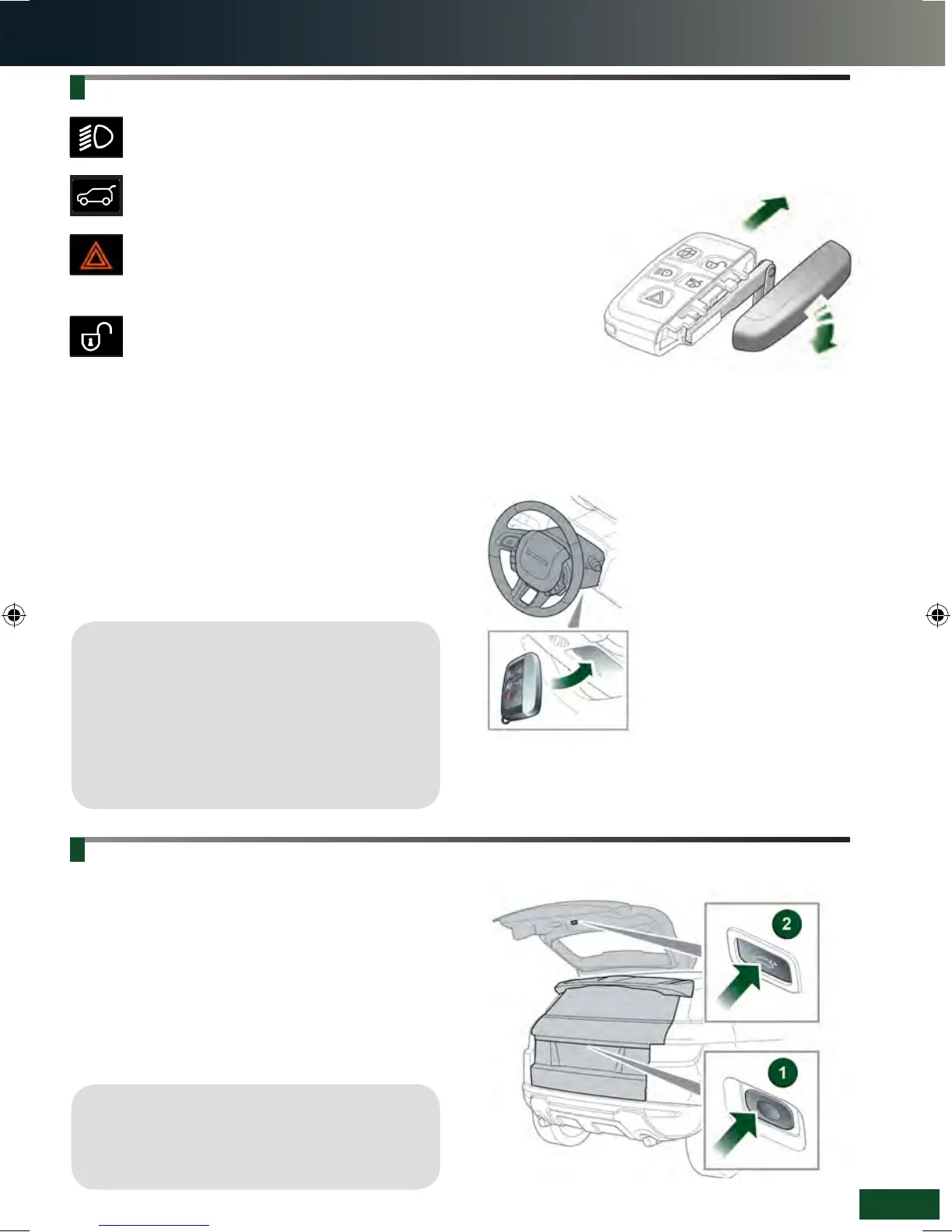
To open the tailgate
1. With transmission P selected, press to release the
tailgate. A powered tailgate will continue to open to
the set height.
Alternatively, use the Smart key or press the internal
release switch.
To close the powered tailgate
2. Press and release to close the tailgate.
Operating note
The Smart key may not be detected if placed in a
metallic container, or behind a device with an LCD
screen such as a smartphone, laptop (including when
inside a laptop bag), etc. Loose coins in the same
pocket as the Smart key can also act as a shield.
Keep the Smart key clear of such devices when
attempting Keyless entry or Keyless starting.
See page 2, item 27.
Press once to switch the headlamps on. Press
again to switch off.
Press to unlock and release the tailgate. A
powered tailgate will open to the set height.
Press and hold for 3 seconds to activate the
panic alarm. After 5 seconds, press again for 3
seconds to cancel.
Unlocking mode alternatives
Single-point entry: Press once to disarm the
alarm and unlock only the driver’s door. If a
locking fuel filler flap is fitted, it will unlock. Press
twice to unlock all of the doors and the tailgate.
Multi-point entry: Press once to unlock all of the doors
and the tailgate. If a locking fuel filler flap is fitted, it will
unlock.
To change between entry modes, with the vehicle
unlocked, press and hold the lock and unlock buttons
simultaneously for 3 seconds. The hazard warning lamps
flash to confirm the change.
Keyless entry/exit
The Smart key needs only to be on the driver’s person
while using a door handle. It does not need to be
exposed or handled.
Emergency key release
If the Smart key fails to open the vehicle, the emergency
keyblade can be used. Slide the side section up, then pull
sideways to remove. Remove the keyblade
and unfold it. Use the blade to gently lever
off the appropriate door
lock cover. The cover
has a key symbol
embossed into it.
Insert the key into
the exposed lock,
then turn and
release it to
unlock.
If the security system was previously armed with the
Smart key, when the door is unlocked, the alarm sounds.
To disarm the alarm, press the unlock button on the
Smart key, or press the START/STOP button with the
Smart key inside the vehicle.
Smart key not found
If, after closing all of the doors,
the Smart key is not detected
by the vehicle, Smart Key
Not Recognised - Place
As Shown And Press Start
Button is displayed in the
Message centre. With the brake
pedal (automatic transmission),
or clutch pedal (manual
transmission), firmly pressed,
press and release the START/
STOP button. The Smart key
can now be removed.
Operating note
When the tailgate closes onto the locking latch,
it will continue to ‘soft close’ to the fully closed
position.
LRL219560161 NLI.indd 3 28/04/2015 13:50:28


 To Next Page
 Loading...

