4
COMFORT ADJUSTMENTS
ELECTRIC SEAT ADJUSTMENT
COMFORT ADJUSTMENTS
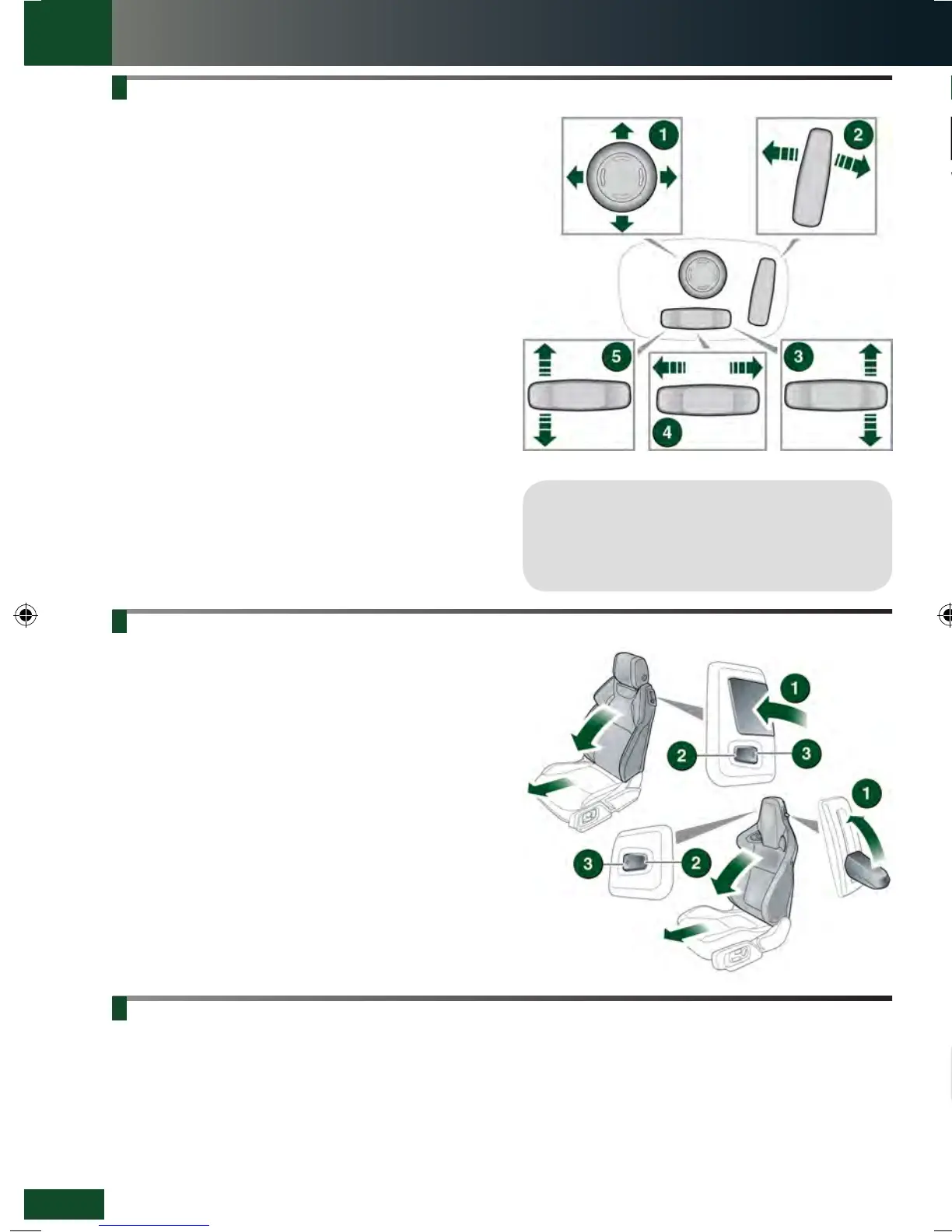
The driver’s seat can be adjusted in up to 10 directions.
The controls are located on the outer edge of the seat.
1. Lumbar support.
2. Height adjustment.
3. Seatback adjustment.
4. Forwards and backwards adjustment.
5. Cushion angle tilt.
Memory seats
Positions for the driver’s seat and exterior mirrors, can be
stored in the vehicle’s memory for future use. Up to 3 sets
of seat and mirror positions can be saved at any one time.
1. When the required positions have been achieved,
press the M button on the driver’s door.
2. Within 5 seconds, press buttons 1, 2 or 3 to store
the current driving position to the chosen number. Any
existing setting on that button is over-written.
3. A stored memory position can now be recalled with
a press of the appropriate button; 1, 2 or 3. The seat
and mirrors move to their preset positions.
SEAT BELT REMINDER
The front seats can tilt and power-slide forwards, enabling
access to the rear seats. Control is by a lever and a two
-way switch.
There are two types of seat. The Sport seat has the lever
and switch panel located on opposite sides of the seat.
1. Lift the lever and pivot the seatback forwards.
2. Press to power-slide the seat forwards.
3. To return the seat to its previous position, pivot the
seatback until it locks into position. Press the switch
to power-slide the seat backwards until it locks into
position.
Operating note
Memory seat buttons 1, 2 or 3 must be pressed
within 5 seconds of pressing the M button,
otherwise the memory store function cancels.
COUPÉ REAR SEAT ACCESS
PASSENGER AIRBAG DEACTIVATION
If it becomes necessary to fit a child restraint on the
front passenger seat, the passenger airbag MUST be
deactivated.
To disable/enable the front passenger airbag, use
the right side steering wheel controls to access the
Instrument panel Main menu.
1. Temperature controls: Rotate to adjust the
temperature.
Note: The system allows temperature differential of up to
4°C (7°F) between the left and right passenger areas.
2. Maximum defrost: Press for the fastest method of
removing frost or heavy misting from the windscreen.
Press again to switch off; screen heaters will remain
on.
3. Air distribution: More than one setting can be selected
simultaneously.
•
Windscreen and side window vents.
•
Foot level.
•
Face level.
4. AUTO mode: The system will adjust the Air
Conditioning (A/C), blower speed, and airflow
distribution to maintain the selected temperature(s)
and reduce misting without constant manual
adjustments.
5. Heated windscreen.
6. Heated rear screen.
CLIMATE CONTROL
See page 2, item 34.
A warning indicator in the Instrument panel
illuminates if a front seat belt is not fastened
or is unfastened, while the vehicle is moving.
While the ignition is on, the Message centre displays
each seating position represented by one of the following
icons:
1. Green - seat belt in the indicated position is fastened.
2. Red - seat belt in the indicated position has been
unfastened while the vehicle’s ignition is on. This
indicator will turn grey after 30 seconds.
3. Grey - seat belt not fastened.
Select Vehicle Settings.
Select Passenger Airbag to display the current status.
Select Passenger Airbag On or Off, as required.
The status indicator in the overhead console will
illuminate while the ignition is on and Passenger Airbag
Off is selected.
Operating note
AUTO is the recommended Climate control
operating mode. This will help to prevent misting.
LRL219560161 NLI.indd 4 28/04/2015 13:50:29


 To Next Page
 Loading...

