To prevent inadvertent wiper activation,
turn the Automatic rain sensing off:
•
Before entering an automatic car wash.
•
During hot, dry and dusty periods.
8
DRIVING
DRIVING
ELECTRIC PARKING BRAKE (EPB)
EXTERIOR LAMPS
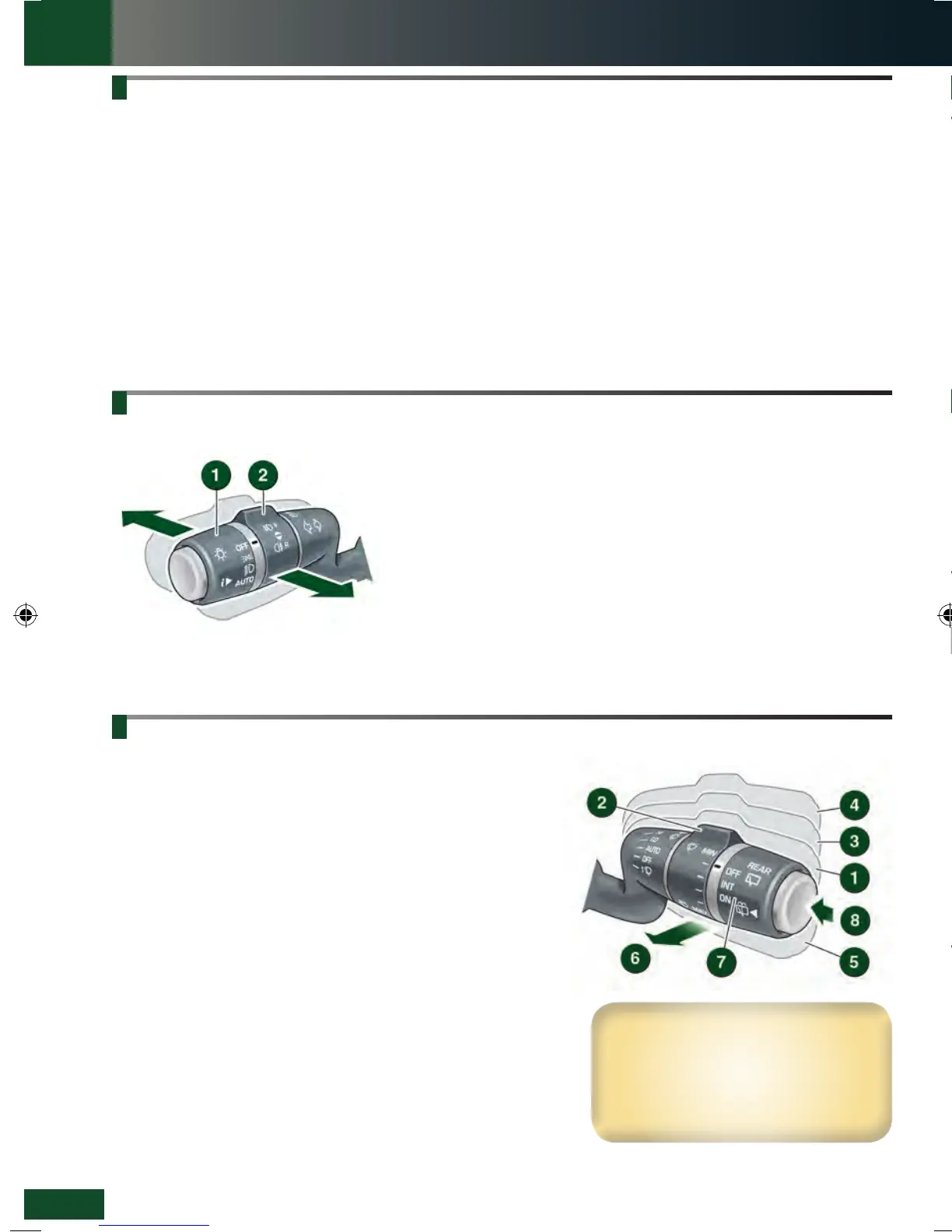
1. Outer collar: First position for side lamps, second position for
headlamps and the third position for AUTO. With AUTO selected, all
exterior lamps will switch on automatically when the ambient light fades.
2. Inner collar: Turn it away and release for front fog lamps. Turn it towards
you and release for rear fog lamps. Turn and release again to switch off.
Headlamps high beam: Push the control forwards for high beam. To flash
the headlamps, pull back and release.
Auto high beam: Active when set via Vehicle Settings in the Instrument
panel menu with the lighting control in the AUTO position and low beams in
use.
High beam then automatically activates when the sensor detects no light
or very low light source ahead. Low beam is automatically selected, when
appropriate.
Applying
With the vehicle stationary, pull the EPB switch up and
then release it. A red lamp in the Instrument panel will
illuminate continuously until the EPB is released.
•
With an automatic transmission, the EPB will
automatically apply when transmission P is selected.
•
With a manual transmission, the EPB will automatically
apply if the ignition is switched off and the vehicle’s
speed is below 3 km/h (2 mph).
Releasing
With the ignition on, press the brake pedal and press
down on the EPB switch.
With an automatic transmission and either D or R
selected, pressing the accelerator will automatically
release the EPB.
With a manual transmission, automatic release can be
effected in first, second, and reverse gears.
To effect an automatic release, the driver’s door must be
closed or the driver’s seat belt must be buckled.
WIPERS AND WASHERS
See page 2, item 16.
BLIND SPOT MONITORING (BSM)
While a forward gear is selected and the vehicle’s speed
is above 10 km/h (6 mph), BSM will detect a vehicle
approaching from behind, on either side, within its
scanned range. The detection range is approximately 6 m
to the rear, and 2.5 m to the sides.
1. An amber icon, depicting an approaching vehicle,
illuminates in the relevant door mirror.
2. An amber dot illuminates when the vehicle’s speed
is below 10 km/h (6 mph). BSM is active only when
the amber dot is extinguished.
PARK ASSIST
See page 2, item 1.
See page 2, item 5.
1. With Automatic rain sensing, the front wipers respond to rain
severity.
Without Automatic rain sensing, move up to select intermittent
delay.
2. With Automatic rain sensing, rotate towards MAX to increase
sensitivity.
Without Automatic rain sensing, rotate towards MAX to increase
the frequency of intermittent wipes.
3. Low speed continuous wipe.
4. High speed continuous wipe.
5. Windscreen single wipe.
6. Windscreen wash/wipe.
7. Rear wiper: Rotate to INT for intermittent wipe. Frequency
increases with the vehicle’s speed. Rotate to ON for continuous
operation.
8. Rear wash/wipe: Continue to hold for additional operation.
If freezing conditions are likely, the wipers can be set to a higher
position so that they can be lifted from the screen. See Instrument
panel menu.
Park assist can help the driver to manoeuvre into, and
out of, a space. With Park assist activated and while
driving forwards at a vehicle speed of less than 30 km/h
(18 mph), sensors identify a suitable space where the
vehicle can be steered automatically into place. The driver
only operates the accelerator and brake.
To search for a space on the driver’s side, signal a
turn in that direction.
When searching for a parking space, use the following
procedure:
Briefly press the Park assist button, located
alongside the Touch screen, to activate the
system.
Note: Park assist will already have recorded any available
space passed within the last few seconds and may issue
immediate advice to stop.
1. A first press switches the system on and selects
Parallel parking.
2. Press again for Perpendicular parking.
3. Press a third time for Parking exit.
Follow the displayed instructions.
Park assist instructs you to stop or to drive forward to a
starting point and when to select Reverse gear.
Further manoeuvring may be required. Follow
instructions in the Message centre.
When the manoeuvre is completed, STOP
will be
displayed.
LRL219560161 NLI.indd 8 28/04/2015 13:50:31


 To Next Page
 Loading...

