RANGE ROVER SPORT RANGE ROVER SPORT
RANGE ROVER SPORT RANGE ROVER SPORT
3
Vehicle access
Range Rover Sport Smart Key
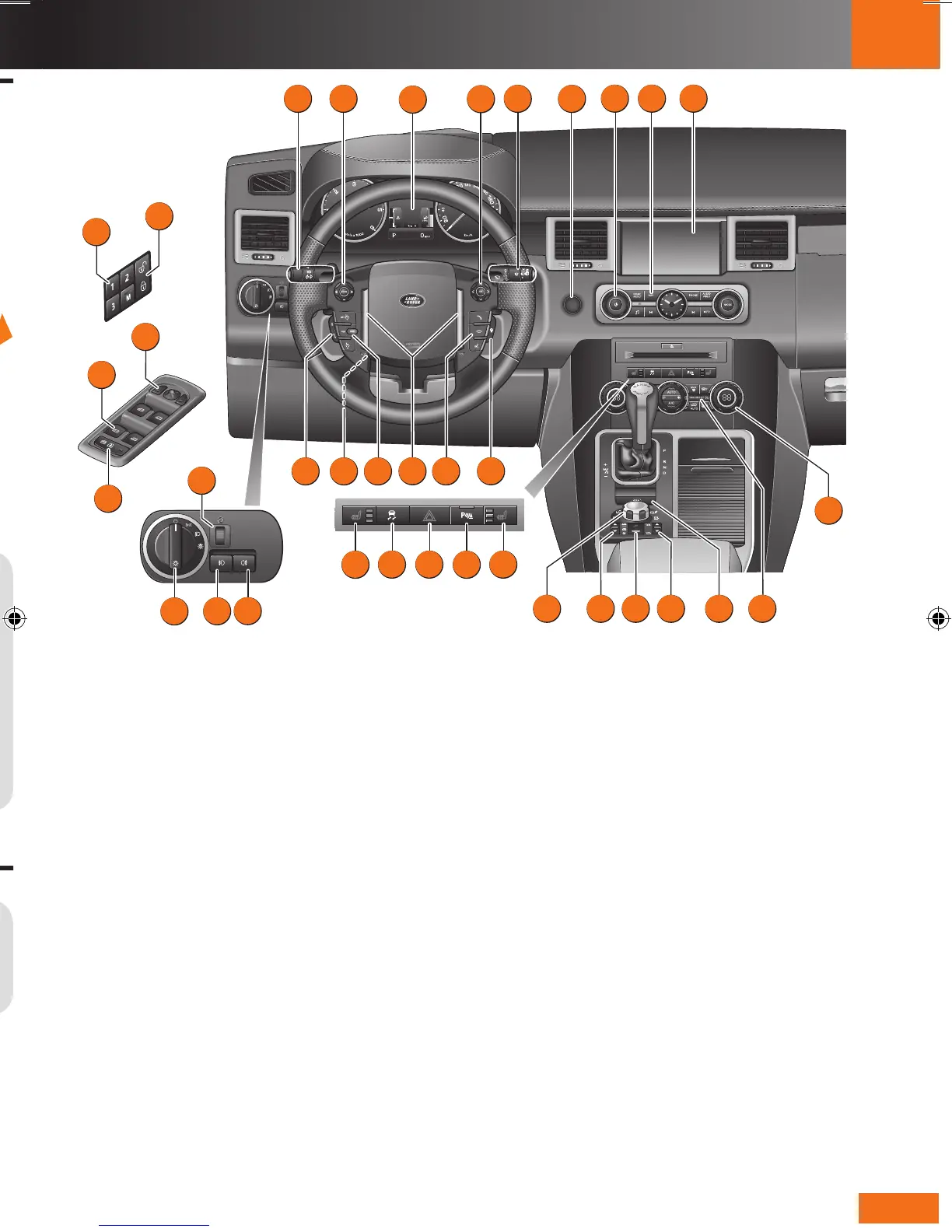
Driver controls
Headlamps, direction indicators and trip computer1.
Audio controls2.
Instrument panel, warning indicators and message 3.
center
Settings menu control4.
Wipers and washers5.
Starter6.
Audio system7.
Navigation system8.
Touch screen9.
Climate control10.
Passenger air bag status indicator11.
Electric parking brake12.
Transfer gearbox control13.
Hill Descent Control14.
Air suspension control15.
Terrain Response control16.
Heated seat - right side17.
Parking aids switch18.
Hazard warning switch19.
Dynamic Stability Control20.
Heated seat - left side21.
Heated steering wheel switch22.
Telephone and voice recognition controls23.
Horns24.
Cruise control switches 25.
Electric steering column adjuster26.
Adaptive cruise control distance setting27.
Rear fog lamps28.
Front fog lamps 29.
Exterior lamps master switch30.
Instrument illumination31.
Rear window isolation switch32.
Window controls33.
Mirror controls34.
Memory seat controls35.
Master locking switches36.
10:24
Dist.to Empty 428 km
20˚c
AM
R
L
START
ENGINE
START
STOP
ENGINE
1
23
22
2
3
4
7
6
5
8 9
25
17
18
20
21
19
16
14
15 13
12
31
33
34
35
36
10
24
27 26
11
28
29
30
32
Central door locking
Operating note
If the vehicle has already been locked with the
Smart Key, the master unlocking switch will not
release the locks.
Operating note
If the Smart Key
fails to operate,
hold it under the
steering column in
the indicated position.
Start the engine as
normal (see page 7).
The Smart Key can
now be removed.
Drive away locking
If enabled, all apertures will automatically lock when the
vehicle speed exceeds 5 mph (8 km/h).
The feature can be turned off or on in the Settings option
accessed via the trip computer.
Emergency key release
Press the release button then slide the side
section out. Pull up the keyblade.
Use the blade to prise off the front
left-hand door lock cover.
Insert the key into the
exposed lock and turn
towards the rear of the
vehicle, then release
it to unlock.
If the security
system was
previously
armed with
the Smart Key,
when the door
is unlocked the alarm will
sound. To disarm the alarm, press
the unlock button on the Smart Key or press the START
STOP button with the Smart Key inside the vehicle.
LRL189654111.indd 3 19/05/2010 12:48:52



 To Next Page
 Loading...