Ranger Fluid Warming Systems
English
8
Testing the Over-temperature Alarm Points (43° and 46°C)
The over-temperature alarm test causes the Ranger unit to go into an over-temperature test mode by
manually overriding the primary control system and engaging the heaters. The Ranger system is very
responsive to heater input; therefore the test procedures are technique sensite. Read instructions thoroughly
before beginning these tests.
The first alarm point at 43°C alerts user to the rise in temperature (see step 3). At the 46°C secondary alarm
set point, the unit cuts power to the heaters (see step 4). Please note that due to the heaters’ rapid response,
you may see temperature readings drift within the range of 44-49°C.
1. Perform Test Setup.
2. Turn the Ranger unit ON and allow it to stabilize at normal operating temperature (41°C±1) for 5 minutes.
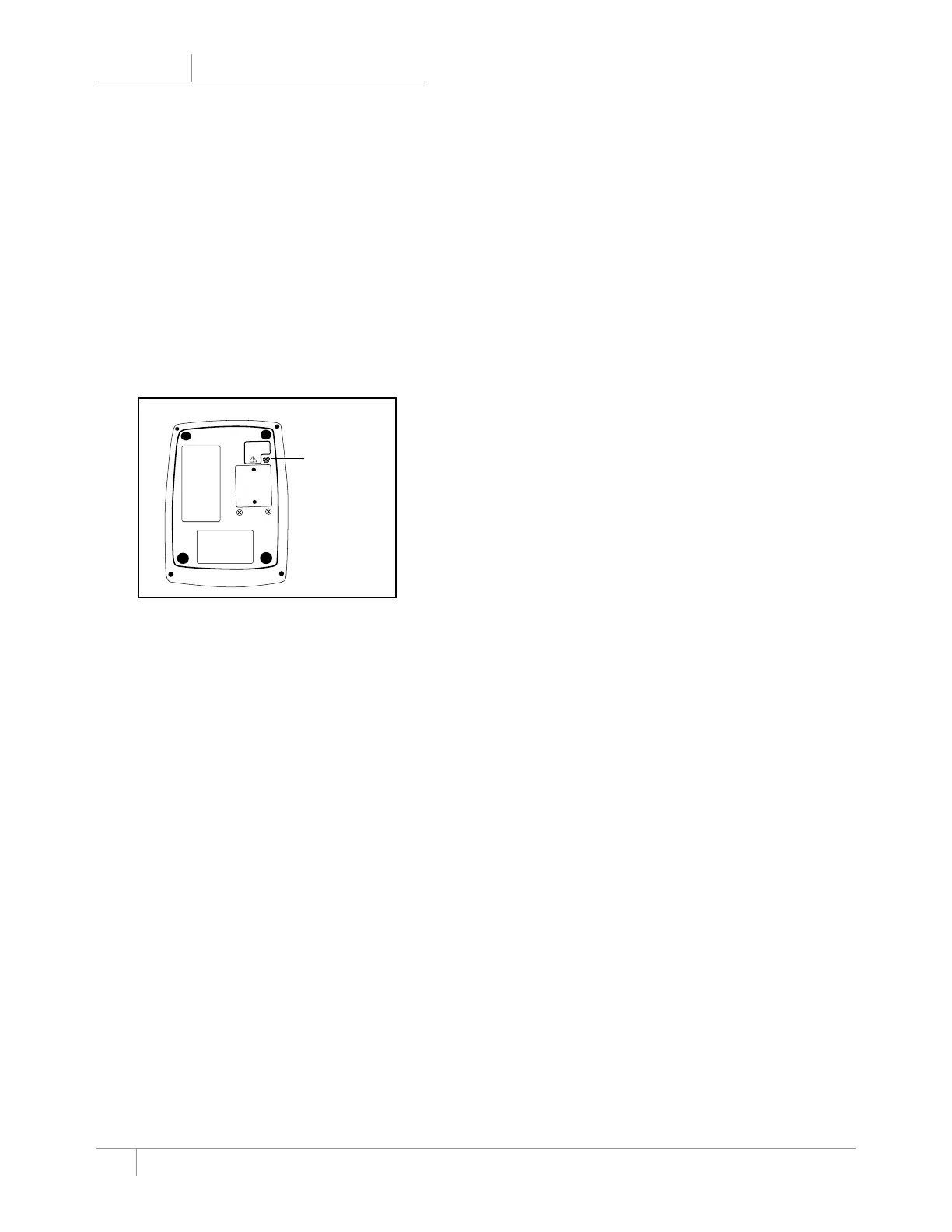
3. Slowly loosen the over-temperature screw on the bottom of the Ranger unit (see Figure 3). Listen for
a slight click as the microswitch opens. Stop turning the over-temperature screw as soon as you hear
the click. This unit is now in over-temperature test mode, and the temperature output of the unit
should begin to rise. When the display reads 43°C, verify that an audible alarm sounds, the alarm light
illuminates, and the display alternately flashes “HI” and the plate temperature.
4. Listen for the power relay to click between 44-49°C (you can feel the click when holding the lower left
corner of the unit as you face the front display). The click signifies the secondary alarm trip point and
signals that power to the heaters has been shut off. The over-temperature alarm sounds, the alarm light
illuminates, and the alphanumeric display alternately reads “HI” and the plate temperature. Watch the
thermocouple temperature monitor to determine the unit’s peak temperature output (less than 1 minute).
The temperature reading on the monitor should peak between 44-49°C.
note: If the temperature displayed on the thermocouple monitor exceeds 49°C during the test, tighten the
over-temperature test screw on the bottom of the Ranger unit, unplug it, and run cold fluids through
the warming cassette. This returns the unit to normal operating temperature. Call Arizant Healthcare
Inc. Technical Support.
5. The secondary alarm is designed to latch. Verify this feature by momentarily turning off the power switch,
then turning it on again. The Ranger unit should continue alarming throughout this sequence.
6. Securely tighten the over-temperature screw, turn off the Ranger unit, and unplug the unit. Once power is
cut to the Ranger unit, the alarm will cease. The unit is ready to return to service after it cools to normal
operating temperature (approximately 20-30 minutes).
Scr
e
w must be
fully seated f
or
unit to function
pr
operly
.
Fig. 3: Ranger over-temperature screw
Over-temperature
screw


 To Next Page