How to use the app?
Control AICE 3 and view your health data more
conveniently on the App.
9:41
790F
Cooling Mode
Wearables
9:41
790F
Cooling Mode
Smart Wearables
Aice 3
30
Auto Mode
Aice 3
30
Auto Mode
Home
754
82F
70 82
Heating Mode
87
O'
Heating Mode
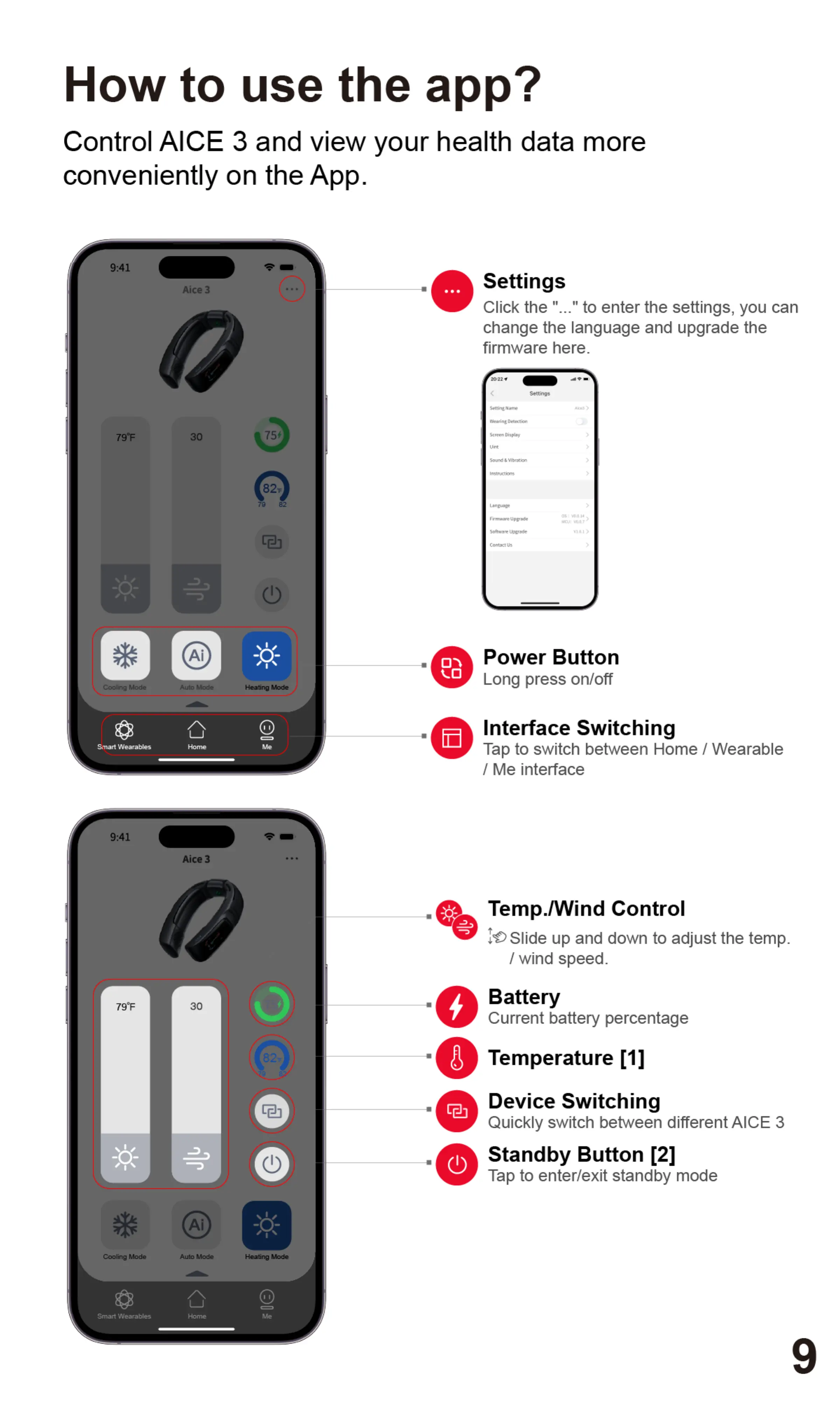
Settings
Click the "..." to enter the settings, you can
change the language and upgrade the
firmware here.
Set titgs
Scree OispL'Y
Sourd
Instructs-az
Softwore t*grode
Contxt
Power Button
Long press on/off
Interface Switching
Tap to switch between Home / Wearable
/ Me interface
Temp./Wind Control
10Slideup anddownto adjustthe temp.
/ wind speed.
Battery
Current battery percentage
Temperature [11
Device Switching
Quickly switch between different AICE 3
Standby Button [21
Tap to enter/exit standby mode


 To Next Page
 Loading...