HOW to use the screen?
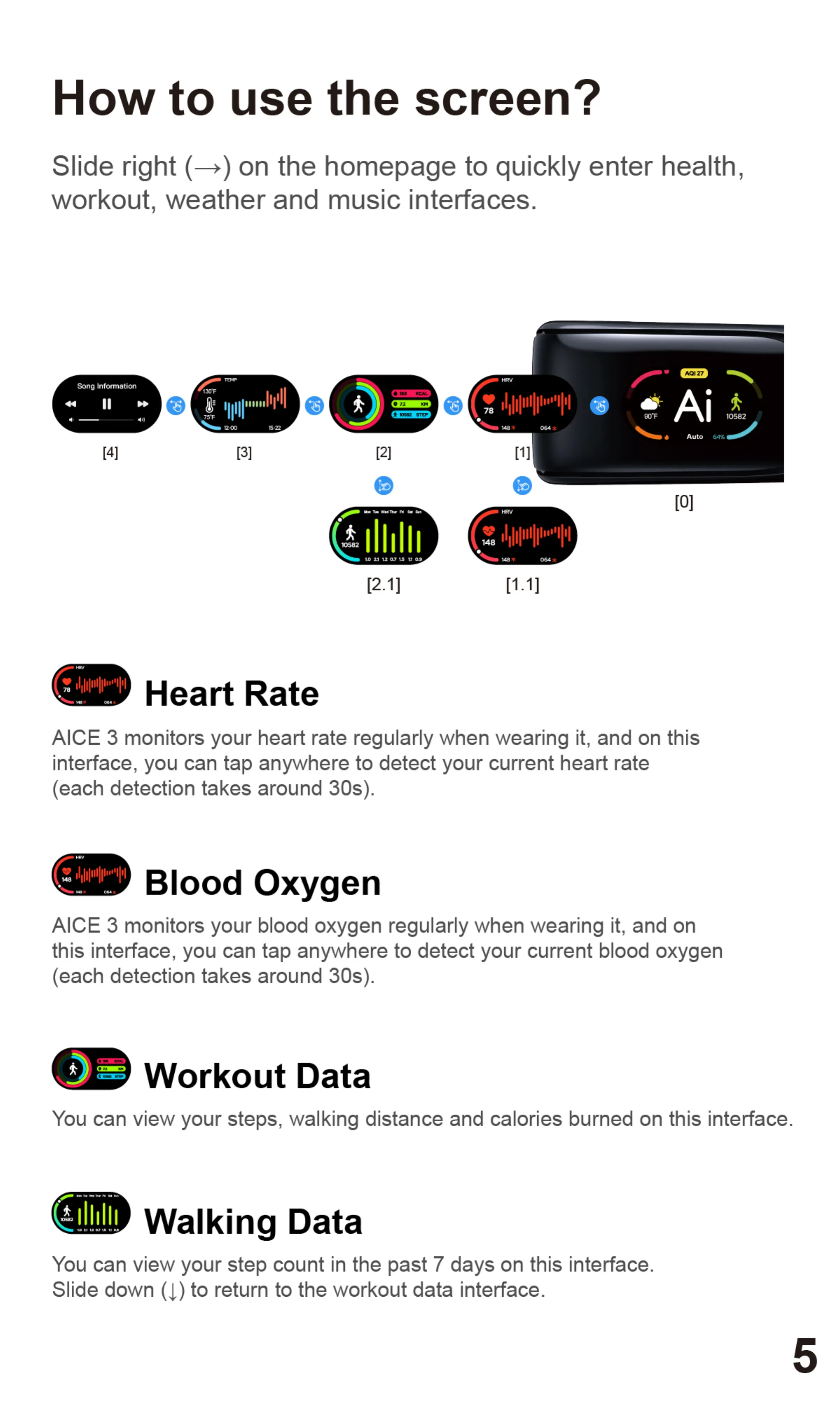
Slide right (—) on the homepage to quickly enter health,
workout, weather and music interfaces.
Song Information
[4]
130F
[3]
Heart Rate
KCAL
7.2
P582 STEP
[2]
[2.1]
78
10582
Auto
[1.1]
AICE 3 monitors your heart rate regularly when wearing it, and on this
interface, you can tap anywhere to detect your current heart rate
(each detection takes around 30s).
Blood Oxygen
AICE 3 monitors your blood oxygen regularly when wearing it, and on
this interface, you can tap anywhere to detect your current blood oxygen
(each detection takes around 30s).
Workout Data
You can view your steps, walking distance and calories burned on this interface.
Walking Data
You can view your step count in the past 7 days on this interface.
Slide down (l) to return to the workout data interface.
5


 To Next Page
 Loading...