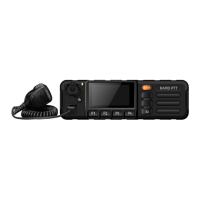
Machine Chart:
Installation:
SIM Inserting Slot
1. Remove SIM card cover, insert SIM card,
place cover back on and screw to tighten.
2. Rotate xed bracket screws clockwise
until the xed bracket is tightened.
3. Connect with the power supply.
DC power input
4. Insert GPS antenna/external main antenna.
GPS antenna interface
5. Plug in the microphone.
Hand microphone interface
1 2 3 4 5
6
7
8
9101112
13
14
191817
16
15
20
21
Machine Chart Legend
1. Volume Knob
Turn left (-V), Turn right (+V) & Press to set
8. Return 15. Fixed Bracket Screw
2. Indicator 9. Customised Button 16. Fixed Bracket
3. LampLCD 10. Customised Button 17. GPS Antenna Interface
4. SOS 11. 2G/3G Switch Key 18. External Main Antenna Interface
5. Logo 12. SIM Switch Key 19. DC Power Interface
6. Previous Page 13. Mic Interface 20. Headset/USB Interface
Device/Installation Kit Components
1x M2000 PTToC Device 1x Fist Microphone metal bracket
1x Fist Microphone 3x Fist Microphone metal bracket mounting screws
1x Mounting Bracket - Metal 1x GPS Antenna
2x Mounting Bracket pivot screws 1x 4G LTE Patch Antenna 698-2700 MHz (Glass Mount)
2x Mounting Bracket xing screws 2x DC Power cables (1 x black 1 x red)


 To Previous Page
 Loading...