The OWL 1280 is a digital camera designed for high-resolution applications requiring Short-Wave Infrared (SWIR) imaging (400-1700nm). It utilizes an InGaAs sensor with a resolution of 1280 x 1024 pixels, providing a linear response and sensitivity for rapid image capture. The camera is suitable for various applications, including industrial inspection, scientific research, and surveillance.
Function Description
The OWL 1280 camera is designed to capture high-resolution images in the SWIR spectrum. It features a 12-bit Camera Link digital output for data transfer and is compatible with a Camera Link standard card. The camera supports a global shutter mode, allowing for precise image capture without motion blur, and offers a frame rate of up to 120Hz programmable, with 25ns resolution. The camera's low-noise performance, with less than 170 electrons in low gain and less than 35 electrons in high gain, ensures high-quality images even in challenging light conditions. The TE Cooling feature allows for temperature control, with the optimal temperature set at 15°C for start-up.
Important Technical Specifications
FPA Specification:
- Sensor Type: InGaAs PIN-Photodiode
- Active Pixel: 1280 x 1024 / 640 x 512 (binning)
- Pixel Pitch: 10µm x 10µm / 20µm x 20µm (binning)
- Active Area: 12.8mm x 10.24mm
- Spectral Response: 0.4µm to 1.7µm
- Noise (RMS): <170 electrons Low Gain, <35 electrons High Gain
- Quantum Efficiency: Peak >92% (>87% @ 1.064nm, 82% @ 1.55nm)
- Pixel Well Depth: Low Gain: 500Ke-, High Gain: 10Ke-
- Pixel Operability: >99.5%
- Digital Output Format: 12 bit Camera Link (Medium Configuration)
- Exposure Time: 1µs to 1 / frame rate
- Shutter mode: Global shutter
- Frame Rate: Up to 120Hz programmable, 25ns resolution
- Optical Interface: C mount (selection of SWIR lens available) or M42
- Camera Setup / Control: Camera Link
- Dynamic Range: 75 bit
- Trigger Interface: Trigger IN and OUT - TTL compatible
- Power Supply: 12V DC ±10%
- TE Cooling: ON / OFF
- Image Correction: 3 point NUC (offset, Gain & Dark Current) + pixel correction
- Functions controlled by serial communication: Exposure, intelligent AGC, Non Uniformity Correction, Gamma, Pk/AV, TEC, ROI
- Camera Power Consumption: < 3W (TEC OFF, NUC ON), <5W (TEC ON in ambient, NUC ON)
- Operating Case Temperature: -20°C to +55°C
- Storage Temperature: -30°C to +60°C
- Dimensions & Weight: 50mm x 50mm x 61.2mm / 247g
Usage Features
The OWL 1280 camera is designed for ease of use and integration into various systems. It supports a standard C-Mount for easy attachment to microscopes and other optical setups. For mounting on tripods or optical tables, the camera features a ¼-20 BSW (Whitworth) threaded hole.
Connectivity:
- Power: The camera requires a 12V DC power supply.
- Trigger: It includes Trigger IN and OUT for synchronization with external devices.
- Camera Link Connectors: Two Camera Link connectors are provided for digital output and control.
Software Integration:
The camera is supplied with a Software Development Kit (SDK) for interfacing with custom software. Raptor Photonics supports a range of 3rd party software packages, including XCAP, XCLIB, Labview, Micro-Manager, StreamPix, Genika Astro, Audela, and Astro Control. For optimal performance and full functionality, it is recommended to use EPIX software, specifically XCAP, which provides comprehensive control over camera settings.
Getting Started with EPIX XCAP:
- Install EPIX XCAP: Download and install the software from the EPIX website. Ensure a PIXCI E8 frame grabber is installed and configured.
- Connect Camera: Connect the camera to your computer using Camera Link cables and a frame grabber. Insert the EPIX software key dongle into a USB port.
- Open XCAP: Launch XCAP and select "Open / Close" from the PIXCI menu.
- Select Camera: Choose "Raptor Photonics Owl 1280" from the list of available cameras.
- View and Control: Open the viewing and control windows in XCAP. The control window allows adjustment of various camera parameters.
- Live Image Capture: Click the "Live" button to view a live image from the camera.
- Adjust Settings:
- Gain Tab: Adjust analog and digital gain settings.
- Trigger Tab: Set readout mode (Live, Free Run, Trigger Mode) and frame rate.
- Auto Tab: Configure Automatic Level Control (ALC) for optimal exposure and spread.
- Auto ROI Tab: Define a Region of Interest (ROI) for auto-level control, gain, and other image adjustments.
- NUC Tab: Control Non Uniformity Correction (NUC) settings, including 3point NUC Offset, Gain & Dark.
- TEC Tab: Monitor and control the Thermoelectric Cooling (TEC) temperature.
- Misc Info Tab: View camera manufacturer data, build date, and serial number.
- Image Enhancement: Use the "Modify" menu in XCAP to adjust image display, including contrast modification (Linear, Exponential, Logarithmic, Histogram-based), binning, convolution, correlation map, edge detection, FFT, and HSB Tweak.
Maintenance Features
Raptor cameras require no regular maintenance except occasional external cleaning of the sensor window (the glass window between the camera sensor and the microscope or lens).
- Cleaning the Sensor Window: Gently wipe the face of the sensor window with a small amount of optical grade isopropyl alcohol and lens paper. Apply forced air again to remove any loose particles.
- Caution: The camera's sensor and circuits are sensitive to static discharge. Ensure you are using a static strap or are completely grounded at all times to release any static energy before you clean the window.
- Do not use acetone for cleaning.
- Contact Local Agent: Should any other issues occur, please contact your local agent for support.

 Need help?
 General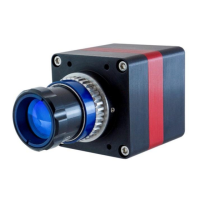

 To Next Page