9
[ EN]
Smart Protect Plus
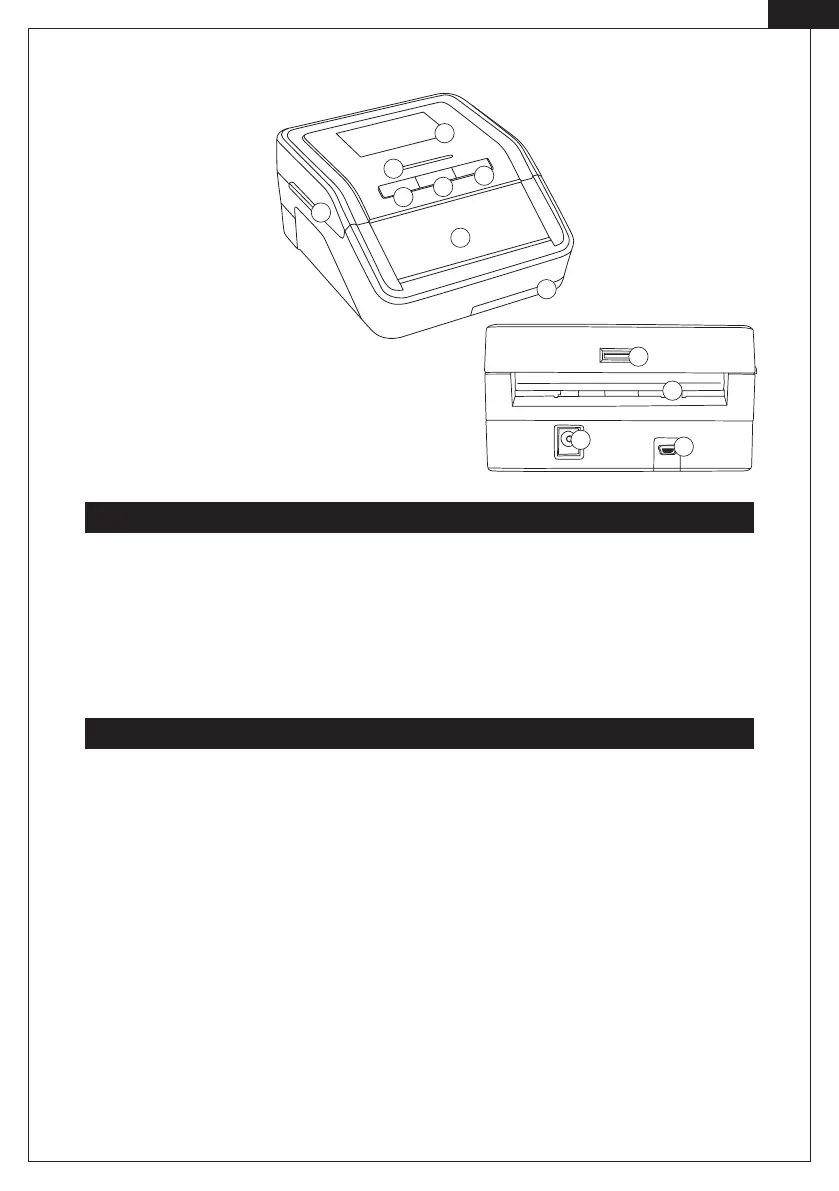
. LCD display
. LED indicator
. Banknote feeder
. Mode key
. ON/OFF key
. UP/DOWN arrow key
. Cover-turning handle
. MicroSD card slot
. Banknote ejector
. Mini USB port
. Mains cable port
. Battery compartment
Switch ON and OFF
Exit direction
Smart Protect:
Press the ON/O key and hold for two seconds to switch on the device.
Smart Protect Plus:
Press the ON/O key and hold for two seconds to switch on the device. The LED indicator lights up. The bank-
note detector is now ready for use.
Smart Protect:
A real banknote is ejected at the front. A wrong or suspicious banknote is ejected at the back.
Smart Protect Plus:
Press and hold the UP/DOWN arrow key for two seconds to select the ejection direction. The arrow symbol is
shown in the left part of LCD display. ”↑“Banknote is ejected at the back ”↓ “ Banknote is ejected at the front.
.
.
.
.
.
.
.
.
.
.
.
.



 To Next Page